9 posts tagged with "case-study"

View All Tags

iFlytek Enhances AI Infrastructure with Volcano, Wins CNCF End-User Case Study Award

· 3 min read

[HONG KONG, CHINA — June 10, 2025] — The Cloud Native Computing Foundation (CNCF) today announced that iFlytek has won the CNCF End-User Case Study Competition. The CNCF, which is committed to building a sustainable ecosystem for cloud native software, recognized iFlytek for its innovative use of Volcano. The company shared its success in large-scale AI model training at the KubeCon + CloudNativeCon China conference, held in Hong Kong from June 10-11.

iFlytek's Challenges​

As a leading Chinese technology company specializing in voice and language AI, iFlytek faced significant scaling challenges amid its rapid business growth. Inefficient scheduling led to underutilized GPU resources, while complex workflow management and intense resource contention among teams slowed down research and development, straining the company's infrastructure.

By adopting Volcano, iFlytek implemented elastic scheduling, DAG-based workflows, and multi-tenancy isolation, which simplified operations and significantly improved resource utilization.

"Before using Volcano, coordinating training across our large-scale GPU clusters was a constant exercise in firefighting, with frequent resource bottlenecks, task failures, and complex pipeline debugging," said DongJiang, Senior Platform Architect at iFlytek. "Volcano gives us the flexible control we need to scale our AI training efficiently and reliably. We are honored to be recognized by the CNCF and look forward to sharing our experiences with the community at KubeCon + CloudNativeCon China."

About Volcano​

Volcano is a cloud-native batch computing system built on Kubernetes. It is designed for high-performance workloads, including AI/machine learning, big data processing, and scientific computing. Volcano offers advanced scheduling capabilities such as job orchestration, fair-share resource allocation, and queue management to efficiently handle large-scale distributed tasks. After joining the CNCF as a Sandbox project in 2020 and graduating to the Incubating stage in 2022, Volcano has become a critical tool for compute-intensive workloads.

Significant Results iFlytek Achieved with Volcano​

As the demand for AI grew, iFlytek turned to Volcano to manage its increasingly large and complex training infrastructure. The engineering team required a more efficient way to allocate resources, handle complex multi-stage training workflows, minimize job interruptions, and ensure fair resource access across teams. With Volcano, they achieved:

  • A 40% improvement in GPU utilization, leading to significantly lower infrastructure costs and reduced resource idling.
  • A 70% faster recovery from task failures, ensuring continuous training operations.
  • A 50% reduction in resource interference, ensuring service stability and resource usage flexibility.

Chris Aniszczyk, CTO of the CNCF, commented, "iFlytek's story is a great example of how open source technology can solve complex and critical challenges at scale. By leveraging Volcano to improve GPU efficiency and streamline their training workflows, they have reduced costs, accelerated development, and built a more reliable AI infrastructure on Kubernetes—a critical advantage for any organization at the forefront of AI."

As AI workloads become more complex and resource-intensive, iFlytek's success demonstrates that cloud-native tools like Volcano are essential for teams looking to simplify operations and enhance scalability. Their presentation at KubeCon + CloudNativeCon China [1] offers practical insights into managing distributed training more effectively in a Kubernetes environment.

References​

[1] Presentation: https://kccncchn2025.sched.com/event/23EWS?iframe=no

ING Bank: How Volcano Empowers Their Big Data Analytics Platform

· 7 min read

On October 26, 2022, Krzysztof Adamski and Tinco Boekestijn from ING Group delivered a keynote speech "Efficient Scheduling Of High Performance Batch Computing For Analytics Workloads With Volcano" at KubeCon North America. The speech focused on how Volcano, a cloud native batch computing project, supports high-performance scheduling for big data analytics jobs on ING's data management platform. More details: KubeCon + CloudNativeCon North America

Introduction to ING​

Internationale Nederlanden Groep (ING), a global financial institution of Dutch origin, was created in 1991 with the merger of Dutch insurer Nationale-Nederlanden and national postal bank NMB Postbank.

ING provides services in more than 40 countries around the world. Core businesses are banking, insurance, and asset management. Their 56,000 employees serve 53.2 million customers worldwide, including natural persons, families, businesses, governments, and organizations such as IMF.

Business Background​

Regulations and restrictions on banking vary depending on the country/region. Data silos, data security, and compliance requirements can be really challenging. It is not easy to introduce new technologies. Therefore, ING builds their Data Analytics Platform (DAP) to provide secure, self-service functionality for employees to manage services throughout the entire process.

In 2013, they conceptualized data platform. In 2018, ING introduced cloud native technologies to upgrade their infrastructure platform. Since then, more and more employees and departments turn to the platform, and by now, there are more than 400 projects on the data index platform.

They aim to meet all analytics needs in a highly secure, self-service platform that has the following features:

  • Open source tool model
  • Powerful computing
  • Strict security and compliance measures
  • One platform for all
  • Both global and local

Challenges and Solutions​

ING is shifting from Hadoop to Kubernetes. They met some challenges in job management and multi-framework support. For example:

  • Job management
    • Pod scheduling: Unaware of upper-layer applications.
    • Lack of fine-grained lifecycle management
    • Lack of dependencies of tasks and jobs
  • Scheduling
    • Lack of job-based scheduling, such as sorting, priority, preemption, fair scheduling, and resource reservation
    • No advanced scheduling algorithms, such as those based on CPU topology, task topology, IO-awareness, and backfilling
    • Lack of resource sharing among jobs, queues, and namespaces
  • Multi-framework support
    • Insufficient support for frameworks such as TensorFlow and PyTorch
    • Complex management of each framework (such as resource planning and sharing)

Managing applications (stateless and even stateful ones) with Kubernetes would be a perfect choice, if Kubernetes is as user-friendly as Yarn in the scheduling and management of batch computing jobs. Yarn also provides limited support, for example, on TensorFlow and PyTorch. Therefore, ING looked for better solutions.

Kubernetes + Hadoop

When managing clusters, ING once separated Hadoop and Kubernetes. They ran almost all Spark jobs in Hadoop clusters, and other tasks and algorithms in Kubernetes clusters. They want to run all the jobs in Kubernetes clusters to simplify management.

When Kubernetes and Yarn work together, Kubernetes and Hadoop resources are statically divided. During office hours, Hadoop applications and Kubernetes use their own resources. Spark tasks, when heavily pressured, cannot be allocated extra resources. At night, there are only batch processing tasks in clusters. All Kubernetes resources are idle but cannot be allocated to Hadoop. In this case, resources are not fully used.

Kubernetes with Volcano

When managing clusters with Kubernetes and scheduling Spark tasks with Volcano, resources do not need to be statically divided. Cluster resources can be dynamically re-allocated based on the priorities and resource pressure of pods, batch tasks, and interactive tasks, which greatly improves the overall utilization of cluster resources.

For example, during office hours, idle resources of common service applications can be used by batch and interactive applications temporarily. In holidays or nights, batch applications can use all cluster resources for data computing.

Volcano is a batch scheduling engine developed for Kubernetes with the following capabilities:

  • Job queues with weighted priority
  • Able to commit above queue limits if the cluster has spare capacity
  • Able to preempt pods when more pods come in
  • Configurable strategies to deal with competing workloads
  • Compatible with Yarn scheduling

Volcano supplements Kubernetes in batch scheduling. Since Apache Spark 3.3, Volcano has become the default batch scheduler of Spark on Kubernetes, making it easier to install and use.

Highlighted Features​

Redundancy and Local Affinity

Volcano retains the affinity and anti-affinity policies for pods in Kubernetes, and adds those for tasks.

The idea of DRF is that in a multi-resource environment, resource allocation should be determined by the dominant share of an entity (user or queue). The volcano-scheduler observes the dominant resource requested by each job and uses it as a measure of cluster resource usage. Based on this dominant resource, the volcano-scheduler calculates the share of the job. The job with a lower share has a higher scheduling priority.

For example, a cluster has 18 CPUs and 72 GB memory in total. User1 and User2 are each allocated one queue. Any submitted job will get its scheduling priority based on the dominant resource.

  • For User1, the CPU share is 0.33 (6/18), the memory share is 0.33 (24/72), and the final share is 0.33.
  • For User2, the CPU share is 0.67 (12/18), the memory share is 0.33 (24/72), and the final share is 0.67.

Under a DRF policy, the job with a lower share will be first scheduled, that is, the job committed by User1.

Queue resources in a cluster can be divided by configuring weights. However, overcommitted tasks in a queue can use the idle resources in other queues. In this example, after using up the CPUs of its own queue, User2 can use the idle CPUs of User1. When User1 commits a new task, it triggers resource preemption and reclaims the resources occupied by other queues.

Resource Reservation

Batch computing tasks and other services may preempt resources and cause conflicts. Assume there are two available nodes in a cluster and we need to deploy a unified service layer in the cluster to provide services externally, such as Presto or cache services like Alluxio, batch computing tasks may have already taken all resources and we can't deploy or upgrade that service layer. Therefore, ING's platform now allows users to reserve some resources for other services.

DRF Dashboard

ING built a DRF scheduling dashboard based on the monitoring data from Volcano to obtain scheduling data at different layers. In the service cluster, ING stores the tasks of interactive users in one queue, and the computing tasks of all key projects running on the data platform in another queue. ING can take certain resources from other queues to the key project queue, but that won't do any good to the tasks of interactive users.

ING is considering displaying the peak hours of cluster use to provide users with more information. With this, users can decide when to start their tasks based on the cluster resource readiness, improving computing performance without complex configurations in the background.

Summary​

Volcano abstracts batch task scheduling, allowing Kubernetes to better serve ING in task scheduling. ING will contribute their developed functions to the community, such as the DRF dashboard, idle resource reservation on each node, auto queue management, new Prometheus monitoring metrics, Grafana dashboard updates, kube-state-metrics update, and cluster role restrictions.

OpenI-Octopus: How to Avoid Resource Preemption in Kubernetes Clusters

· 9 min read
Junmao Li
System Architect in Pengcheng Laboratory

This article was firstly released at Container Cube on September 30th, 2020, refer to鹏城实验室启智章鱼教你彻底摆脱Kubernetes集群资源抢占难题

Introduction to OpenI-Octopus​

OpenI-Octopus is a cluster management and resource scheduling system developed and maintained by Peng Cheng Laboratory, Peking University, and University of Science and Technology of China.

  • This system is completely open-source, complying with the Open-Intelligence license.

  • It deploys, manages, and schedules jobs using Kubernetes.

  • AI jobs can be run in clusters. Hardware such as GPUs, NPUs, FPGAs, Huawei Ascend chips, and Cambricon MLUs are supported.

  • It provides high-performance networks for AI and supports InfiniBand networks.

  • Monitoring and analysis tools for networks, platforms, and AI jobs are available.

  • Mainstream deep learning frameworks are supported.

  • A microservice-based architecture is used.

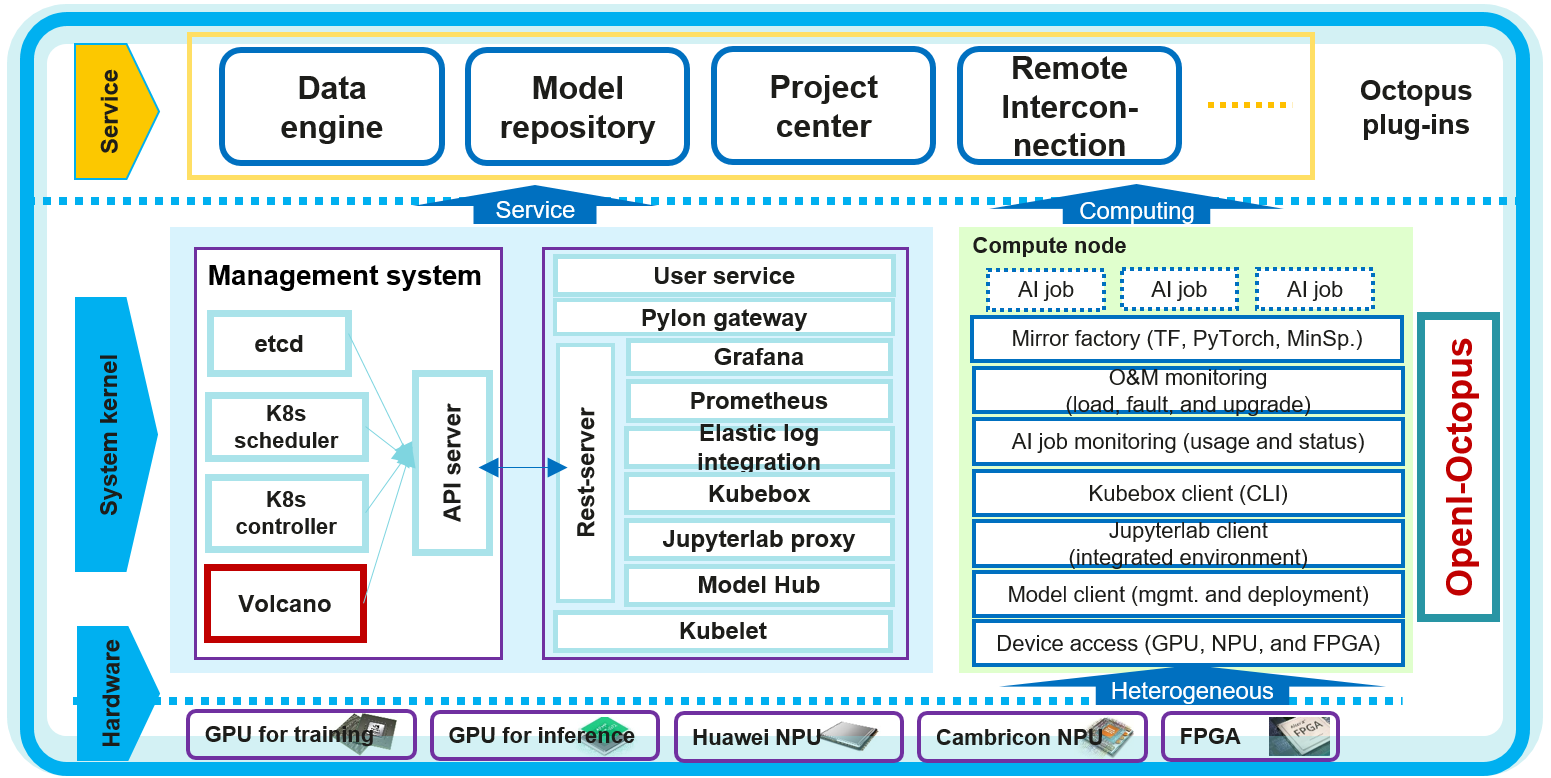
The service architecture of OpenI-Octopus is illustrated above. The bottom layer is hardware. OpenI-Octopus supports various types of heterogeneous hardware, including CPUs, GPUs, NPUs, and FPGAs. Different hardware types are adapted so that the upper-layer Kubernetes services can identify and manage them.

The second layer is the platform layer. The blue panels on the left cover the node management functions. OpenI-Octopus employs native Kubernetes functions, including orchestration planning and controllers, and enhances scheduling by integrating Volcano.

Management components communicate with integrated development services through the API server.

The rest-server module developed by OpenI-Octopus carries the core functions of the system and integrates monitoring tools such as Grafana and Prometheus, Elasticsearch, Jupyterlab proxy, and model repository.

The panel on the right covers the capabilities of compute nodes, including image factory, O&M, job monitoring, kubebox client, and Jupyterlab client for users to log in to containers.

The top layer is the services provided by the system, such as data engine, model repository, and project center. With remote interconnection, remote users can also enjoy cluster services.

Business Scenarios and Challenges​

OpenI-Octopus is built for research teams and laboratories. They develop and train models in fields such as transportation, healthcare, and finance, model training, and perform model inference. These models are used for vehicle tracking, medical image recognition, auxiliary diagnosis, financial quantization, and many other applications. Some deep learning algorithms are used in these courses, which require strong compute resources.

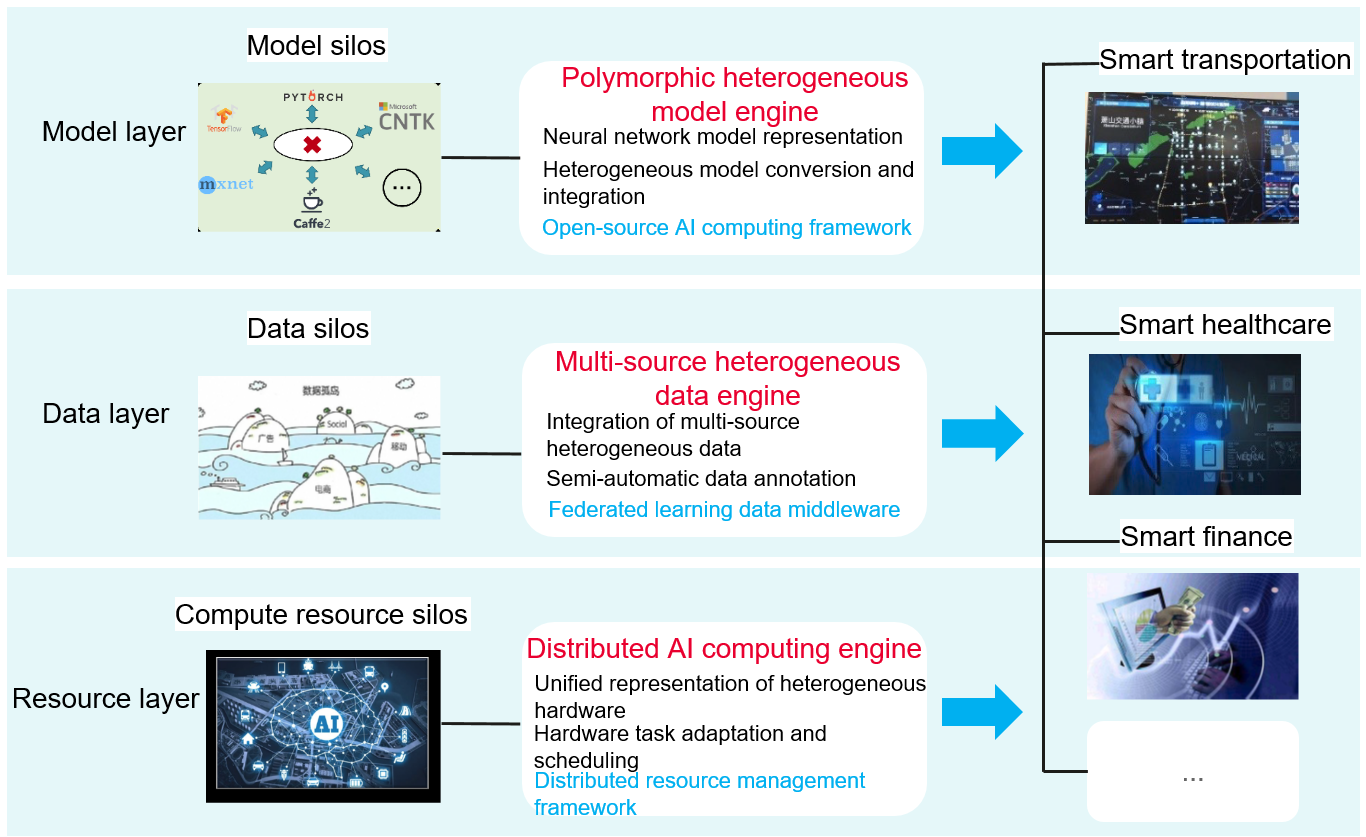
OpenI-Octopus aims to break the model, data, and compute resource silos on the traditional platforms, and provide computing power through a single platform.

  • At the model layer, OpenI-Octopus provides a multi-architecture, heterogeneous model engine, which supports common open-source computing frameworks and provides model conversion for them.

  • At the data layer, OpenI-Octopus provides a multi-source, heterogeneous data engine, which supports heterogeneous data convergence and semi-automatic data labeling.

  • At the resource layer, OpenI-Octopus provides a distributed AI computing engine for job scheduling and the unified representation of heterogeneous hardware.

Service Requirements:

  • Excellent performance in scientific research and applications of AI, including algorithm training and inference in fields such as smart transportation, healthcare, and finance

  • High-end heterogeneous hardware resources, clusters with 150P+ computing, and 10 PB-level high-speed storage

  • Rapid and flexible deployment. The system runs reliably and stably for external teams to use.

Challenges:

  • No high-performance computing platform to meet service requirements in complex scenarios

  • Heterogeneous hardware resources need to be efficiently used and flexible scheduling policies must be supported. Resource preemption problems need to be resolved to avoid starvation of key task resources.

  • The system architecture must be scalable and services must be highly available.

Why Volcano?​

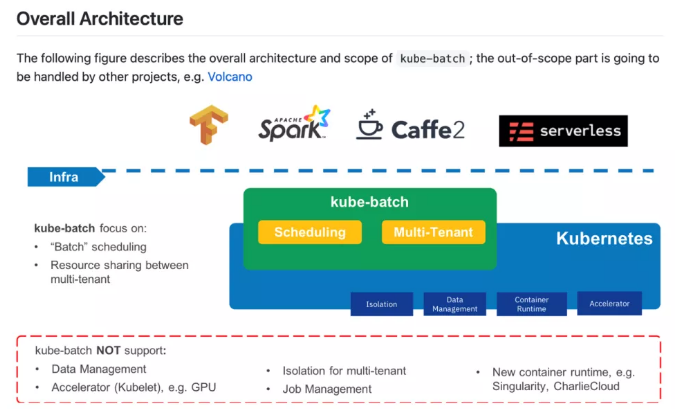
At the beginning, OpenI-Octopus looked into several existing open source projects in the community. These projects can basically satisfy the service requirements and reduce the development workload. The OpenI-Octopus team narrowed down their choices to four resource schedulers. The first one was the default Kubernetes scheduler, which is not friendly to batch scheduling. The second choice was Yarn scheduler, which is based on Hadoop. However, the current architecture has been transformed to Kubernetes-based. Yarn does not fit. The last two were kube-batch and Volcano. Volcano is developed from kube-batch, and better supports deep learning and common computing frameworks. Volcano implements scheduling policies through plugins that can be easily customized to develop scenario-specific scheduling policies. That's why OpenI-Octopus chose to integrate Volcano.

Volcano brings the following benefits:

  • Complete architecture and ecosystem; timely feedback from the fast growing community

  • Customizable plugins for scenario-specific scheduling policies. Take the binpack plug-in as an example. Its packing algorithm can reduce resource fragments, allowing your cluster resources to be fully used.

  • Job queue mechanism. Job queues allow clusters to be logically grouped. Users can configure compute resource quotas for different projects, and allocate different types of jobs to different queues for management. In this way, job and compute resource management can be finer-grained.

Secondary Development Based on Volcano - Resource Status Statistics and Management​

OpenI-Octopus performed secondary development on Volcano and added some new capabilities.

The first capability is to collect statistics on resources and manage resource status. These resources include both cluster compute resources and resources such as jobs, tasks, and pods generated by Kubernetes after a user submits a job.

OpenI-Octopus manages to do so. It also allows users to customize the conditions and callback events of resource status transition and subscribe to the customized events and corresponding policies at the service logic layer.

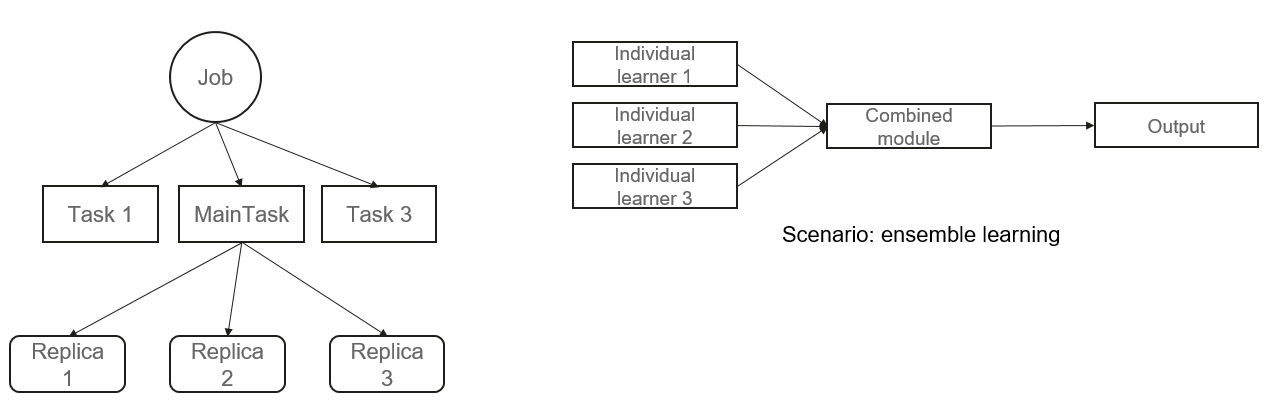
Assume that there is a training job that uses an ensemble learning algorithm. Generally, a distributed training manner is used. It has a combination module and several individual learners, all of which can be regarded as tasks. Each individual learner is trained using one type of algorithm, and the combination module combines the results of each individual learner to output the final result. Once the final result is obtained, the entire training job is complete. In this job-task implementation based on Kubernetes, user can create one or more pods for a task. If you want the entire job to exit as long as the combination module runs to completion, instead of waiting until all tasks are successfully executed, You can customize a job exit policy in the scheduler and use the policy at the service layer. Different scenarios may require different policies, and that's why secondary development is needed.

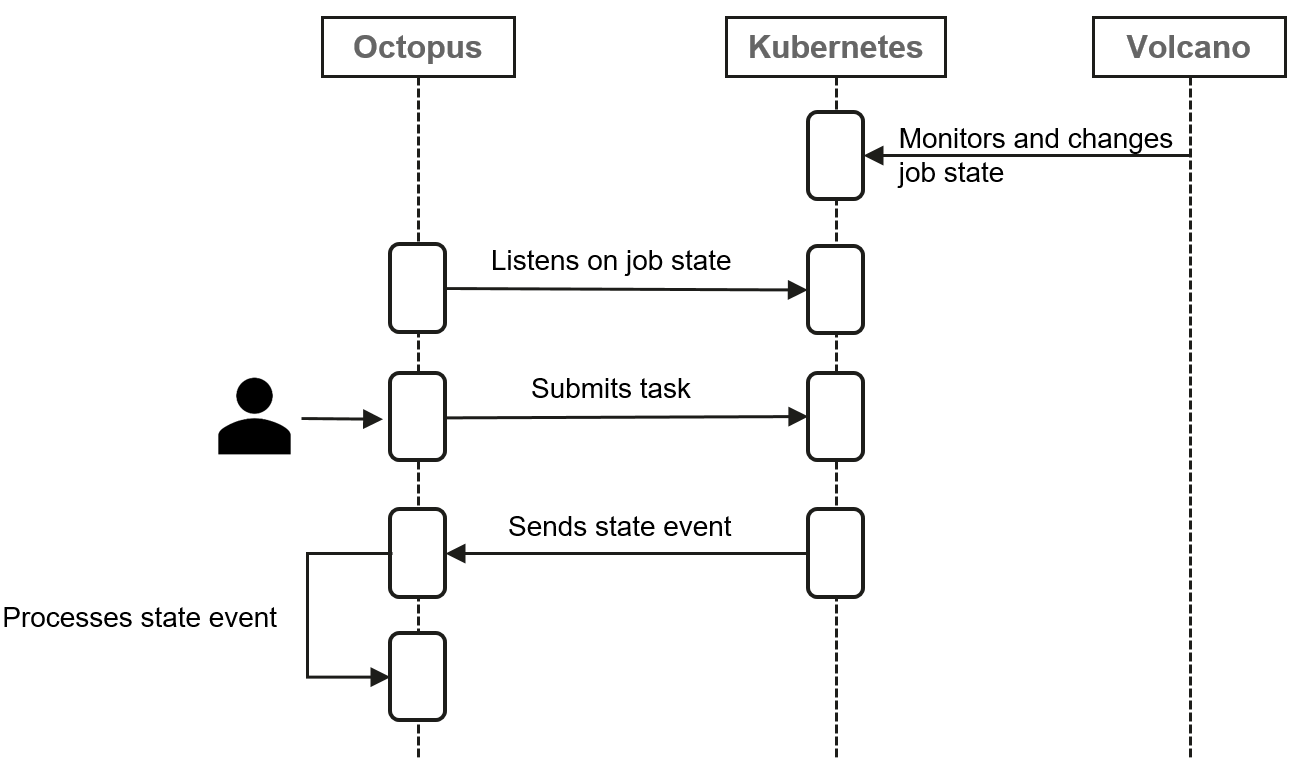
This flowchart shows job state information is transferred among OpenI-Octopus, Kubernetes, and Volcano.

First, both Volcano and OpenI-Octopus listen on all Kubernetes jobs. After the user submits a job to Kubernetes, Volcano updates the job state based on the monitored state of the pod started by the job.OpenI-Octopus will handle the job state changes.The key is how Volcano updates the job states to Kubernetes.

OpenI-Octopus worked out its solution:

1)Develop state machines for Jobs, Tasks, and Replicas.

  • More detailed resource state statistics and command output

  • Finer-grained job lifecycle management

2)Customize events and policies. Back to the ensemble learning example. The entire job can run to completion upon the customized event (e.g. MainTaskEvent) released by the scheduler that the specific task is successfully executed.

3)Implement lifecycle callback hooks, which can be added to any state transition event in any state machine. For example, the billing function collects statistics on the running duration of a job based on the start event and end event of the job.

Volcano-based Secondary Development - Privilege Action

Issues:

  • Resources are starved, and a large number of jobs in the queue keep waiting.

  • Urgent and key jobs need to be preferentially scheduled.

  • Users' jobs may be developed online and cannot be terminated unless allowed.

Existing Capabilities of Volcano:

  • Jobs with different priorities in the same queue can be preempted.

  • Pod-based eviction

  • Immediate preemption

Requirements:

  • When jobs in the same queue are from different tenants, different tenants should have different priorities and preemption permissions.

  • Job-based eviction

  • Delayed preemption

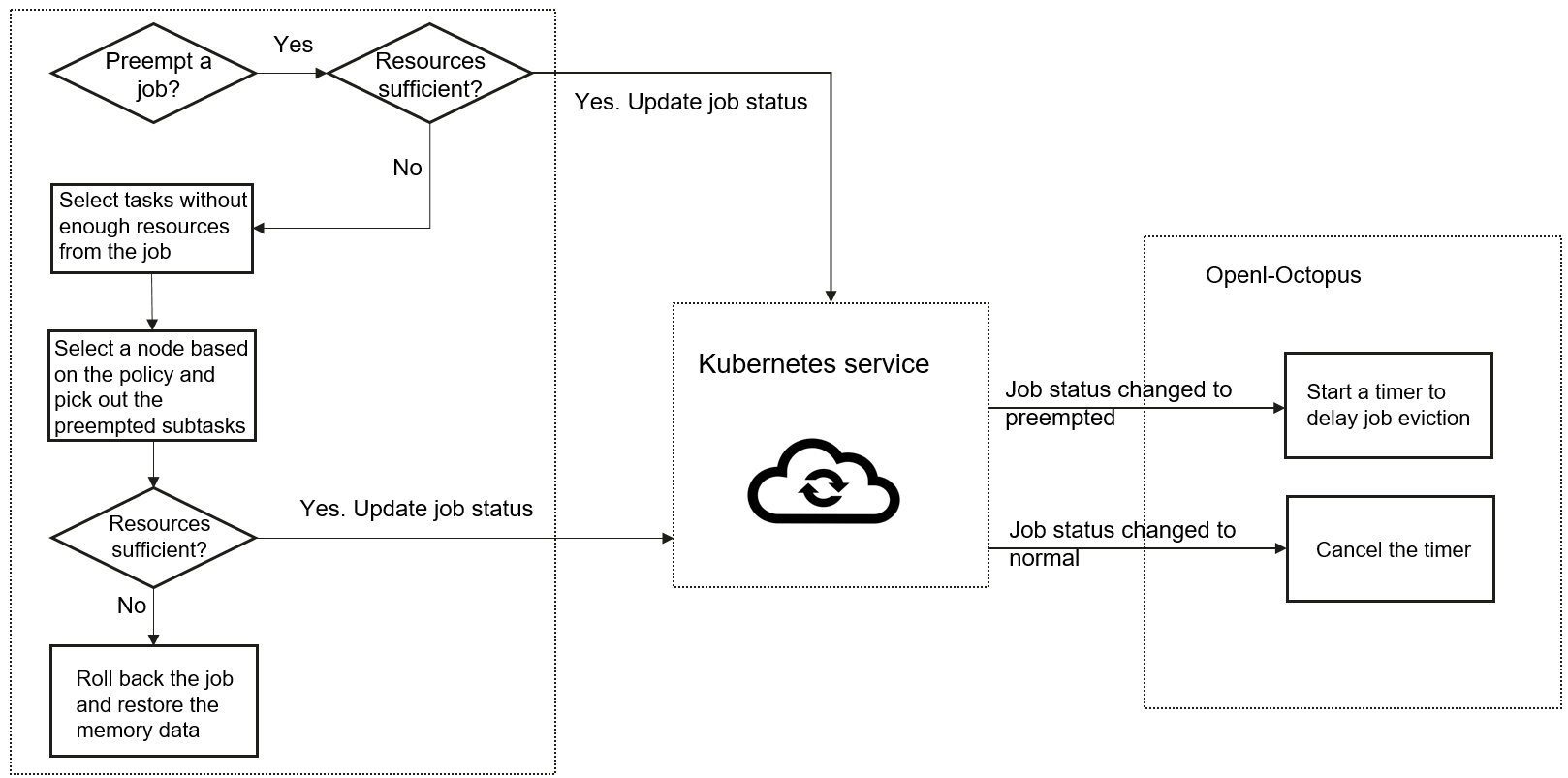
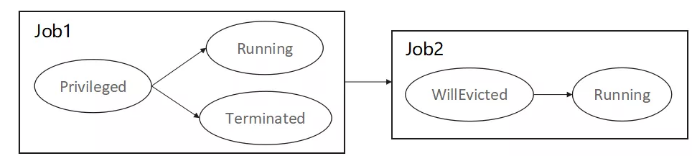
This flowchart shows how the delayed preemption plugin works. On the left is the running logic of the plugin in the scheduler. Kubernetes services lie in the middle, and the right part is the core OpenI-Octopus modules.

Specifically, the plugin finds the jobs that need to be preempted in Volcano. The compute resources occupied by these jobs must be sufficient for the high-priority jobs that are waiting. Then, the plugin updates the states of these jobs in Kubernetes. As soon as the core OpenI-Octopus modules detect the state changes, they start a timer to prepare for eviction of these jobs. If the job preemption is canceled while the timer countdown does not end or because the required resources have been released, the timer is also canceled.

The following chart shows the service logic.

  1. A Boolean attribute called Preempt is added to each job, indicating whether the job is a preempted job.
  • Only jobs with lower priorities in the same queue can be preempted.
  1. The eviction is performed by job instead of by pod.
  • Pods are evicted based on the ID of the jobs to which the pods belong to reduce the number of affected jobs.

  • The scheduler notifies Openl-Octopus to stop the jobs at the service layer.

  1. Delayed preemption
  • The Privileged and WillEvicted states are added for the job state machine.

  • Jobs in Privileged or WillEvicted state cannot be preempted by other jobs.

  • If the state of a preempting or preempted job changes, the state of the other party changes accordingly.

Benefits​

Enhanced capabilities

  • Large-scale distributed training jobs can run efficiently.

  • Multiple AI computing frameworks are supported.

  • Plugin-based scheduler supports customized development to satisfy scenario-specific requirements.

  • Multi-queue scheduling makes possible hardware resource grouping and dynamic resource allocation between groups.

Performance tuning

  • Hardware resource utilization is greatly improved to 90% or higher.

  • The average job scheduling latency is greatly reduced. The average job waiting time is reduced from 60 seconds (using the Yarn scheduler) to 10 seconds (using Volcano).

  • System stability is enhanced, cluster node resources are used in balance, and O&M workloads are reduced.

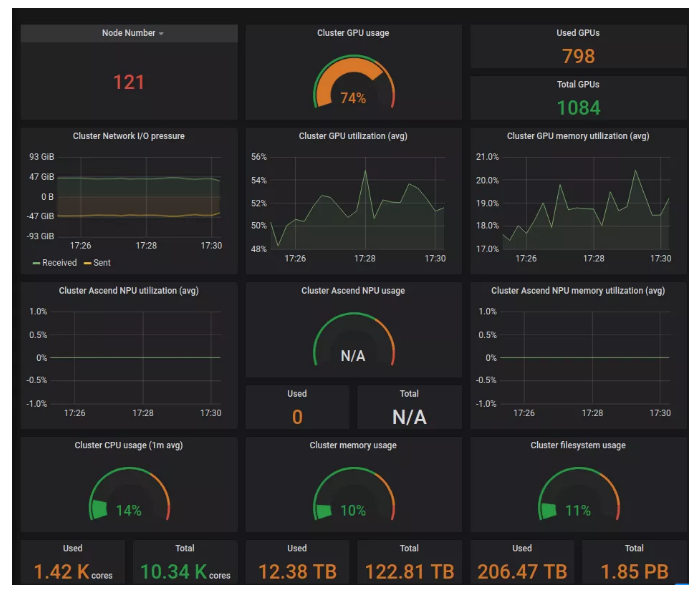
  • With 120+ nodes managed and 1100+ GPU cards in total, the GPU utilization can reach 90% or higher when the system is overloaded.

  • The resource usage of each node is balanced, and the difference is less than 20%.

  • Since the rollout in 2019, more than 120,000 jobs have been run.

iQIYI: Volcano-based Cloud Native Migration Practices

· 10 min read

This article was firstly released at Container Cube on September 30th, 2020, refer to揭秘爱奇艺深度学习平台云原生迁移实践

Introduction to iQIYI Jarvis Deep Learning Platform​

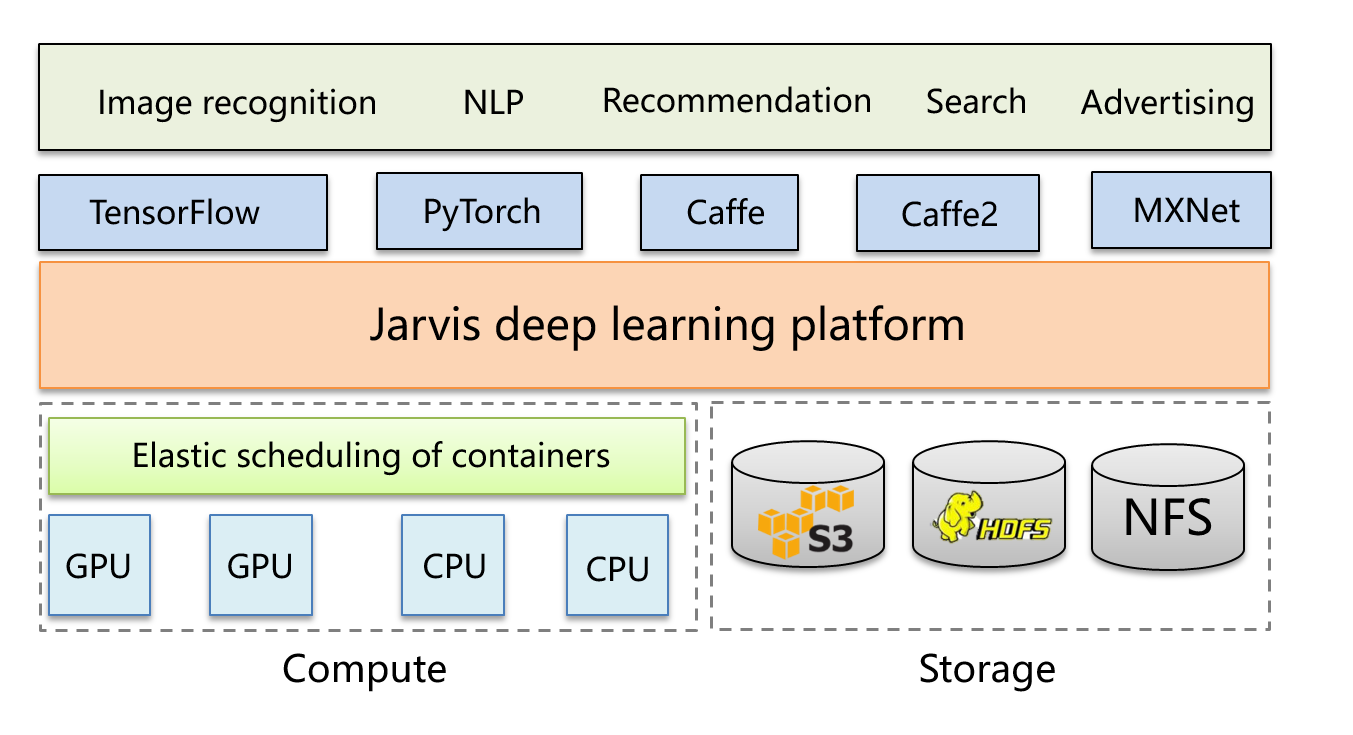
Overall Architecture of the Platform

The platform supports GPU- and CPU-based training and inference. S3, HDFS, and NFS can be used for storing training data and models. The platform supports TensorFlow, PyTorch, Caffe, Caffe2 and MXNet. It uses TensorFlow and PyTorch. TensorFlow 1.X to 2.X are supported.

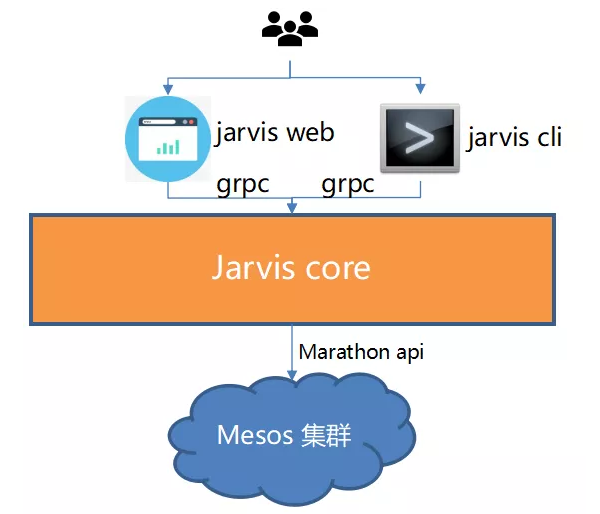
The platform can be used in advertising, search, recommendation, NLP, and other services. iQIYI uses Mesos + Marathon as their elastic container platform. When iQIYI started the platform, Kubernetes was not mature enough to be considered. Therefore, our containers do not run on K8s.

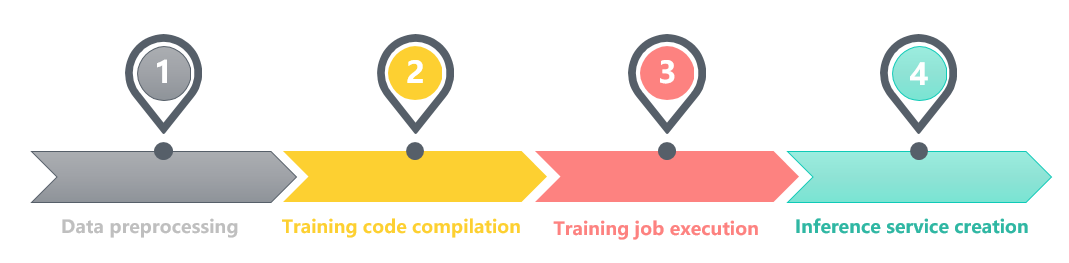
One-stop Platform Service

Four small platforms are used to provide the service. The first is the data preprocessing platform. It analyzes the training data in a visualized manner, helps users adjust parameters, and detects abnormal data in a timely manner.

The second is the training code compilation platform. You can use the RunOnce or notebook training to obtain an environment that is the same as the training environment. You then can compile the training code, and commit the code to GitLab.

The third is the training job execution platform. You can run a training job by using the Jarvis training platform, and then the training code will be executed. An algorithm model will be output.

The last is the Jarvis inference platform. You can create an inference service using the platform and provide the inference service for external systems.

Platform Development

iQIYI started from the inference platform. iQIYI first enables the models to provide services for external systems, and then gradually extends the platform functions to support training, development, and data preprocessing. Currently, iQIYI is migrating the elastic container platform from Mesos + Marathon to K8s + Volcano.

Training Platform Architecture Before Volcano Is Used

The following figure shows the training platform architecture before Volcano is used.

The process is as follows:

A.Compile training code and commit it to GitLab.

B.You can create a training job on the web page or using the command line tool. To create a training job, you need to enter the following information:

  • Required resources

  • Images. Each version of each framework is supported by an image. Selecting an image means selecting an algorithm framework.

  • There may be multiple clusters. You need to specify the cluster where the job is expected to run.

  • The URL of the GitLab project. The project contains the training code you compiled.

C.The Jarvis cli/web converts the request into gRPC and sends it to the Jarvis core.

D.The core converts the request and calls the Marathon API to create a container.

E.The container is started in the specified cluster and executes the training job.

Challenges of Migrating the Training Platform to Kubernetes

The challenges are as follows:

  • Native pods, Deployments, and jobs cannot meet the requirements of distributed training.

  • Queue and quota management are not supported.

  • Lack of scheduling capabilities, such as Gang Scheduling.

Introducing Volcano

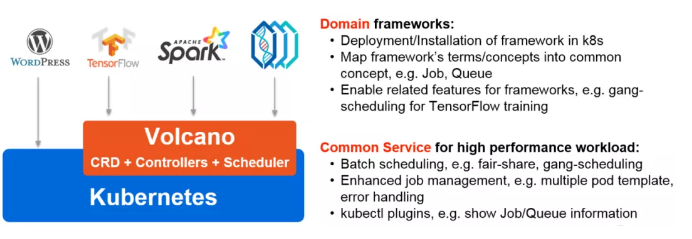
The three most important concepts of Volcano are VolcanoJob, queue, and PodGroup. VolcanoJob, referred to as vcjob, is an extension of Kubernetes jobs or an encapsulation of pods.

Queues can be used to manage quotas.

PodGroup is a group of pods and can be used for advanced upper-layer scheduling.

So far:

  • Volcano is the native batch system of Kubernetes and is highly suitable for AI training.

  • It does not intrude Kubernetes source code and complies with the Kubernetes development specifications, facilitating secondary development.

  • It has been accepted by Cloud Native Computing Foundation (CNCF) and is mature.

Power of Volcano​

How Does Volcano Solve Problems of Migrating to Kubernetes?

Gang Scheduling

1.1 Gang Scheduling

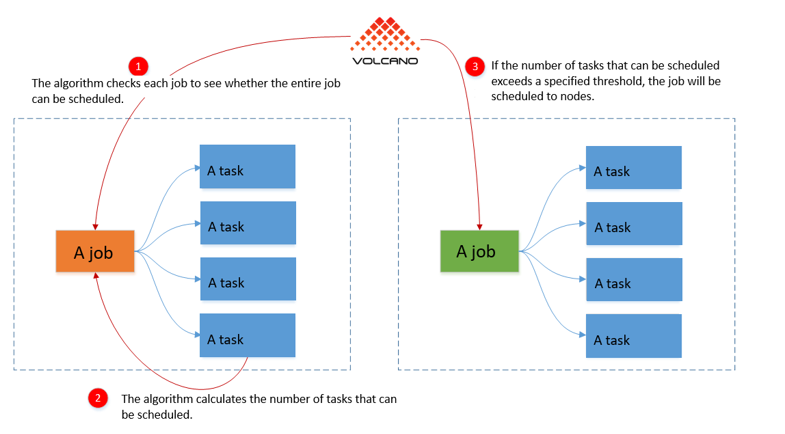
Gang scheduled pods run simultaneously or none of them run. This is important for AI training, especially distributed training in most scenarios. The feature of distributed training is that a large number of pods, for example, 40 or 50 pods, are started at a time. If some pods of a task are scheduled and some pods are not scheduled, the task cannot run properly. This will also cause resource waste, or even deadlocks.

For example, there are only four GPUs in a resource pool and tasks A and B. Each task has four pods, and each pod requires one GPU. When tasks A and B are created at the same time, without gang scheduling, each task may obtain only two GPUs. In this case, neither of the tasks can be completed, resulting in a deadlock. Unless resources are added to the pool, the deadlock cannot be resolved.

Volcano schedules jobs in the unit of PodGroup to implement gang scheduling, avoiding the preceding problem.

1.2 Native Support for Distributed Tasks

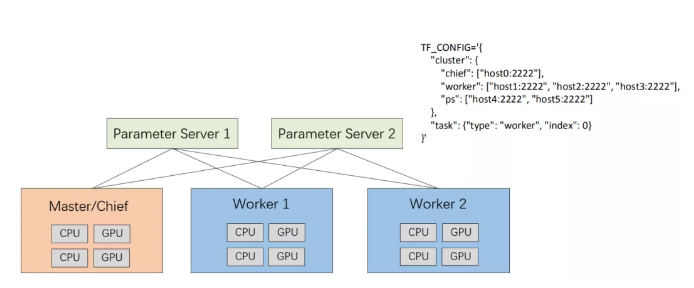
Take TensorFlow distributed training as an example. It has the following roles: Parameter Server (PS), master, and worker. PS is used to store parameters. Master and worker are used to calculate gradients. In each iteration, master and worker obtain parameters from PS and update the calculated gradients to PS. PS aggregates the gradients returned from master and worker, updates the parameters, and broadcasts the updated parameters to master and worker.

Let's focus on one of its network structures. If master or worker needs to communicate with PS, problems will occur. When creating a pod, a user may not know the IP address of the pod. Multiple pods created in a deployment may not know the IP address or domain name of each other. Without Volcano, solutions to these problems are complicated.

Each role must know the IP address or domain name of the other roles, the role it plays, and the number of indexes. A TF_CONFIG configuration file is required to include the IP addresses or domain names of master, worker, and PS. These are difficult to implement in Kubernetes. However, with Volcano, the solutions become simple.

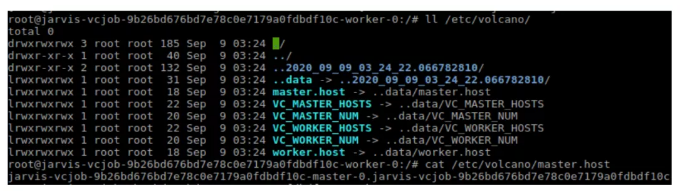
Volcano can easily build TF_CONFIG through file injection to support TensorFlow distributed training. Volcano injects a folder (etc/volcano) to multiple pods under a vcjob. The folder includes all domain names of master, volcano, and PS. In this way, each pod knows the peers in the entire cluster, and the TensorFlow distributed training can be performed.

Currently, TensorFlow provides some high-level APIs, such as TF estimator. The single-node code and distributed code in the estimator are the same, but the configuration of TF_CONFIG is different. If the environment variables or configuration files in such a format are passed, distributed training can be performed. If platforms can build the TF_CONFIG file, users can directly run the file.

1.3 Horovod/MPI

Volcano supports Horovod, which is similar to TensorFlow. They are both used for distributed training but differ in the way of updating parameters.

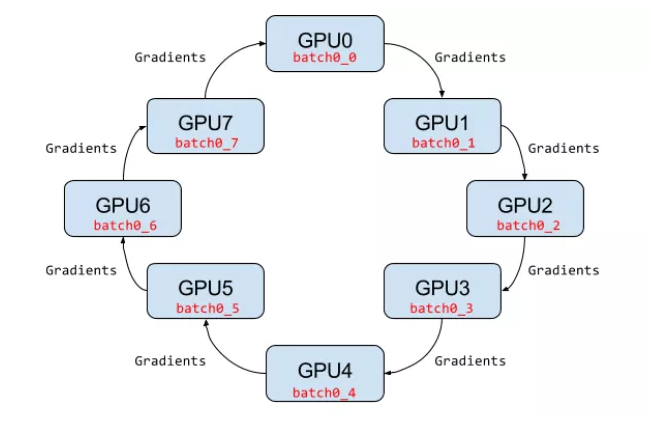
Horovod uses the ring allreduce method to update parameters, and what does that mean for us when we want to build a basic environment for upper-layer applications to use? What does the ring allreduce architecture require?

First, we need to ensure that each node knows the domain name of each other, as mentioned earlier. Second, we need to enable a node to SSH log in to another through port 22 without a password. This passwordless SSH can be automatically implemented with Volcano's SSH plugin, saving a lot of trouble.

1.4 Quotas and Queues

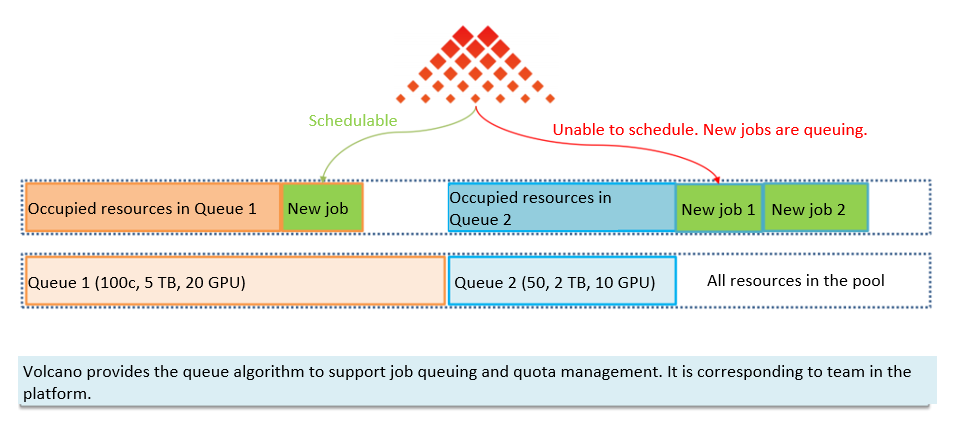
Volcano uses queues (CRD objects) to schedule jobs. Let's assume that we have two queues, as shown in the following figure. Queue1 has a quota of 20 GPUs and queue2 has a quota of 10 GPUs. The resources of queue1 are abundant so new jobs in queue 1 can be scheduled. However, all resources in queue2 have been used, and new jobs in queue2 cannot be scheduled and have to wait in queue. As a result, the PodGroups changes to the pending state.

The teams in our platform are similar to the Volcano queues. How? Each team has a quota, and quotas are independent between teams. When the resource usage reaches the quota of a team, the jobs in the team have to wait in queue. When resources are available, the queued jobs will be executed based on the priority, which means the jobs with a higher priority will be run first. Considering this similarity, the interconnection between Volcano and iQIYI’s platform can be fairly easy.

1.5 Integration with Volcano

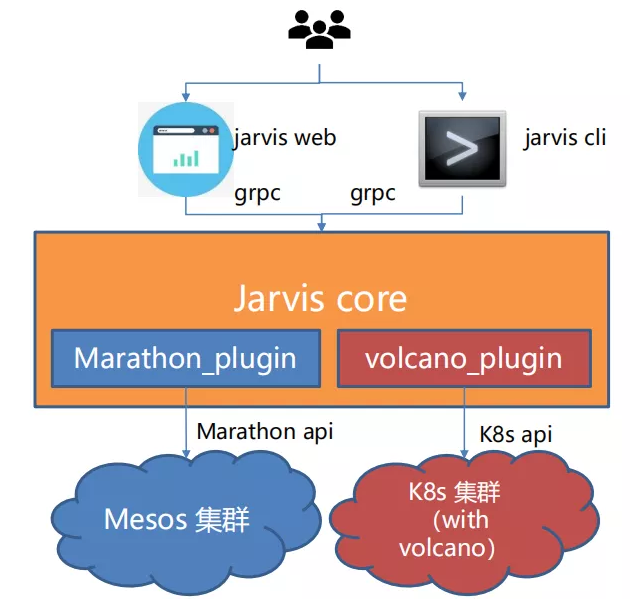
iQIYI has added the volcano_plugin, which encapsulates the RESTful APIs of vcjob, queue, and PodGroup. It converts the gRPC requests into YAML configurations that comply with the Kubernetes API specifications, and calls the Kubernetes API to create containers.

Jarvis Core determines which backend to use based on the passed cluster information.

Encountered Issues​

Issue 1

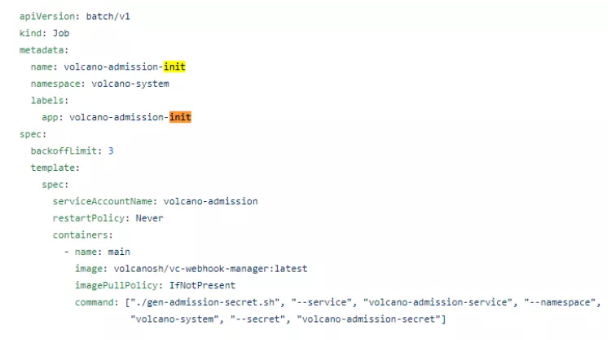
Symptom:During Volcano upgrade, the image in https://github.com/volcano_x0002_sh/volcano/blob/master/installer/volcano-development.yaml was directly modified, and kubectl apply -f <yaml file> was executed. The existing queues and vcjobs all disappeared.

Cause:volcano-admission-init in the YAML file was executed repeatedly. As a result, Volcano was reset.

Solution: Upgrade only the necessary components.

Issue 2

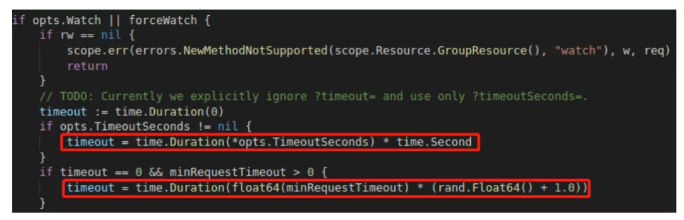
Symptom: When list_and_watch was used to monitor vcjob status, the watch connection broke every 80 to 90 seconds when there were no new events, and the disconnection duration varied. Such issue did not occur when the same code was used to monitor pods.

Cause: The default http timeout for CRD objects in Kubernetes is time.Duration(float64(minRequestTimeout) * (rand.Float64() + 1.0)), where miniRequestTimeout is set to 1 minute. You can specify timeoutSecond on the client to avoid this issue.

Issue 3

Symptom: The container entry address in Jarvis is a bash script. When the script was run in Kubernetes, a container did not exit until 30 seconds after the stop command was delivered.

Cause:Bash did not pass the signal to child processes. When graceful stop timeout was reached, the daemon process detected that the container had not exited and sent a SIGKILL signal to kill the bash script and exit the container. However, other processes in the container had no chance to clean up.

Solution:Use dum-init to run a script such as the following entry script:

#!/usr/bin/dumb-init /bin/bash

my-web-server & # launch a process in the background

my-other-server # launch another process in the foreground

1.6Modifications on Volcano

  • The SVC plugin now supports the input parameter nodeport. It means when we create a vcjob and pass the SVC parameter, a nodeport will be created, so our TensorBoard and other services can be accessed externally.

  • We have fixed the bug that creation fails when the name of the SSH plugin exceeds 63 bytes.

  • Volcano has fixed the bug in the queue capability that resources can be used over the capability. For details, see https://github.com/volcano-sh/volcano/issues/921.

  • After a vcjob is annotated, if a pod fails, the vcjob deletion is not triggered. For details, see https://github.com/volcano_x0002_sh/volcano/issues/805.

Summary​

Volcano makes up for the lack of basic deep learning capabilities in Kubernetes.

  • Gang Scheduler

  • Queue management

Volcano code complies with the Kubernetes standards and is non-intrusive.

  • Lower development and interconnection costs

  • Easy for secondary development

Volcano-based Jarvis has been released and is running properly.

Using Volcano in Large-Scale, Distributed Offline Computing

· 9 min read
Yunzhi Cheng
Ruitian Tech-Leader

This article was firstly released at Container Cube on December 24th, 2020, refer to锐天投资基于Volcano的大规模分布式离线计算平台的应用实践

Service Scenarios and Solution Selection​

Service Scenarios

  • VMs for research and development for policy personnel

  • AI training and inference

  • Data ETL

  • General-purposed, distributed batch processing jobs

Why Use Kubernetes?

A distributed batch processing platform can be used to manage compute and storage resources. In this use case, Ruitian decided to use Kubernetes to manage compute resources due to the following reasons:

  • Containers streamline development for users in different environments. Ruitian has four to five groups of users who use different development environments and policies. Environment isolation posed a great challenge to resource management and development efficiency. Now with containers, environments are encapsulated in containers that can be scheduled using Kubernetes.

  • Heterogeneous devices such as GPUs can be supported through Device Plugins.

  • Data storage can be centralized by using etcd.

  • Kubernetes has a robust technology ecosystem.

  • The Go language complies with the technology stack in Ruitian.

Why Use CephFS

CephFS is a type of distributed file storage interface provided by Ceph. Ceph provides three types of storage interfaces: S3, block storage, and CephFS. The reasons for using CephFS are as follows:

  • Posix Filesystem permission and interface: Local file systems are widely used in our businesses and CephFS provides stable file system mounting. In multi-tenant scenarios, each user has a UID, and the data of each user can be accessed only by themselves. Posix Filesystem provides a permission mechanism that allows users to seamlessly migrate their file permissions to SAP.

  • Strong consistency: A file written to node A can be directly read on node B.

  • Small file access at scale and high-bandwidth I/O

  • Hierarchical hardware support

  • Kubernetes ReadWriteMany PV

Why Volcano​

Why not default-scheduler

Ruitian did not choose the default-scheduler, because it cannot provide queue scheduling, fair scheduling, multi-tenant isolation, and advanced scheduling policies such as gang scheduling. Fair scheduling and advanced scheduling policies are the most important factors. Fair scheduling decides which job to run first when there are too many jobs in a queue or when the cluster has available resources. To achieve this, each queue must be mapped to a team, and each namespace must correspond to a user. The default-scheduler cannot meet the preceding requirements.

Another option was kube-batch, a batch processing scheduler of the community. However, it is only a scheduler and does not provide any solution other than scheduling. What Ruitian needed was a batch processing solution that takes care of scheduling and processing for the environment and CRDs.

Why is Volcano

  • Supports fair scheduling.

  • Supports advanced scheduling policies, such as gang scheduling and binpack.

  • Supports mutual access between pods through SSH plug-ins.

  • Supports injecting job dependencies to pods via ENV plug-ins and supports Tensorflow Worker Sharding.

  • Provides services externally via SVC plug-ins.

Such a scheduling platform can satisfy Ruitian.

System Architecture​

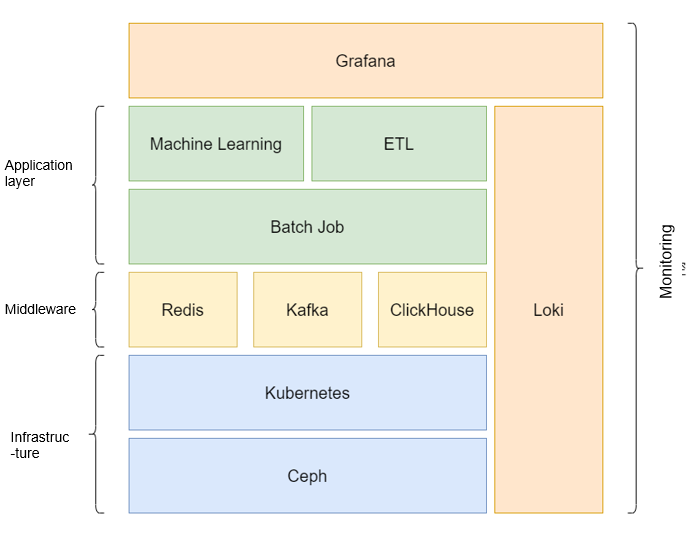
Service Architecture

  • Ceph-based high-performance storage

  • Kubernetes-based heterogeneous hardware management

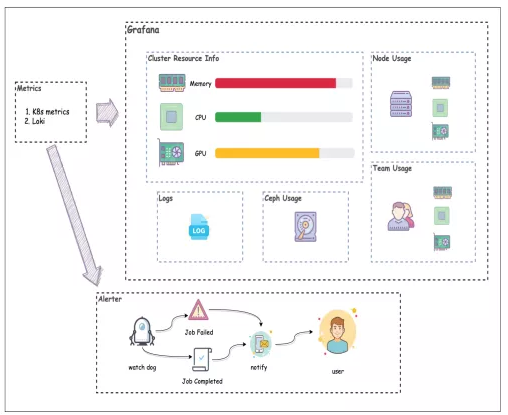
  • Loki + Grafana for user and monitoring panel

  • Hybrid deployment of middleware and application layer, making full use of cluster resources

  • Extended service scenarios with Batch Jobs

Multi-tenancy

When a user submits a job, multi-tenancy can be a problem. For example, when a user adds a pod to a cluster, the cluster needs to know the running user and the UID. By default, the UID of a running user is that of the image builder, which means the UIDs of the pods submitted by all users can be the same. This is not allowed because the data obtained and generated by a user should not be accessible to other users.

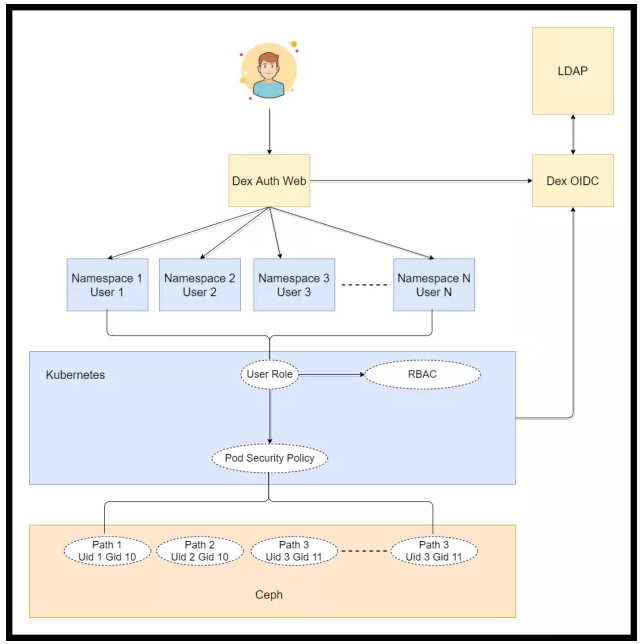
In this case, Ruitian uses Kubernetes namespaces to isolate all resources. One namespace corresponds to one user. Namespaces interconnect with the development information through the existing LDAP service and OIDC to authenticate users and authorize them through RBAC to use pod security policies (PSPs). A PSP requires users to specify UID and GID in SecurityContext when submitting a pod to a cluster. The entire runtime environment of the user is subject to these settings.

With PSPs, users can be isolated when accessing data, which is all stored in Ceph. Multi-tenancy is thereby easily managed.

Workflows

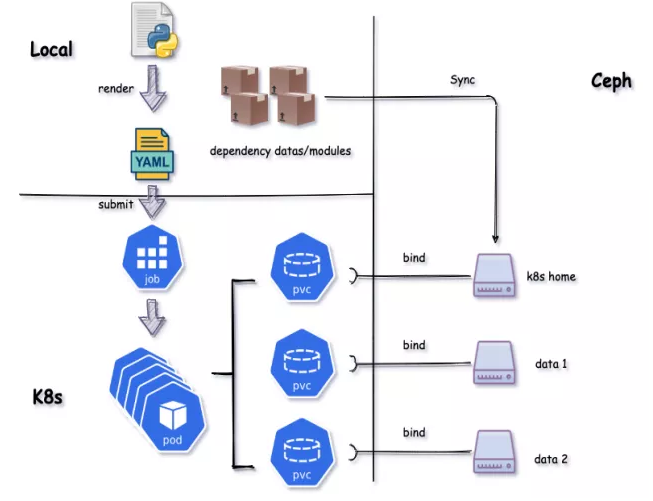
What comes next is basic workflows. The local configurations are rendered into a job YAML and then submitted. All dependency data of the user is synchronized to CephFS, and the pod is mounted with a PVC. Each user has the PVC permissions of their own directory in their own namespace. The permissions are managed and controlled through IBS. In this way, jobs are submitted to the cluster to run.

In-depth Customization on Volcano​

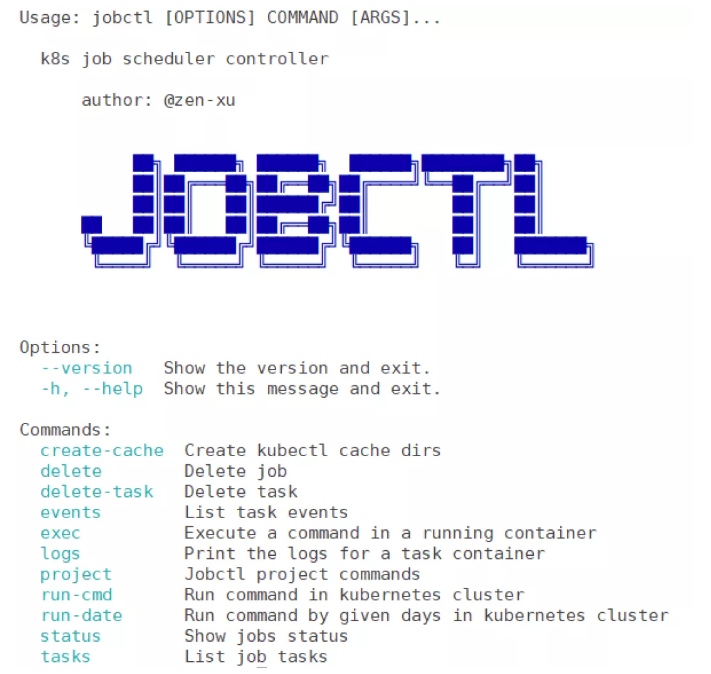
In the basic submission framework, Ruitian provides libraries for users and is developing a submission tool, Jobctl. This tool can be used as a command line tool or as the Python list that is input to the notebook or directly to the Python script of the user. Jobctl supports asynchronous and synchronous submissions. In the asynchronous mode, jobs are continuously submitted to the entire cluster. After the jobs are submitted, Jobctl exits directly. In the synchronous mode, Jobctl submits and watches jobs, and returns the execution results to the user only after the jobs are complete.

With Jobctl, Kubernetes complexities can be shielded for users. In addition, command line submission and Python Lib integration are supported, and the most basic parallel execution by replicas and by day is provided.

OOM Auto Scale Up

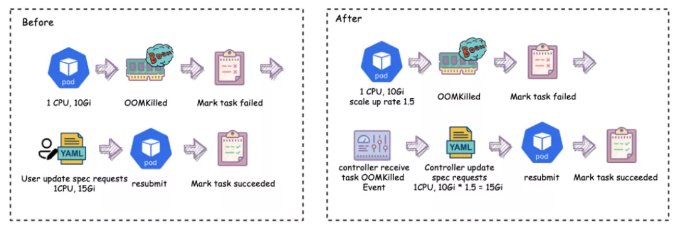
The first customization is to scale up resources of the entire job during OOM. Users may not be able to configure the exact memory required, and need to submit the job again for verification after the OOM. Therefore, Ruitian customized OOMKill Auto Scale-Up to modify the Volcano Controller to automatically scale up the resources requested by the OOMKill pods. After the scale-up, the jobs are automatically submitted again. The user will be informed upon the successful submission. This function guarantees reasonable memory requests without manual intervention, combining the Volcano policy event mechanism mentioned above.

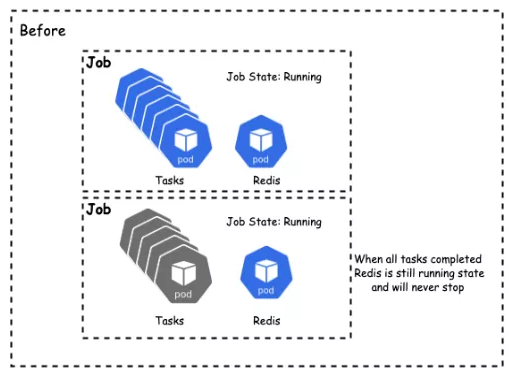
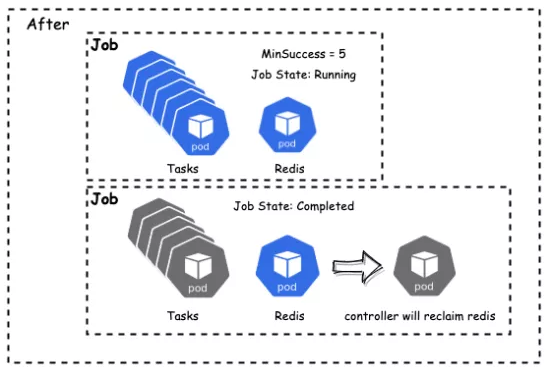
MinSuccess

  • If the number of pods that run to completion reaches minAvailable, the job is complete.

  • Non-Gang jobs cannot be flexibly scheduled.

  • If the number of pods that run to completion reaches minSuccess, the job is complete.

  • Decouple the number of jobs required by Gang and the number of jobs required for completing Jobs.

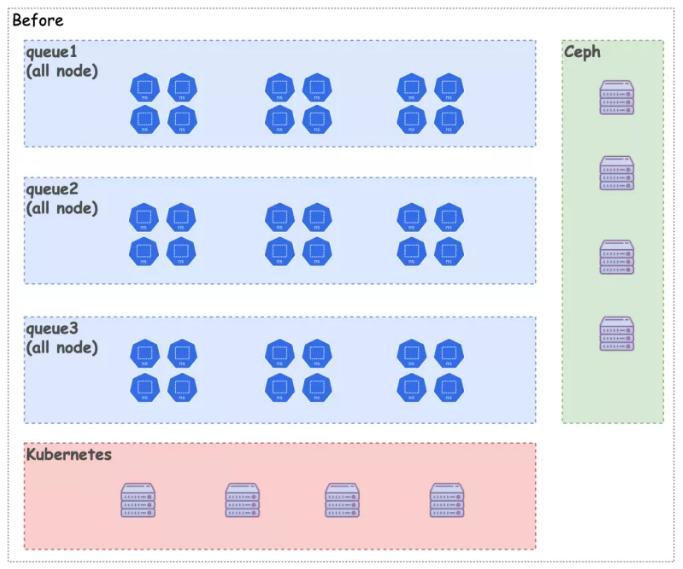
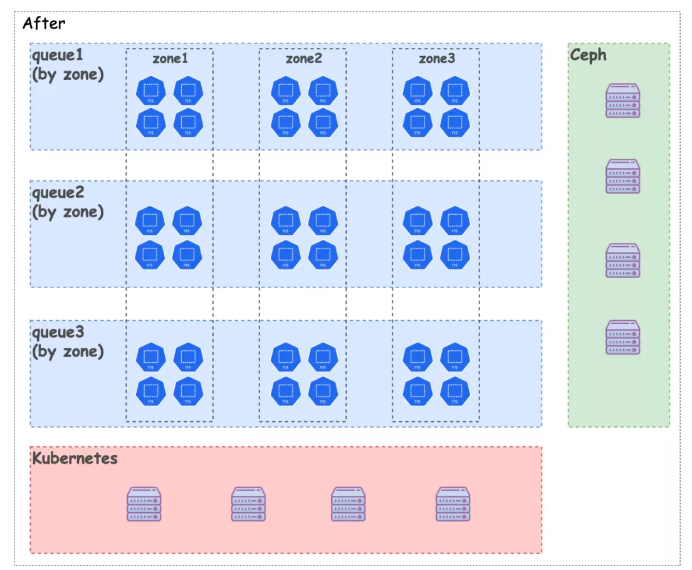
NodeZone

  • One Volcano instance manages all nodes.

  • Noisy Neighbor cannot be resolved.

  • Resources cannot be reserved for emergency.

  • Multiple Volcano instances manage multiple zones.

  • Certain jobs are physically isolated.

Volcano Namespace Quota

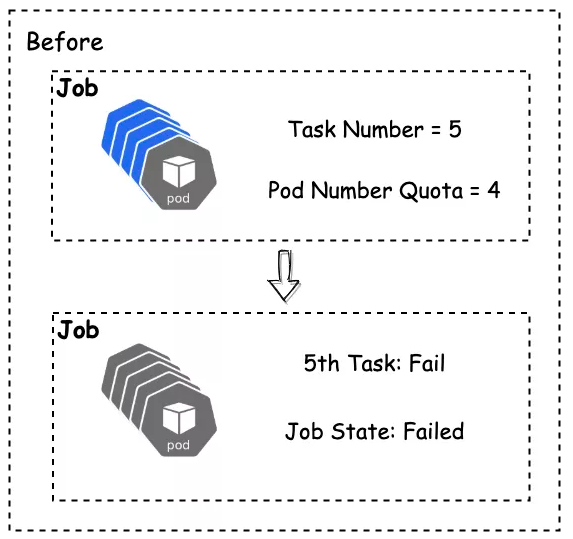
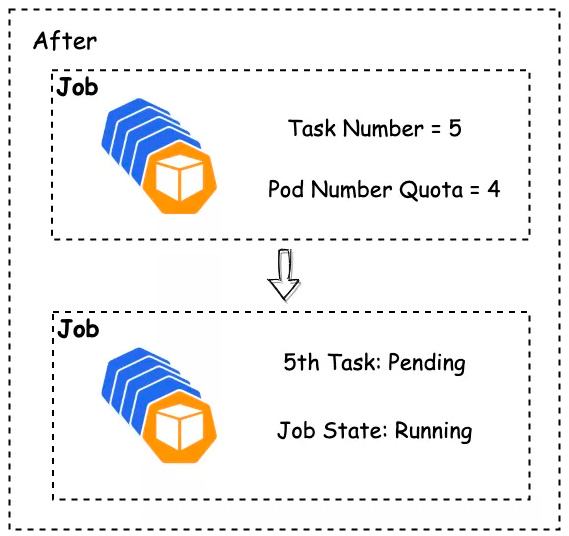
The default Kubernetes quotas cannot satisfy Ruitian's system. When the native namespace quota is triggered, pods directly fail. Therefore, Ruitian re-designed the quota in Volcano.

  • When the Volcano namespace quota is triggered, pod creation in a queue will be suspended.

Volcano Monitoring and Alarming

Volcano Exporter

  • Outputs the queue label of the job.

  • Outputs the queue capability.

  • Outputs the job start time and end time.

WatchDog

  • Registers the Informer and collects metrics.

  • Reports job failure and usage alarms.

  • Automatically updates the queue capability.

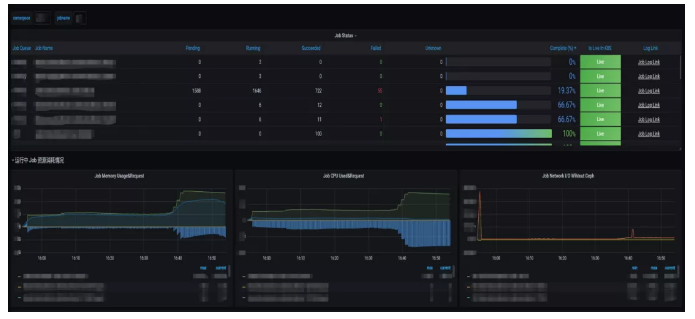
Job dashboard

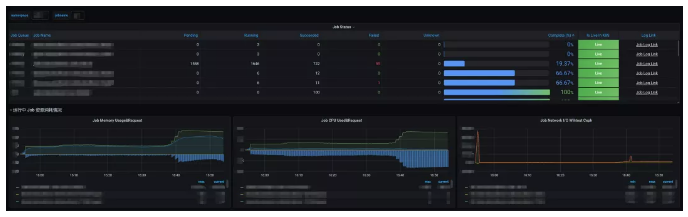
The upper panel covers the information about all jobs and provides a state table to display the job completion status. The panels below display the CPU, memory, and network resource usage. The negative axes refer to wasted cluster resources, which are allocated to pods (jobs) but not actually used during job running. These time series tables can provide resource insights to users in real time.

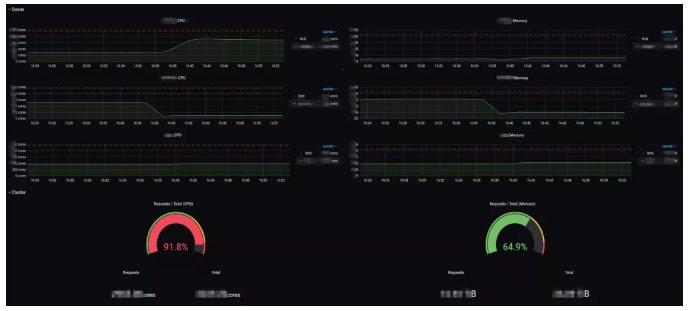
Cluster resource dashboard

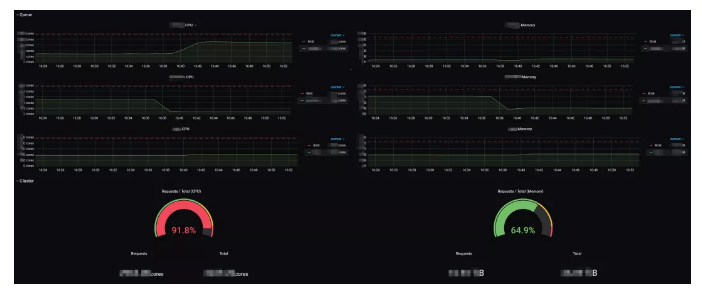
Graphs show the usage of overall queue resources, including CPU and memory. For jobs that consume a large amount of resources, for example, 300 or 500 GiB of memory, users need to know whether there is any node that can run such jobs. Therefore, we need to display the resource usage of each node available.

Challenges and Solutions in High-Concurrency Scenarios​

In Ruitian, the number of compute nodes in a single cluster has reached 200 and long-time jobs (1 week) and short-time jobs (1 minute) co-exist. The total storage capacity is 1.5 PB, the read/write bandwidth is 15 GB/s, and the number of pods increases by 100,000 to 300,000 every day. These brought challenges.

Challenge 1: Too Large Jobs

Issues:

  • The CPU usage exceeds Max Request Size (1.5 MB) of etcd when there are a large number of pods.

  • Adjusting Max Request Size will impact etcd due to a large number of objects.

Solution:

  • Submit a job in the form of multiple replicas for a single task.
  • The information provided by ENV plug-ins in a pod is read in Sharding mode.

Challenge 2: Out of CPU/Memory

Issues:

  • There are a limited number of nodes, and a large number of short-term jobs keep being scheduled.

  • Kubelet PLEG is under great pressure, and the pod binding takes too long.

Issues:

  • There are a limited number of nodes, and a large number of short-term jobs keep being scheduled.

  • Kubelet PLEG is under great pressure, and the pod binding takes too long.

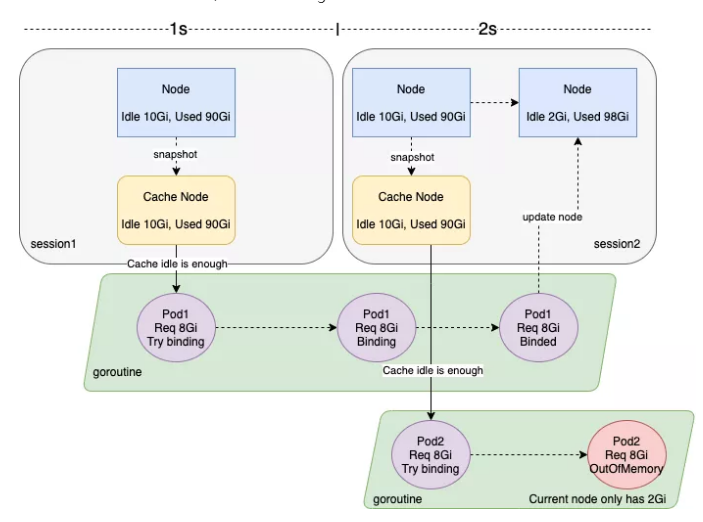
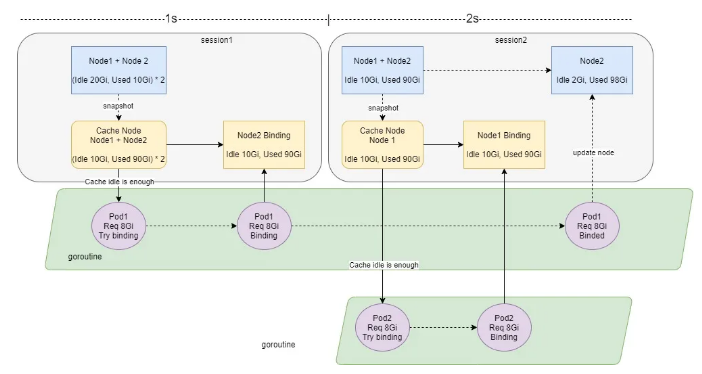
  • The default session interval of Volcano is 1s. As a result, cache snapshots are inconsistent.

  • Out of CPU + Out of Memory

Solution:

  • Add binding task numbers for nodes.

  • When a snapshot is being created for a session, the nodes whose binding task number is smaller than 0 are skipped.

HPC on Volcano: How Containers Support HPC Applications in the Meteorological Industry

· 8 min read
Zhe Jin
Senior Engineer in HUAWEI CLOUD

This article was firstly released at Container Cube on October 27th, 2020, refer to HPC on Volcano:容器在气象行业HPC高性能计算场景的应用

Kubernetes has become the de facto standard for cloud native application orchestration and management. An increasing number of applications are being reconstructed or built to employ Kubernetes. High performance computing (HPC) is a popular distributed computing mode and is widely used in many fields. For users who have deployed HPC applications and are eager to containerize and manage their applications using Kubernetes, Volcano, CNCF's first distributed scheduling system for batch computing, is a good choice. Volcano supports multiple types of computing frameworks, such as Spark, TensorFlow, and Message Passing Interface (MPI). This article uses a traditional HPC application, the Weather Research and Forecasting (WRF) model, as an example to describe how Volcano works for HPC applications.

About HPC​

HPC and HPCC are two common terms in the area of computing jobs. HPCC is short for high performance computer cluster, which integrates a large amount of computer software and hardware to conduct parallel computing on large computing jobs. HPC is widely used in CAE simulation, animation rendering, physics, chemistry, oil exploration, and life, meteorological, and environmental science.

An HPCC consists of three parts:

  • Portable Batch System (PBS): A resource manager that manages all node resources in a cluster. Other common resource management systems include Slurm and Platform Load Sharing Facility (or simply LSF).

  • Maui: A third-party job scheduler that supports multiple priority-based scheduling policies, resource reservations, and preemption mechanisms. Maui provides more advanced scheduling services than the default schedulers embedded in most resource managers.

  • Open MPI: An upper-layer communication environment that provides a communication library and compilation functions and starts distributed tasks.

PBS and Maui are imperceptible to users. Users only need to submit jobs in the mode defined by PBS and do not need to understand internal implementation details. However, users are required to learn how to use Open MPI to compile parallel computing applications.

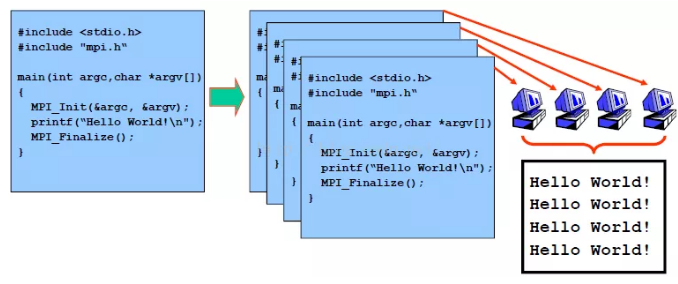
The following uses mpirun -np 4 ./mpi_hello_world as an example to illustrate how an MPI job runs.

  • Invoke Open MPI or other MPI libraries to compile the source code. In this example, Hello World! is printed.

  • Use a compiler that supports MPI to compile the executable program mpi_hello_world.

  • Distribute mpi_hello_world to each node. You can also make mpi_hello_world accessible by sharing the file system.

  • Run mpirun to execute mpi_hello_world in parallel.

About WRF​

The Weather Research and Forecasting (WRF) model is a common HPC application. WRF is a mesoscale numerical weather prediction (NWP) system designed for both atmospheric research and forecasting. It allows researchers to produce simulations based on real or hypothetical atmospheric conditions.

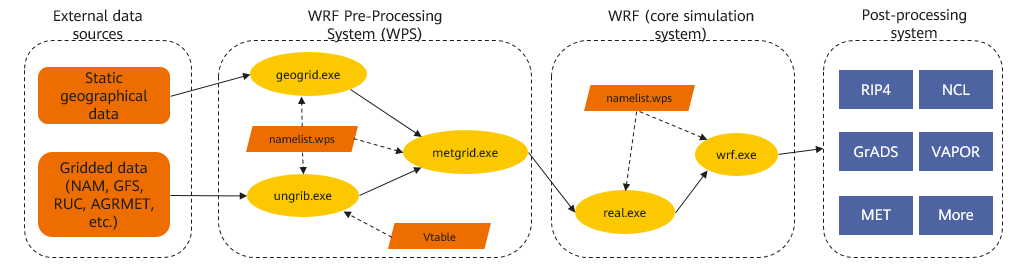
WRF consists of multiple modules with different processing flows. The following illustrates a WRF process.

As shown in the figure above, this WRF process has four parts:

  • External data sources

  • WRF Pre-Processing System (WPS)

  • WRF, which is the core simulation system

  • Post-processing system

External Data Sources

The WRF model data includes static geographical data and gridded data. Geographical data refers to geographical information in a domain, such as mountains, rivers, lakes, and forests. Gridded data refers to the meteorological environment data in a domain, such as temperature, wind speed, wind direction, air humidity, and rainfall.

WPS

——WPS,WRF Pre-processing System)

WPS loads geographical and meteorological data, interpolates meteorological data to grids, and finally provides data input for the WRF. It consists of three main programs:

  • geogrid.exe: defines model projections, domain range, and nesting relationships, interpolates terrestrial parameters, and processes terrain and gridded data.

  • ungrib.exe: extracts required meteorological parameters from the GRIB data.

  • metgrid.exe: interpolates meteorological parameters to simulation domains.

The three programs work together to generate data used for meteorological simulation. Currently, the three programs do not support MPI parallel computing.

WRF

As the core module of the WRF model, WRF performs simulation and prediction based on the meteorological information generated by WPS. WRF consists of two main programs:

  • real.exe: initializes the actual meteorological data.

  • wrf.exe: simulates and predicts results.

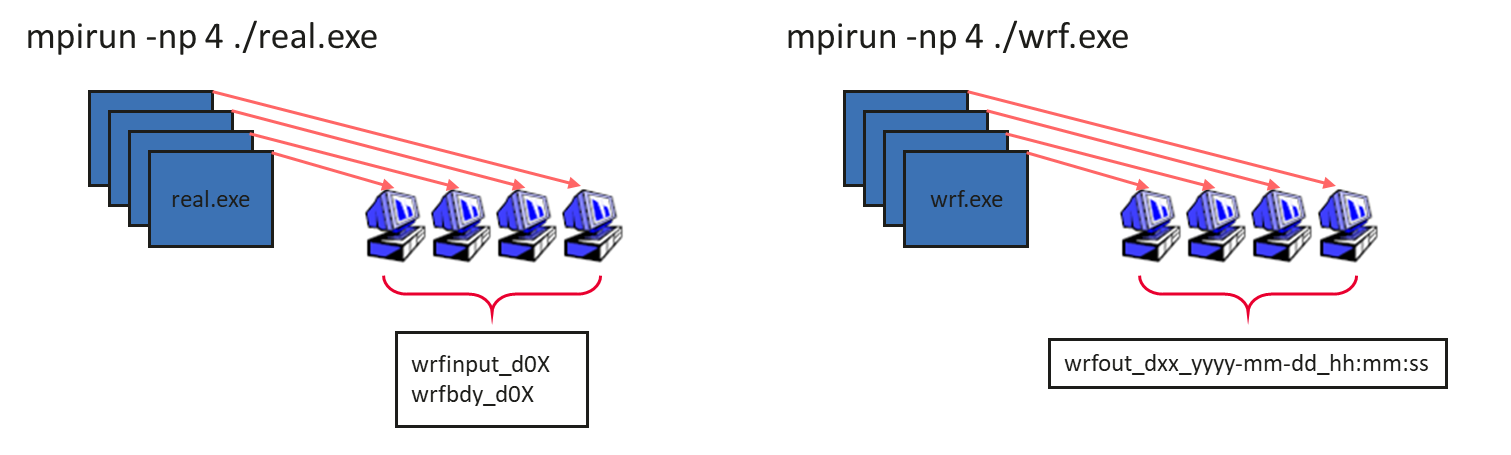
real.exe and wrf.exe can run as MPI parallel jobs to improve the computing speed.

As shown in the preceding figure, wrfinput_d0X and wrfbdy_d0X are the calculation results generated by real.exe. wrf.exe performs meteorological simulation based on these results to generate the final result wrfout_dxx_yyyy-mm-dd_hh:mm:ss, which is verified and displayed by the post-processing system.

Post-Processing System

The post-processing system verifies and displays the calculation results generated by WRF. It consists of various third-party images and verification tools. The following figure shows the simulation and prediction results of the relative humidity in each area in CONUS 2.5km case.

CONUS 2.5km refers to the 2.5 km resolution case covering the Continental U.S. (CONUS) domain. (In this case, the entire domain is divided into multiple cubes of 2.5 km x 2.5 km x 2.5 km. The meteorological information in each cube is considered consistent.)

HPC on Volcano​

As mentioned above, an HPCC consists of a resource manager, scheduler, and MPI parallel computing library. In the container context, Kubernetes functions as the resource manager and Volcano functions as the scheduler.

To run HPC applications in the Kubernetes+Volcano environment is to run HPC jobs in containers, as shown in the following figure.

Two types of containers are involved: master and worker. The master container starts the mpirun and mpiexec commands, and the worker containers run computing jobs.

To support MPI jobs, Volcano has been enhanced to provide the following functions:

  • Multiple pod charts, which are used to define master and worker pods at the same time
  • Gang scheduling, which ensures that all pods in a job are simultaneously started
  • Mapping of host IP addresses of the master and worker pods
  • SSH password-free login between the master and worker pods
  • Job lifecycle management

The following is an example of running an MPI job on Volcano.

  1. Define a Volcano MPI job by the mpi_sample.yaml file.
apiVersion: batch.Volcano.sh/v1alpha1
kind: Job
metadata:
name: mpi-job
labels:
# Set the job type based on service requirements.
"Volcano.sh/job-type": "MPI"
spec:
# Set the minimum number of required pods (less than the total number of replicas).
# For this example, set it to the total number of mpimaster and mpiworker replicas.
minAvailable: 3
# Specify Volcano as the scheduler.
schedulerName: Volcano
plugins:
# Configure SSH password-free authentication.
ssh: []
# Configure the network information, such as hosts file and headless Service, required for running the job.
svc: []
# Define a policy in which the entire MPI job will be restarted when a pod is evicted.
policies:
- event: PodEvicted
action: RestartJob
tasks:
- replicas: 1
name: mpimaster
# Define another policy in which the entire MPI job will be considered as complete when mpiexec execution completes.
policies:
- event: TaskCompleted
action: CompleteJob
template:
spec:
# The Volcano-related information will be stored in the /etc/Volcano directory.
containers:
# The master container will perform the following operations:
# 1. Start the sshd service.
# 2. Obtain the mpiworker container list from /etc/Volcano/mpiworker.host.
# 3. Run mpirun/mpiexec.
- command:
- /bin/sh
- -c
- |
MPI_HOST=`cat /etc/Volcano/mpiworker.host | tr "\n" ","`;
mkdir -p /var/run/sshd; /usr/sbin/sshd;
mpiexec --allow-run-as-root --host $`{MPI_HOST}` -np 2 mpi_hello_world;
image: Volcanosh/example-mpi:0.0.1
imagePullPolicy: IfNotPresent
name: mpimaster
ports:
- containerPort: 22
name: mpijob-port
workingDir: /home
resources:
requests:
cpu: "100m"
memory: "1024Mi"
limits:
cpu: "100m"
memory: "1024Mi"
restartPolicy: OnFailure
imagePullSecrets:
- name: default-secret
- replicas: 2
name: mpiworker
template:
spec:
containers:
# The worker containers will only start the sshd service.
- command:
- /bin/sh
- -c
- |
mkdir -p /var/run/sshd; /usr/sbin/sshd -D;
image: Volcanosh/example-mpi:0.0.1
imagePullPolicy: IfNotPresent
name: mpiworker
ports:
- containerPort: 22
name: mpijob-port
workingDir: /home
resources:
requests:
cpu: "100m"
memory: "2048Mi"
limits:
cpu: "100m"
memory: "2048Mi"
restartPolicy: OnFailure
imagePullSecrets:
- name: default-secret
  1. Commit the Volcano MPI job.

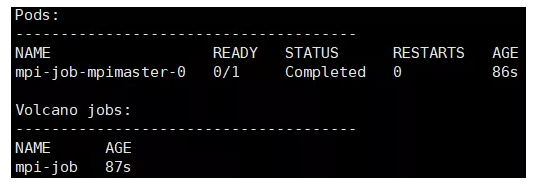
The job is executed.

  1. Check the execution result of the master pod.

The preceding execution result shows that Volcano clears only the worker pods and retains the master pod after the job completes. In this way, you can run the kubectl command to obtain the execution result.

Note that there may be latency in the container network. When a job starts, the master pod may fail to connect to the worker pods. If this happens, Volcano will automatically restart the master pod to make the job run properly.

If you intend to use Volcano to run a WRF job, you need to replace mpi_hello_world with real.exe and wrf.exe and perform the following operations:

  • Build Docker images, which must include a complete WRF running environment.

  • Mount the data (original or intermediate data) required for calculation to the corresponding container.

In this way, you can run meteorological simulation jobs in the Kubernetes+Volcano environment.

How Does Volcano Empower a Content Recommendation Engine in Xiaohongshu

· 13 min read
Yi Guo
Tech-Leader

This article was firstly released at Container Cube on May 27th, 2021, refer to 小红书基于Volcano的大规模离线与在线推荐模型训练实践

Introduction to Xiaohongshu​

Xiaohongshu is a leading life-sharing community in China. Popular among female users and joined by more and more trendy boys, now Xiaohongshu has more than 100 million monthly active users. This UGC community has hundreds of thousands of notes submitted every day and nearly 10 billion views/hits per day.

The recommendation on the homepage is in the charge of our recommendation team and is one of the core service scenarios of Xiaohongshu. In the first years when Xiaohongshu was established, all of the recommended notes were manually selected without assistance of any machine learning models. As a result, we recommended the same content to almost every user.

Since 2016, we started to explore personalized recommendation for different users. In 2018, the first recommendation machine learning model based on SparkML and GBDT was introduced. It had only tens of thousands of parameters. Since the end of 2018, we accelerated the model iteration. By the second half of 2020, our model scale reached hundreds of billions of parameters. We also introduced online learning, and the model could be updated in hours. From April this year, the model is updated every few minutes, which means the model can capture users' behavior within one or two minutes to get users' short-term interests and generate recommendations that are more appealing for users.

Big Data Architecture in Xiaohongshu Search, Recommendation, and Ad Scenarios​

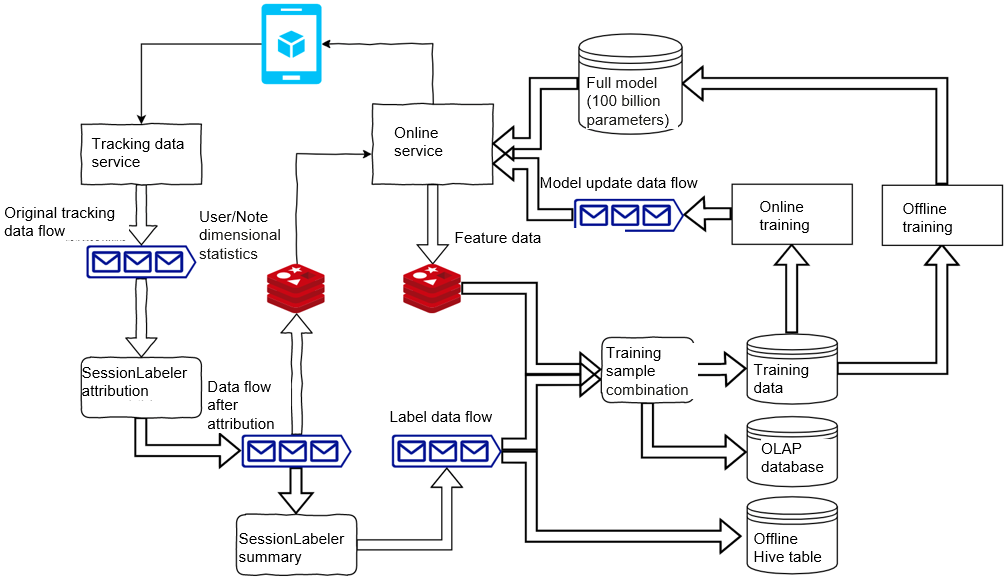
The architecture consists of four parts. The upper left corner shows the interaction between the client and the real-time service/tracking data service. After being started, the Xiaohongshu app requests an online service for recommendation. The online service caches the recommended notes and requested features, and returns the recommendation results to the client. When the user browses the notes recommended to him/her, a series of interaction behaviors are generated. The interaction behaviors become data flows that pass through the tracking data service and go to the original tracking data flow.

In the lower left corner, there are attribution and summary tasks used to clean and process user behavior data in real time to generate the label data flow. The label data flow and feature data flow are combined to generate the training samples, and the three major products of Xiaohongshu big data: training data, OLAP database, and offline Hive table.

The upper right corner shows online and offline training. Online training trains the data in real time to generate the updated data of the model. Offline training generates a full model and uploads it to the online service.

Behavior Attributions and Labels
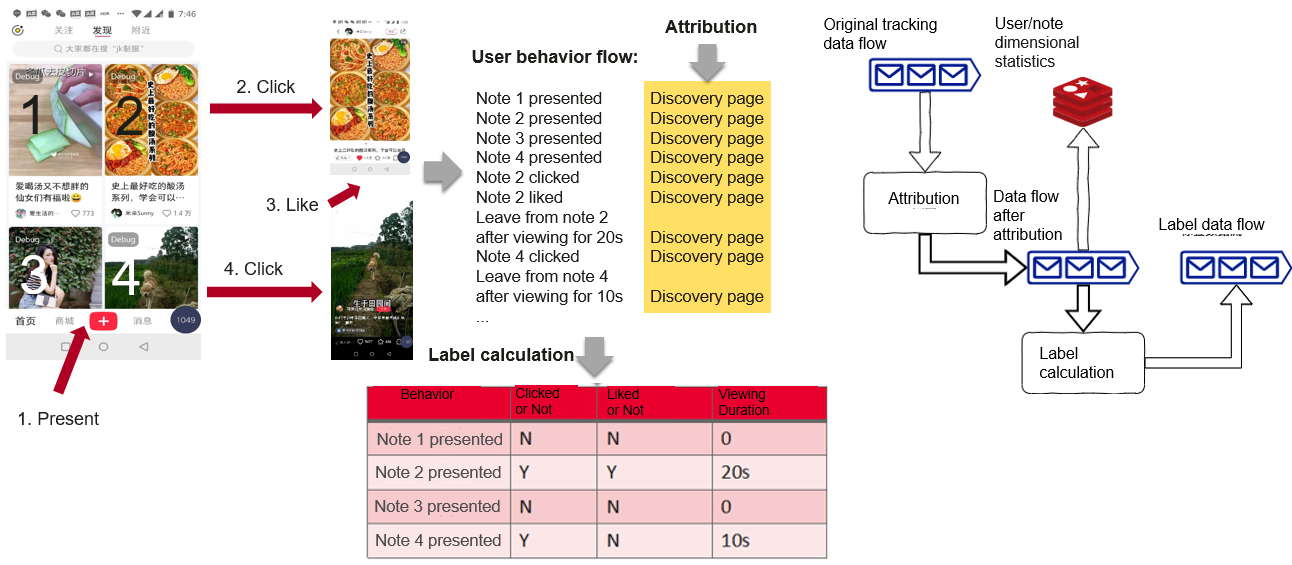
This task for user behaviors can be divided into two parts: attribution and label. Attribution is to associate each behavior captured in data tracking with the past behaviors of the user. For example, you browse 4 notes in the app, one found on the Discovery page, one on the search results page, and two on a blogger's homepage. You click Like for the final piece. Your browsing and clicking Like are tracked. The tracking data does not tell us what happened before the like is given.

We can determine the cause of the like behavior based on the user behavior flow and user's historical browsing records prior to the like. This process is called attribution. Through the attribution task, we can also add labels about why a user follows a blogger, and which of the blogger's notes the user has viewed before following the blogger.

Opposite to attribution, label calculation summarizes the actions performed by a user after a certain behavior. If the user browsed four notes on the Discovery page, for each note Xiaohongshu makes several labels about whether the user liked the notes after browsing, or whether the user tapped to enter the note details page and how long the user stayed on this page. This label data is important for subsequent model training and the generation of daily user reports.

Real-Time Big Data Products for Search, Recommendation, and Ad
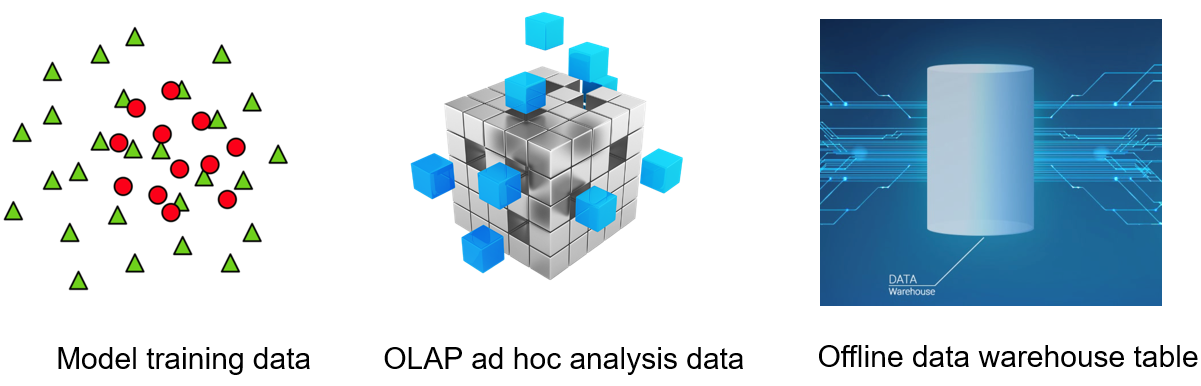
After the label data is generated, the above three big data products are provided for the service.

The model training data is used to train models in real time, and provide more accurate and real-time information about users' latest interests.

Both the ad hoc data analysis and offline warehouse perform analysis based on the label data. The ad hoc data analysis is real-time. For example, if there is any change in the system and policy, effects should be observed immediately from a multi-dimensional segmentation perspective. In contrast, the offline data warehouse provides daily or weekly reports, or shows the changes have been made to certain metrics in the past six months.

Online and Offline Model Training
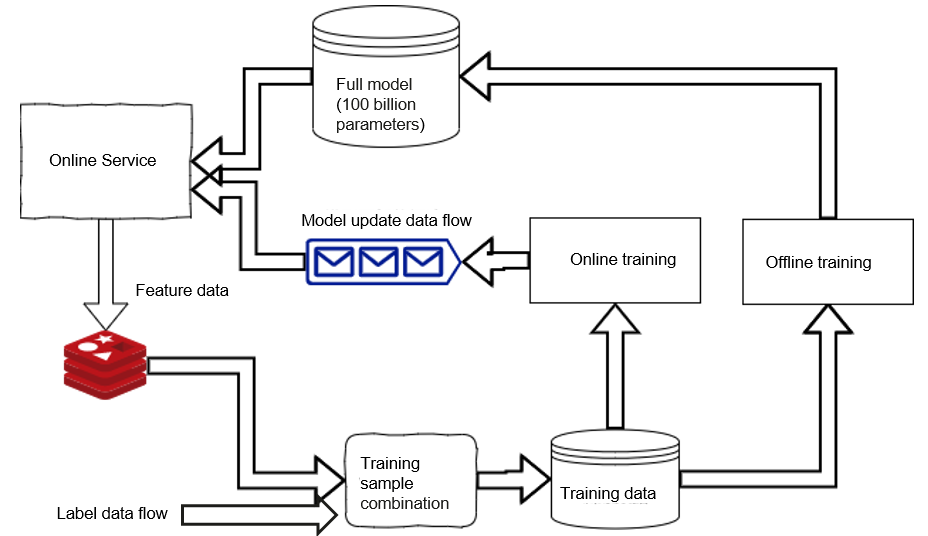
Training data generated after the combination of label data and feature data is used for both offline and online training.

Though the same data source is used, there are differences between online and offline training. For online training, the data source is provided to Kafka for online consumption. After that, a model update data flow is output, which actually means that the last batch of model changes is released online in real time. Offline training is performed on a batch and daily basis. A full migration parameter model is released, and data is migrated back to the online service.

Evolution from Offline Batch Computing to Online Stream Computing​

Offline Batch Only

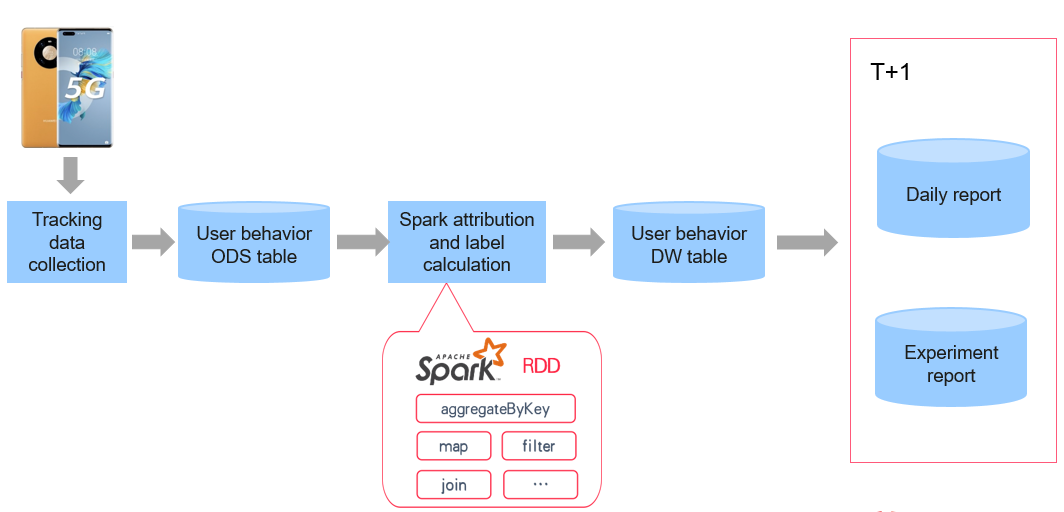
The preceding figure shows the earliest offline batch label calculation process. Click behaviors of users are collected and recorded in the ODS table, that is, the original log table. The attribution and label calculation are performed by the Spark task, which is an offline batch task. The processed data forms a data warehouse table to generate daily reports and experiment reports as big data products. In the batch environment, the report is generated on a T+1 cycle. Generally, we cannot obtain the complete reports until the second or third day after each experiment.

Offline Batch + Online Streaming
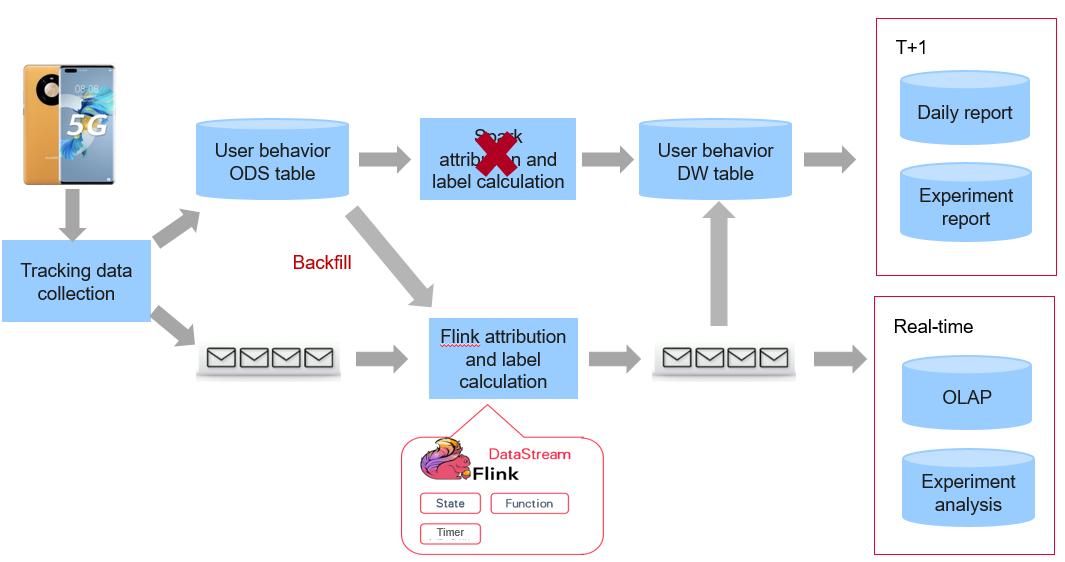
Increase in the number of developers poses higher requirements on service implementation. Therefore, we introduced the real-time link, which is completely based on the Flink framework. The real-time link inputs data through streaming Kafka, outputs the data to Kafka, and sends the data to the OLAP database and real-time experiment analysis. However, the challenge is that Spark and Flink are two different programming frameworks. For example, the logic for determining whether a click on an ad is valid is complex, because an interaction behavior or a stay of at least three seconds after the click is required before the click can be called a valid click.

If there are two data flows, the logic is implemented both in the offline service and the Flink framework. Many problems may occur when the same logic is implemented twice. One problem is that development needs to be repeated in both the Spark and Flink frameworks. A bigger problem is that the logic may be changed after being developed in both of the frameworks.

For some complex scenarios, the change may cause inconsistency between reports and requests. In some other scenarios, when the data warehouse makes a request offline, and the logic is implemented only in the Spark task, but not implemented offline, if we want to view the task, we need to implement the logic again, which will cause extra workload.

After the upgrade we made, all new labels are calculated in real time, not in Spark. However, interruption may occur in the real time mode. After the interruption, calculation may start from the latest data, and the earlier data may have changed. This problem is simple to solve in the offline mode, as we can re-run data of each hour to form the complete data.

We actually need to solve a technical problem: How to convert the real-time Flink training task from an offline data warehouse table to a real-time flow table, use the same computing logic to generate new data and then backfill the new data to the real-time flow table? In this way, the core logic of the real time and offline modes only needs to be implemented in real time, which solves the problem of inconsistent logics between the two developments.

Offline Training
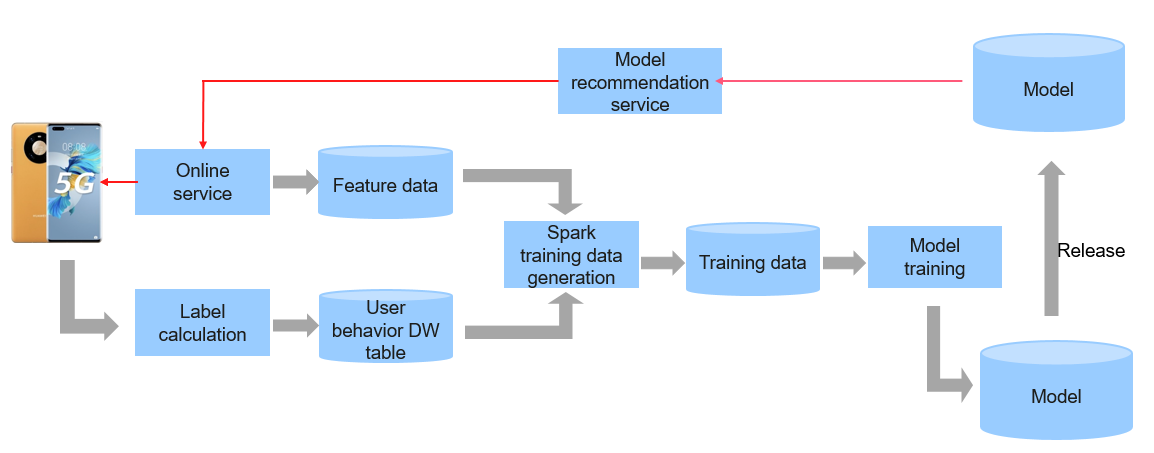
The preceding figure shows the training process of the machine learning model. At the earliest, there was only one batch data calculation task. Feature data and user behavior data are stored in offline tables. The Spark task is used to combine the data to generate a training task, and then release the learning model. The entire process may be performed once a day.

Online + Offline Training
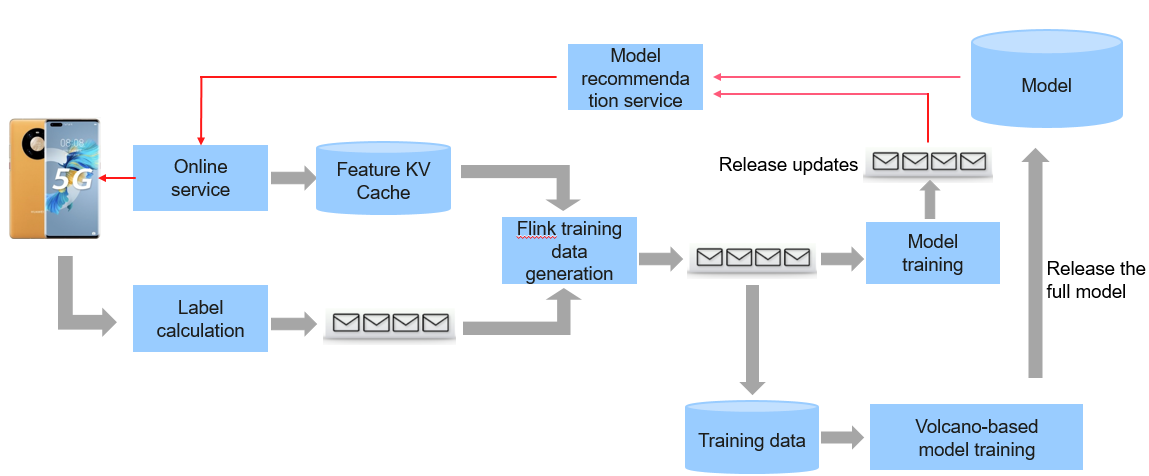
To capture users' real-time interests and make judgment on newly released notes more quickly, more real-time update is required for our models. Therefore, Flink is used for real-time model training. After Flink generates data, the Volcano scheduling system is used to update models in real time and in batches.

Optimization and Multi-cloud Management of Offline Training​

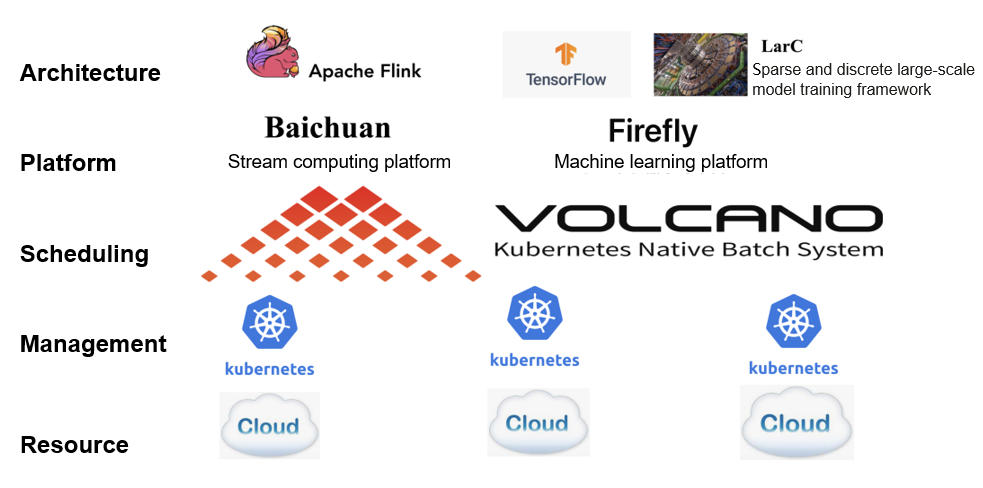
The preceding figure shows the technology stack of Xiaohongshu in machine learning and big data. Xiaohongshu is a relatively new company without on-premises equipment rooms. All of our services are deployed on clouds provided by cloud vendors, and most of the services are managed through Kubernetes.

We have two important platforms. One is the stream computing platform called Baichuan, which is used to manage the Flink tasks of real-time label computing and online learning mentioned above. The other is the task management platform for machine learning, which is called Firefly. Our model training is based on TensorFlow and runs on the machine learning platform. For sparse and discrete large-scale model training of recommendation, search and advertisement, we also developed a TensorFlow-based training framework, LarC. The framework models of TensorFlow and LarC run on the machine learning platform through Firefly.

The key point between these two platforms is how to schedule tasks to the Kubernetes clusters. In fact, the native Kubernetes has a big problem in this scenario, because it performs scheduling based on individual pods.

However, the stream computing and machine learning tasks are not single-pod tasks. They are tasks performed on a group of pods. Therefore, we have encountered a big challenge at the beginning. Assume that there are two jobs, each job contains 10 pods, and each pod requires one core of CPU. That is, 20 cores are required for the two jobs to run simultaneously. If the current cluster has only 15 available cores and we are using the native Kubernetes scheduler, the scheduler may schedule 7 cores to one job and 8 cores to another, so that both jobs can obtain some resources to run. However, neither of them can be completed properly because the numbers of cores allocated to them do not meet the requirements. As a result, deadlocks occur. This is caused by the limits of the native Kubernetes scheduling.

To solve this, we need to first schedule 10 cores to one job to ensure that it can be properly completed and exited. After that, the 10 cores are released and allocated to another job so that both jobs can be properly completed.

Based on these, we researched products and found Volcano. Its predecessor is Kubernetes batch and can completely meet our requirements. Therefore, we participate in the Kubernetes batch community and become a loyal user of Volcano.

Enhanced Volcano Scheduling: binpack -> task-topology
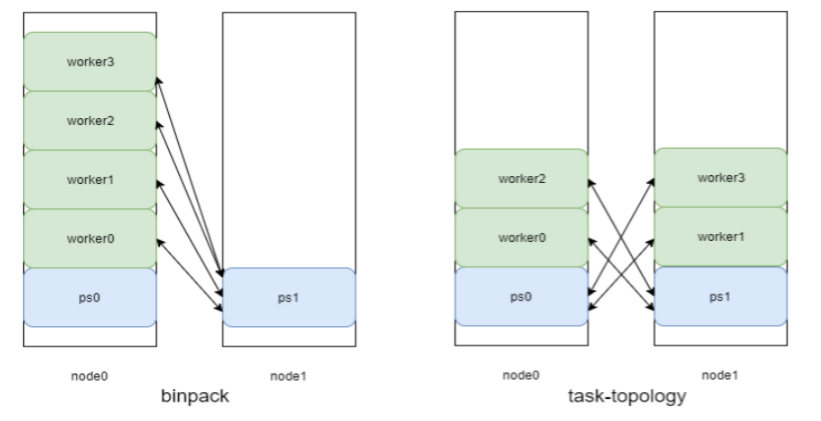
The scheduling algorithm supported by the native Volcano is binpack. Machine learning training tasks are classified into two types: worker for performing forward and reverse computing, which is a computing task; ps with the main task of storing parameters, which is a memory-type service. If the native open-source Volcano is used, its default scheduling algorithm optimizes the resources to reduce fragments. Therefore, it will schedule as many tasks as possible to the same node, and then schedule all worker and ps tasks of those tasks to the same node. When that node does not have capacity for one of the ps tasks (taking ps1 as an example here), it can only be put on another node.

In this scenario, workers and ps0 are on the same node. The I/O between them does not cross nodes, leading to fast I/O and large storage capacity. But the running speed is slow because ps1 is on another node.

With task-topology algorithm, tasks are scheduled to nodes in a balanced manner, the speed is balanced, and the overall storage capacity is greatly improved. The optimization from binpack to task-topology can increase the throughput of task training by 10% to 20%.

Data Transfer Between Multiple Clouds
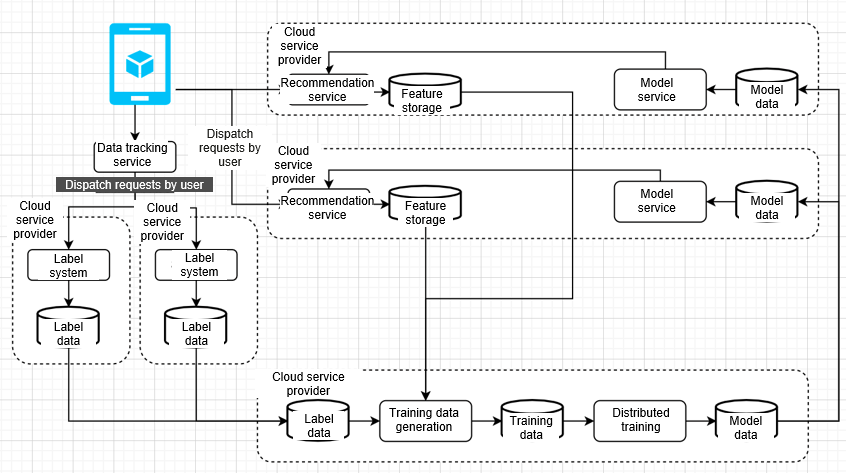
In the online mode, users are distributed to different AZs. The feature cache of the recommendation service is stored in the local AZ. After user data tracking, users are distributed to different clusters based on their requests, and the label system performs computing for each user. Finally, all label system computing is transferred to the cloud vendors that provide offline training and services for us to combine and generate data training, and perform distributed model training. The trained models are distributed to different AZs for online services.

How to implement transfer learning under this architecture Xiaohongshu users consume traffic on the homepage, which is a scenario where a large amount of data is generated and accumulated, and a model involving hundreds of billions of parameters will be trained. How do we use this large model built on recommendations for the search and advertisement scenarios? After the recommendation model is trained, it is synchronized to the search training cluster. The search training uses the search data to discover the recommendation model, and release the final search model online. In this way, the small-scale data training can obtain features of the large recommendation model training, so that the large recommendation model can be utilized by the search scenario.


Integrating Volcano into the Leinao Cloud OS

· 5 min read
Jian Zhu
Senior Architect in Leinao OS

This article was firstly released at Container Cube on December 24th, 2020, refer to Volcano在中科类脑云OS中的落地实践

Introduction to the Leinao cloud AI platform​

The Leinao cloud AI platform includes an AI development platform, public service platform, AI visualized operations platform, and an AI community.

  • The AI development platform provides end-to-end technical support and solutions for AI researchers in a diverse range of business scenarios.

  • The public service platform provides news and insight into AI for institutions and for the general public.

  • The AI visualized operations platform helps managers make better informed decisions.

  • The AI community is where AI developers and companies gather, exchange ideas, and improve their skills.

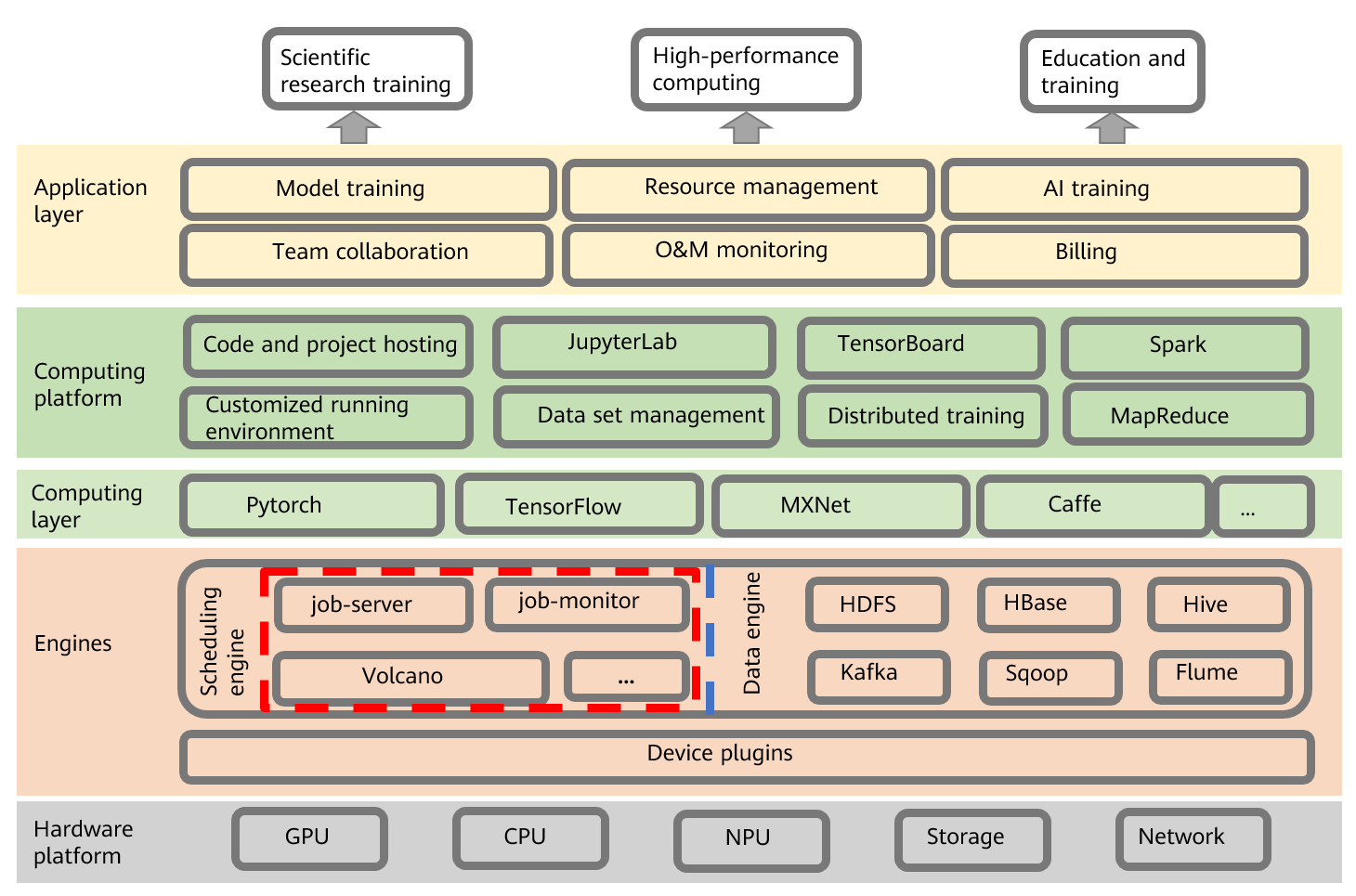
The architecture of Leinao cloud OS​

In the Leinao OS, the hardware platforms sit at the bottom of the architecture. On top of them are the job scheduling and data engines.

The computing layer, the next layer up, is composed of a set of APIs used to create general distributed training jobs.

Finally, on the top, is the application layer, which consists of various service systems, such as the model training, resource management, and O&M monitoring systems.

Why Volcano?​

The Kubernetes default-scheduler does not work well for batch scheduling, and batch scheduling is critical to AI and big data services. Therefore, when we were building Leinao cloud OS 2.0, we decided to replace the default-scheduler with a scheduling engine that can better serve AI and big data scenarios. Volcano has diverse advanced scheduling policies and can easily connect to mainstream computing frameworks in the AI and big data sectors.

More importantly, Volcano allows you to configure retry policies for distributed training jobs based on events rather on the number of retries. It is more flexible. In addition, it is more light-weighted than Hadoop, which is a distributed processing framework that also supports batch scheduling. After thorough analyses and comparisons, we finally chose Volcano for Leinao cloud OS 2.0.

Volcano provides enhanced job APIs.

Volcano improves many aspects of default-scheduler.

Default-scheduler and Volcano work differently in a couple of other ways as well.

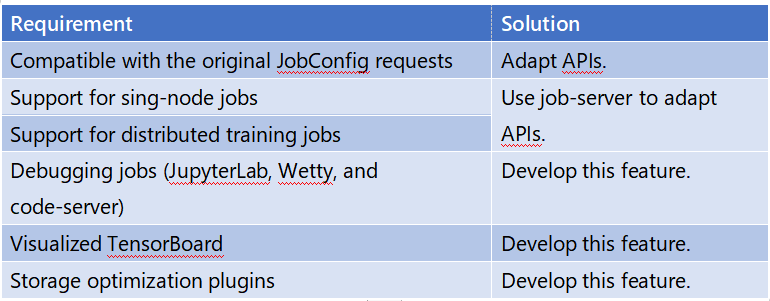
We encountered some obstacles when we connected the OS to Volcano. For example, OS development was already complete when we tried to connect it to Volcano, and connecting them directly required a huge change to the OS's computing and application layers. Moreover, Volcano did not support debugging jobs and tool sets yet. That was when we decided to introduce job-server, for API adaptation and integrated development of debugging tool sets.
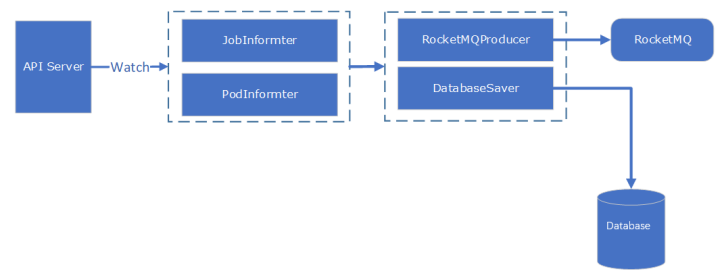
Another problem we faced was how to deal with task monitoring. Upper-layer services need detailed information on current and recent task status, and historical records, but Volcano only supports job monitoring. Should we customize Volcano or further develop the OS to support task monitoring? If we customize Volcano, it would get complicated later on, when we want to upgrade Volcano. The Volcano community iterates in a fast speed. We did not want to miss its latest features provided with every iteration. Therefore, we went with the latter choice, that is, to further develop the OS.

The following figure shows the monitoring mechanism. It uses an API server to watch jobs and pods.

Creating a job​

Scenario requirements:

  • Jobs can be created in batches.
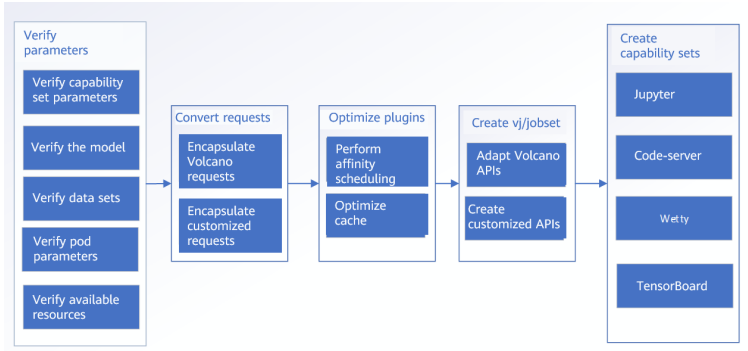
  • Debugging tool sets, such as JupyterLab, TensorBoard, code-server, and Wetty, are supported.
  • Data storage set optimization policies can be configured for batch jobs.
  • Training, quantization, and model conversion are supported.

The workflow is as follows:

Deleting a job​

Scenario requirements:

  • Jobs are automatically deleted when they finish.
  • Additional capabilities (Jupyter and code-server) of the jobs are deleted, as well.

When the job finishes, Volcano automatically deletes it.

Related resources (pods, services, and ingresses) are deleted.

Retrying a job​

In OS 1.0, retry policies are set simply based on the number of retries. Volcano allows you to set retry policies based on events. It is much more flexible and better suits our scenarios. We gave up on our original solution and adopted the retry mechanism of Volcano.

  • Policies defined in taskRole have a higher priority than the retry policies defined in jobs. A retry policy consists of an event and action.

  • event indicates a triggering condition.

  • action indicates the action to take when the specified triggering condition is met.

  • maxRetry indicates the maximum number of retries allowed for a job.

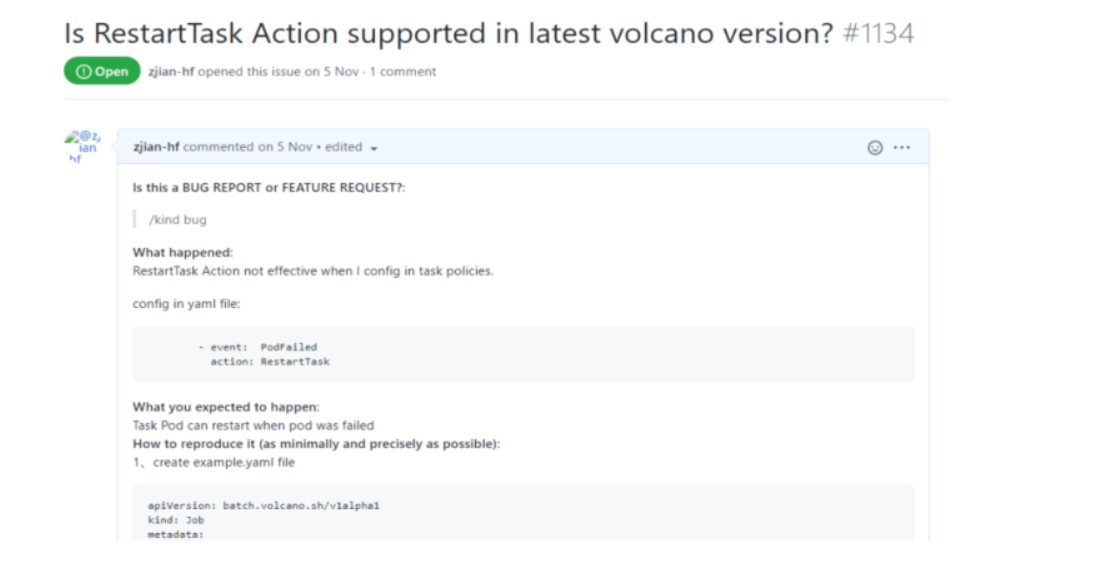
When we were developing the OS to support task monitoring, we received great support from the Volcano community. For example, we once found that RestartTask became invalid. The problem was solved the same day it was reported to the community. Their response was very fast.

Next Up​

We look forward to working with the community on topology scheduling and how to select the best GPU topology for scheduling when there are multiple GPUs on a single server. We seek deeper cooperation with the community in developing more advanced features and building a more inclusive ecosystem.

How Ruitian Used Volcano to Run Large-Scale Offline HPC Jobs

· 9 min read
Yunzhi Cheng
Tech-Leader in Ruitian
Zhengyu Xu
R&D in Ruitian

This article was firstly released at Container Cube on January 5th, 2021, refer to 基于Volcano的锐天离线高性能计算最佳实践

Why Volcano​

Ruitian Capital is a private equity investment firm committed to helping customers achieve returns by using diverse range of trading strategies. Ruitian offline computing clusters are dedicated to strategy development and big data processing. The clusters analyze large volumes of data to help develop quantitative models for stock and futures trading.

In the early stages, we used Yarn to schedule batch jobs and Ceph to store massive data. As the company grew, our strategic planners have had to work in different environments. This has prompted us to look into container technologies for multi-environment research.

With the mature and stable development of Kubernetes in recent years, container technologies, especially Kubernetes, have been widely used in computing clusters. However, the Kubernetes default-scheduler does not support:

  • Running multiple pods in one job
  • Fair-share scheduling of jobs assigned to different queues
  • Gang scheduling
  • Specifying a number of pods that must be scheduled for a job to be considered successfully scheduled
  • Dominant Resource Fairness (DRF) algorithm

We discovered the Volcano project as part of our research into these issues. Volcano is based on Kubernetes, and its robust job scheduling and control policies meet all of our requirements. Its simple architecture was a major reason we decided to migrate our scheduling platform from Yarn to Kubernetes.

How to Migrate to Volcano​

Customization of Volcano Job Templates
Our strategic planners use clusters but do not know much about Kubernetes. We encapsulated the technical details of Kubernetes and developed Jobctl to generate Volcano job templates.

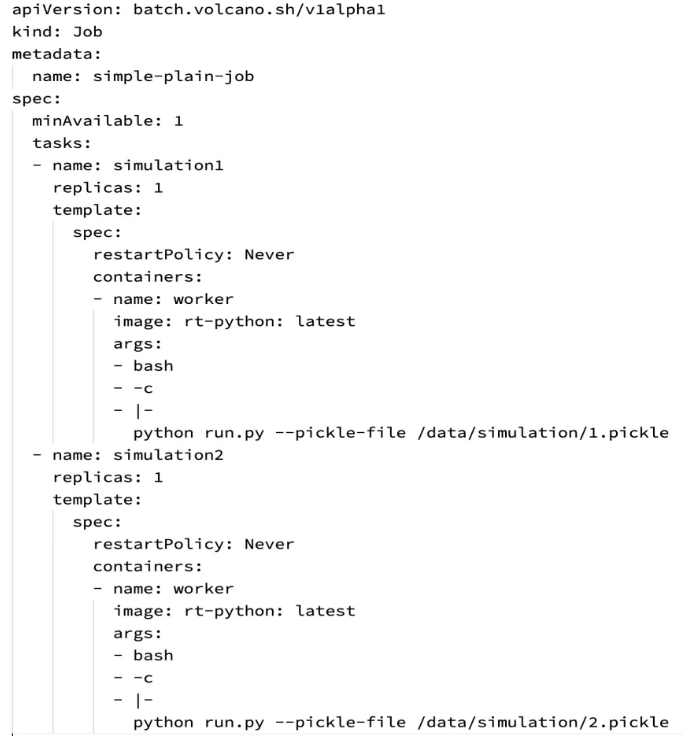
Preliminary solution: Defining a job with multiple tasks

apiVersion: batch.volcano.sh/v1alpha1
kind: Job
metadata:
name: awesome-job
spec:
minAvailable: 1
tasks:
- name: simulation1
replicas: 1
template:
spec:
restartPolicy: Never
containers:
- name: worker
image: rt-python:latest
resources:
requests:
cpu: 1
memory: 1Gi
limits:
cpu: 1
memory: 1Gi
args:
- bash
- -c
- |-
python run.py --pickle-file /data/simulation/1.pickle
- name: simulation2
replicas: 1
template:
spec:
restartPolicy: Never
containers:
- name: worker
image: rt-python:latest
resources:
requests:
cpu: 1
memory: 1Gi
limits:
cpu: 1
memory: 1Gi
args:
- bash
- -c
- |-
python run.py --pickle-file /data/simulation/2.pickle
- name: simulation3
replicas: 1
template:
spec:
restartPolicy: Never
containers:
- name: worker
image: rt-python:latest
resources:
requests:
cpu: 1
memory: 1Gi
limits:
cpu: 1
memory: 1Gi
args:
- bash
- -c
- |-
python run.py --pickle-file /data/simulation/3.pickle

In this solution, you can set different parameters and images for pods to enable these pods to run different tasks.

In most cases, tasks are executed at different times and are kept separate from each other. If all pods participate in scheduling and minAvailable is set to 1, the job state changes to Running when any one pod is successfully scheduled. However, during the trial run, we found that some tasks could not be submitted. This is because some strategic planners submitted more than 5,000 concurrent pods. The size of the generated YAML file can exceed 1.5 MiB, which is more than the default request size limit allowed by etcd.

Considering that the load on etcd is high when a large number of jobs and pods are running, instead of simply increasing the default request size limit, we made some optimizations (see the final solution).

Final solution: Defining a job with one task and multiple replicas

In most cases, as only parameters of all tasks in a job are different, you can use the multi-replica function to load the corresponding parameter file for each task based on the replica ID. In this way, the size of each request sent to etcd is reduced.

apiVersion: batch.volcano.sh/v1alpha1
kind: Job
metadata:
name: awesome-job
spec:
minAvailable: 1
tasks:
- name: simulation
replicas: 10
template:
spec:
restartPolicy: Never
containers:
- name: worker
image: rt-python:latest
resources:
requests:
cpu: 1
memory: 1Gi
limits:
cpu: 1
memory: 1Gi
args:
- bash
- -c
- |-
python -u call_module_func.py --pickle-file /data/simulation/**Work ID:** .pickle module.submodule magic_function

call_module_func.py is a boot script, which is mounted to the container using a ConfigMap. It is responsible for:

  • Converting Work ID: to the replica ID, which is obtained from the host name in the container. For example, if the host name is awesome-job-awesome-job-1, the replica ID is 1.

  • Loading pickle parameters (mounted to the container using a PVC) and transferring them to the magic_function function in module.submodule.

Other Volcano Customizations​

minSuccess

Most jobs do not require the gang scheduling, but we don't want a job to be considered successfully scheduled unless all of the tasks it includes are successful.

The Volcano parameter minAvailable did not meet our requirements, so we added a new parameter, minSuccess, to decouple the logic for determining a job success from the minAvailable parameter.

minSuccess := ps.job.Job.Spec.MinSuccess
if minSuccess == 0 {
minSuccess = jobReplicas
}
​
if status.Succeeded >= minSuccess {
status.State.Phase = vcbatch.Completed
return true
}
​
if status.Succeeded+status.Failed == jobReplicas {
if status.Failed != 0 {
status.State.Phase = vcbatch.Failed
} else {
status.State.Phase = vcbatch.Completed
}
return true
}

autoMemoryScale

The requested CPU and memory must be specified when a Volcano job is submitted. Most of our planners cannot estimate the memory required by their applications, which is why we developed the autoMemoryScale function to monitor OOM events. If an application exits due to an OOM event, the memory will be automatically scaled out and the application will be rescheduled, thereby reducing costs associated with trial and error.

for i := 0; i< int(ts.Replicas); i++ `{
podName := fmt.Sprintf(jobhelpers.PodNameFmt, job.Name, name, i)
if pod, found := pods[pdName]; found {
if len(pod.Status.ContainerStatuses) == 0 {
continue
}`

reason := pod.Status.ContainerStatuses[0].State.Terminated.Reason

if reason == "OOMKilled" `{
podToScaleUp = append(podToScaleUp, pod)
jobResources := ts.Template.Spec.Containers[0].Resources
podResources := pod.Spec.Containers[0].Resources

jobReqMem, _ := jobResources.Requests[v1.ResourceMemory]
podReqMem, _ := podResources.Requests[v1.ResourceMemory]

if podReqMem.Value() >= jobReqMem.Value() {
scaleUpResource(jobResources.Requests, job.Spec.ScaleUpJobResourceRate)
scaleUpResource(jobResources.Limits, job.Spec.ScaleUpJobResourceRate)
ts.Template.Spec.Containers[0].Resources = jobResources
job.Spec.Task[taskId] = ts
}`
}
}
}

nodeZone

In the original Yarn clusters, we can forcibly reserve some nodes for urgent jobs by partitioning. We want to retain this feature after migration. Our preliminary solution is to create an independent daily queue with a relatively low weight. In addition, we use nodeSelector to constrain the tasks in the daily queue to only be able to run on specific nodes. In actual processing, we found that the resources allocated to the daily queue are not enough to run those tasks when the cluster load is high. The reason is that resources are allocated based on the weight to ensure fair-share scheduling.

For example, we define three queues:

name  weight
Q1 45
Q2 45
daily 10

The cluster has a total of 100 CPU and 100 GiB memory, among which 20 CPU and 20 GiB memory are reserved for the daily queue. When the three queues are heavily loaded, the daily queue can be allocated with only 10 CPU and 10 GiB memory due to the low weight. Although nodeSelector is used, the resource requirements cannot be met.

Our solution is to enable schedulers to support nodeZone. Nodes in a cluster are divided into different zones. Each scheduler is responsible for scheduling pods on nodes in its matching zone. When all queues on a scheduler are heavily loaded, resource allocation on another scheduler is not affected. If there is only one queue on this scheduler, the queue can apply for all resources. If you need to run tasks with different features, select different schedulers instead of a special queue (for example, daily queue) to avoid resource shortages.

On the basis of Volcano, we developed a feature where you can select nodes with specific labels and use multiple scheduler instances to schedule pods on nodes in different zones.

sc.nodeInformer.Informer().AddEventHandlerWithResyncPeriod(
cache.FilteringResourceEventHandler `{
FilterFunc: func(obj interface{}`) bool `{
switch v := obj.(type) {
case *v1.Node:
nodeZone := v.Labels["node-zone"]
return nodeZone == sc.nodeZone
default:
return false
}`
},
Handler: cache.ResourceEventHandlerFuncs `{
AddFunc: sc.AddNode,
UpdateFunc: sc.UpdateNode,
DeleteFunc: sc.DeleteNode,
}`,
},
0,
)

Metric Monitoring

Currently, Volcano mainly monitors scheduling performance metrics, but these metrics cannot fully meet our requirements. To address this issue, we defined additional metrics and developed the export server component. This component can:

  • Add a queue label for each task. (Pods generated by Volcano do not carry a queue label, which makes it difficult to search queue resources.)

  • Output the queue capability.

  • Output the job start time and end time.

With the additional metrics, Grafana can display monitoring information for the cluster, queue, and node resources as well as the job progress. In this way, you can track cluster resource usage in real time, which facilitates troubleshooting. For example, when a job state is Pending, you can view the monitoring information to check whether the queue or cluster resources are used up or if the remaining resources on each node are sufficient for a single task.

WatchDog

We developed the WatchDog component to perform automatic O&M on Volcano resources. WatchDog provides:

  • Automatic update of capability

capability indicates the upper limit of resources a queue can use. It is difficult to maintain capability. When a node is added or deleted each time, you have to keep adjusting it. Now, WatchDog listens to node resource information and dynamically updates capability based on the queue weight.

  • Task status notification

When a task is completed or fails, you will be notified of the task status in a timely manner.

  • Task resource usage notification

WatchDog obtains the amount of requested and used resources of tasks from the monitoring system and sends you a notification. In this way, you can adjust the requested resource amount to improve the cluster resource usage.

Summary​

Volcano is critical to migrating our applications to Kubernetes. Its simple and clear design allows us to easily customize scheduling policies.

So far, Volcano has been stable in the Ruitian production environment for more than half a year, with more than 100,000 jobs scheduled per day during peak hours. We always follow the updates of the Volcano community and actively participate in the community projects. We hope that more developers can join the Volcano community to let Volcano better handle various complex job scenarios flexibly, efficiently, and intelligently.

About Ruitian

Founded in Shanghai in 2013, Ruitian Capital is a private equity investment company that places great importance on scientific research and technological accumulation. The company has developed an industry-leading strategic R&D and retesting platform and has built on-premises clusters on hundreds of high-performance servers. The founder started his own business after some exceptional achievements with some of the world's top hedge funds. By the end of the first quarter of 2019, Ruitian had been listed in the first tier of the quantitative transaction field in China, with more than 90 managed funds and over 10 billion yuan under management.