2 posts tagged with "hpc"

View All Tags

HPC on Volcano: How Containers Support HPC Applications in the Meteorological Industry

· 8 min read
Zhe Jin
Senior Engineer in HUAWEI CLOUD

This article was firstly released at Container Cube on October 27th, 2020, refer to HPC on Volcano:容器在气象行业HPC高性能计算场景的应用

Kubernetes has become the de facto standard for cloud native application orchestration and management. An increasing number of applications are being reconstructed or built to employ Kubernetes. High performance computing (HPC) is a popular distributed computing mode and is widely used in many fields. For users who have deployed HPC applications and are eager to containerize and manage their applications using Kubernetes, Volcano, CNCF's first distributed scheduling system for batch computing, is a good choice. Volcano supports multiple types of computing frameworks, such as Spark, TensorFlow, and Message Passing Interface (MPI). This article uses a traditional HPC application, the Weather Research and Forecasting (WRF) model, as an example to describe how Volcano works for HPC applications.

About HPC​

HPC and HPCC are two common terms in the area of computing jobs. HPCC is short for high performance computer cluster, which integrates a large amount of computer software and hardware to conduct parallel computing on large computing jobs. HPC is widely used in CAE simulation, animation rendering, physics, chemistry, oil exploration, and life, meteorological, and environmental science.

An HPCC consists of three parts:

  • Portable Batch System (PBS): A resource manager that manages all node resources in a cluster. Other common resource management systems include Slurm and Platform Load Sharing Facility (or simply LSF).

  • Maui: A third-party job scheduler that supports multiple priority-based scheduling policies, resource reservations, and preemption mechanisms. Maui provides more advanced scheduling services than the default schedulers embedded in most resource managers.

  • Open MPI: An upper-layer communication environment that provides a communication library and compilation functions and starts distributed tasks.

PBS and Maui are imperceptible to users. Users only need to submit jobs in the mode defined by PBS and do not need to understand internal implementation details. However, users are required to learn how to use Open MPI to compile parallel computing applications.

The following uses mpirun -np 4 ./mpi_hello_world as an example to illustrate how an MPI job runs.
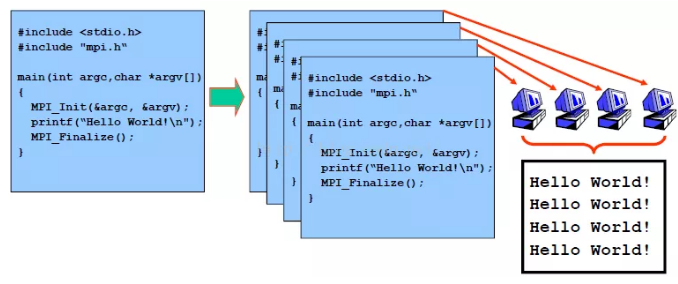
  • Invoke Open MPI or other MPI libraries to compile the source code. In this example, Hello World! is printed.

  • Use a compiler that supports MPI to compile the executable program mpi_hello_world.

  • Distribute mpi_hello_world to each node. You can also make mpi_hello_world accessible by sharing the file system.

  • Run mpirun to execute mpi_hello_world in parallel.

About WRF​

The Weather Research and Forecasting (WRF) model is a common HPC application. WRF is a mesoscale numerical weather prediction (NWP) system designed for both atmospheric research and forecasting. It allows researchers to produce simulations based on real or hypothetical atmospheric conditions.

WRF consists of multiple modules with different processing flows. The following illustrates a WRF process.
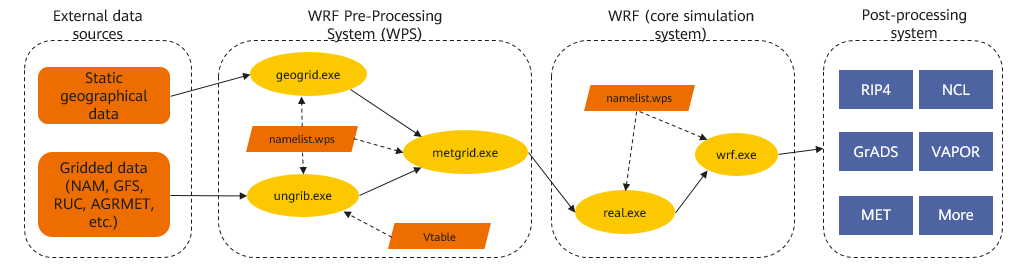
As shown in the figure above, this WRF process has four parts:

  • External data sources

  • WRF Pre-Processing System (WPS)

  • WRF, which is the core simulation system

  • Post-processing system

External Data Sources

The WRF model data includes static geographical data and gridded data. Geographical data refers to geographical information in a domain, such as mountains, rivers, lakes, and forests. Gridded data refers to the meteorological environment data in a domain, such as temperature, wind speed, wind direction, air humidity, and rainfall.

WPS

——WPS,WRF Pre-processing System)

WPS loads geographical and meteorological data, interpolates meteorological data to grids, and finally provides data input for the WRF. It consists of three main programs:

  • geogrid.exe: defines model projections, domain range, and nesting relationships, interpolates terrestrial parameters, and processes terrain and gridded data.

  • ungrib.exe: extracts required meteorological parameters from the GRIB data.

  • metgrid.exe: interpolates meteorological parameters to simulation domains.

The three programs work together to generate data used for meteorological simulation. Currently, the three programs do not support MPI parallel computing.

WRF

As the core module of the WRF model, WRF performs simulation and prediction based on the meteorological information generated by WPS. WRF consists of two main programs:

  • real.exe: initializes the actual meteorological data.

  • wrf.exe: simulates and predicts results.

real.exe and wrf.exe can run as MPI parallel jobs to improve the computing speed.
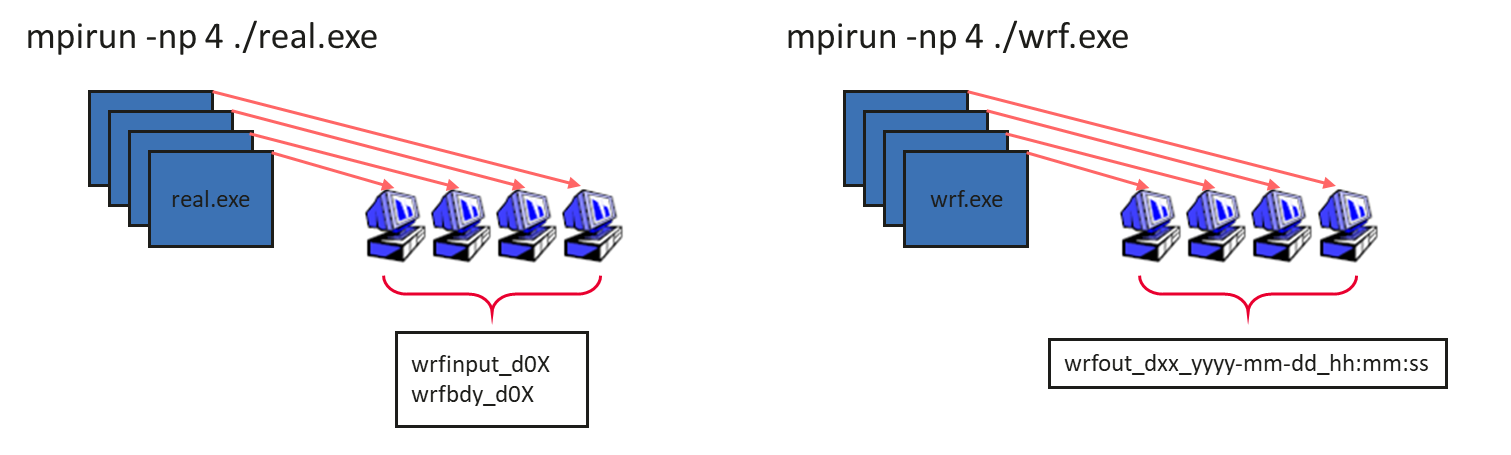
As shown in the preceding figure, wrfinput_d0X and wrfbdy_d0X are the calculation results generated by real.exe. wrf.exe performs meteorological simulation based on these results to generate the final result wrfout_dxx_yyyy-mm-dd_hh:mm:ss, which is verified and displayed by the post-processing system.

Post-Processing System

The post-processing system verifies and displays the calculation results generated by WRF. It consists of various third-party images and verification tools. The following figure shows the simulation and prediction results of the relative humidity in each area in CONUS 2.5km case.
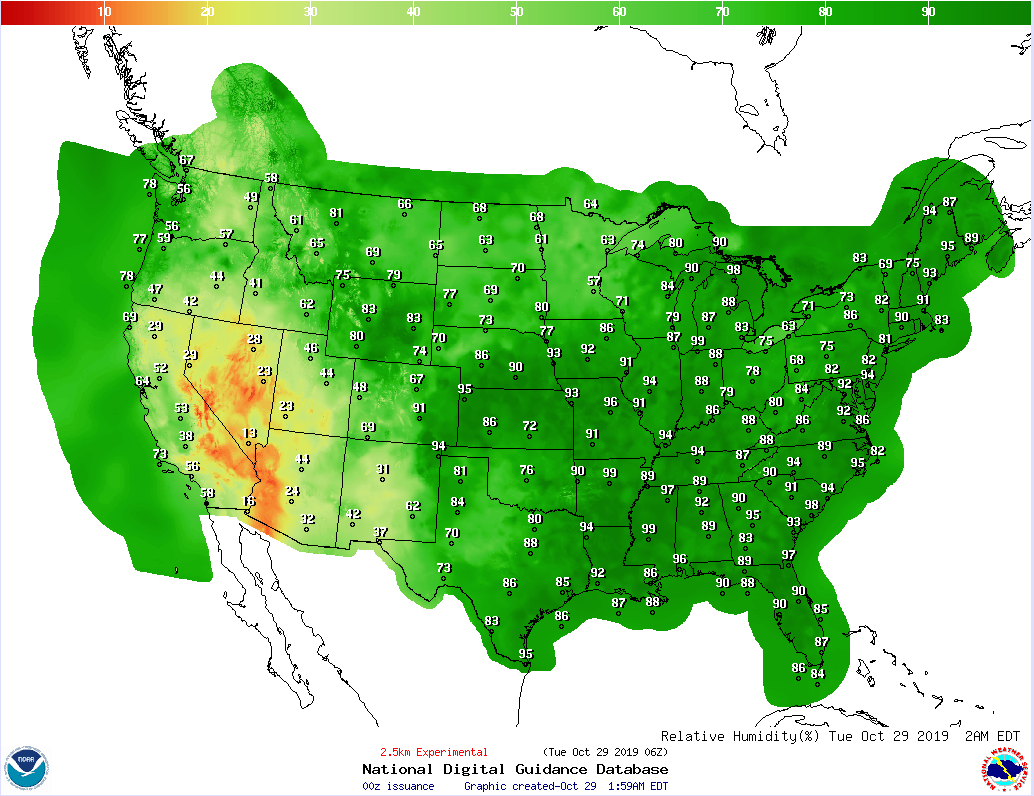
CONUS 2.5km refers to the 2.5 km resolution case covering the Continental U.S. (CONUS) domain. (In this case, the entire domain is divided into multiple cubes of 2.5 km x 2.5 km x 2.5 km. The meteorological information in each cube is considered consistent.)

HPC on Volcano​

As mentioned above, an HPCC consists of a resource manager, scheduler, and MPI parallel computing library. In the container context, Kubernetes functions as the resource manager and Volcano functions as the scheduler.

To run HPC applications in the Kubernetes+Volcano environment is to run HPC jobs in containers, as shown in the following figure.

Two types of containers are involved: master and worker. The master container starts the mpirun and mpiexec commands, and the worker containers run computing jobs.

To support MPI jobs, Volcano has been enhanced to provide the following functions:

  • Multiple pod charts, which are used to define master and worker pods at the same time
  • Gang scheduling, which ensures that all pods in a job are simultaneously started
  • Mapping of host IP addresses of the master and worker pods
  • SSH password-free login between the master and worker pods
  • Job lifecycle management

The following is an example of running an MPI job on Volcano.

  1. Define a Volcano MPI job by the mpi_sample.yaml file.
apiVersion: batch.Volcano.sh/v1alpha1
kind: Job
metadata:
name: mpi-job
labels:
# Set the job type based on service requirements.
"Volcano.sh/job-type": "MPI"
spec:
# Set the minimum number of required pods (less than the total number of replicas).
# For this example, set it to the total number of mpimaster and mpiworker replicas.
minAvailable: 3
# Specify Volcano as the scheduler.
schedulerName: Volcano
plugins:
# Configure SSH password-free authentication.
ssh: []
# Configure the network information, such as hosts file and headless Service, required for running the job.
svc: []
# Define a policy in which the entire MPI job will be restarted when a pod is evicted.
policies:
- event: PodEvicted
action: RestartJob
tasks:
- replicas: 1
name: mpimaster
# Define another policy in which the entire MPI job will be considered as complete when mpiexec execution completes.
policies:
- event: TaskCompleted
action: CompleteJob
template:
spec:
# The Volcano-related information will be stored in the /etc/Volcano directory.
containers:
# The master container will perform the following operations:
# 1. Start the sshd service.
# 2. Obtain the mpiworker container list from /etc/Volcano/mpiworker.host.
# 3. Run mpirun/mpiexec.
- command:
- /bin/sh
- -c
- |
MPI_HOST=`cat /etc/Volcano/mpiworker.host | tr "\n" ","`;
mkdir -p /var/run/sshd; /usr/sbin/sshd;
mpiexec --allow-run-as-root --host $`{MPI_HOST}` -np 2 mpi_hello_world;
image: Volcanosh/example-mpi:0.0.1
imagePullPolicy: IfNotPresent
name: mpimaster
ports:
- containerPort: 22
name: mpijob-port
workingDir: /home
resources:
requests:
cpu: "100m"
memory: "1024Mi"
limits:
cpu: "100m"
memory: "1024Mi"
restartPolicy: OnFailure
imagePullSecrets:
- name: default-secret
- replicas: 2
name: mpiworker
template:
spec:
containers:
# The worker containers will only start the sshd service.
- command:
- /bin/sh
- -c
- |
mkdir -p /var/run/sshd; /usr/sbin/sshd -D;
image: Volcanosh/example-mpi:0.0.1
imagePullPolicy: IfNotPresent
name: mpiworker
ports:
- containerPort: 22
name: mpijob-port
workingDir: /home
resources:
requests:
cpu: "100m"
memory: "2048Mi"
limits:
cpu: "100m"
memory: "2048Mi"
restartPolicy: OnFailure
imagePullSecrets:
- name: default-secret
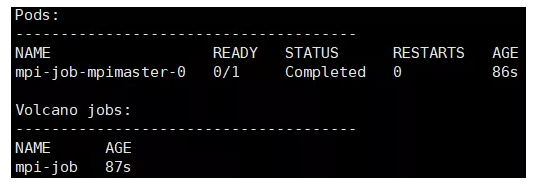
  1. Commit the Volcano MPI job.

The job is executed.
  1. Check the execution result of the master pod.

The preceding execution result shows that Volcano clears only the worker pods and retains the master pod after the job completes. In this way, you can run the kubectl command to obtain the execution result.

Note that there may be latency in the container network. When a job starts, the master pod may fail to connect to the worker pods. If this happens, Volcano will automatically restart the master pod to make the job run properly.

If you intend to use Volcano to run a WRF job, you need to replace mpi_hello_world with real.exe and wrf.exe and perform the following operations:

  • Build Docker images, which must include a complete WRF running environment.

  • Mount the data (original or intermediate data) required for calculation to the corresponding container.

In this way, you can run meteorological simulation jobs in the Kubernetes+Volcano environment.
How Ruitian Used Volcano to Run Large-Scale Offline HPC Jobs

· 9 min read
Yunzhi Cheng
Tech-Leader in Ruitian
Zhengyu Xu
R&D in Ruitian

This article was firstly released at Container Cube on January 5th, 2021, refer to 基于Volcano的锐天离线高性能计算最佳实践

Why Volcano​

Ruitian Capital is a private equity investment firm committed to helping customers achieve returns by using diverse range of trading strategies. Ruitian offline computing clusters are dedicated to strategy development and big data processing. The clusters analyze large volumes of data to help develop quantitative models for stock and futures trading.

In the early stages, we used Yarn to schedule batch jobs and Ceph to store massive data. As the company grew, our strategic planners have had to work in different environments. This has prompted us to look into container technologies for multi-environment research.

With the mature and stable development of Kubernetes in recent years, container technologies, especially Kubernetes, have been widely used in computing clusters. However, the Kubernetes default-scheduler does not support:

  • Running multiple pods in one job
  • Fair-share scheduling of jobs assigned to different queues
  • Gang scheduling
  • Specifying a number of pods that must be scheduled for a job to be considered successfully scheduled
  • Dominant Resource Fairness (DRF) algorithm

We discovered the Volcano project as part of our research into these issues. Volcano is based on Kubernetes, and its robust job scheduling and control policies meet all of our requirements. Its simple architecture was a major reason we decided to migrate our scheduling platform from Yarn to Kubernetes.

How to Migrate to Volcano​

Customization of Volcano Job Templates
Our strategic planners use clusters but do not know much about Kubernetes. We encapsulated the technical details of Kubernetes and developed Jobctl to generate Volcano job templates.

Preliminary solution: Defining a job with multiple tasks

apiVersion: batch.volcano.sh/v1alpha1
kind: Job
metadata:
name: awesome-job
spec:
minAvailable: 1
tasks:
- name: simulation1
replicas: 1
template:
spec:
restartPolicy: Never
containers:
- name: worker
image: rt-python:latest
resources:
requests:
cpu: 1
memory: 1Gi
limits:
cpu: 1
memory: 1Gi
args:
- bash
- -c
- |-
python run.py --pickle-file /data/simulation/1.pickle
- name: simulation2
replicas: 1
template:
spec:
restartPolicy: Never
containers:
- name: worker
image: rt-python:latest
resources:
requests:
cpu: 1
memory: 1Gi
limits:
cpu: 1
memory: 1Gi
args:
- bash
- -c
- |-
python run.py --pickle-file /data/simulation/2.pickle
- name: simulation3
replicas: 1
template:
spec:
restartPolicy: Never
containers:
- name: worker
image: rt-python:latest
resources:
requests:
cpu: 1
memory: 1Gi
limits:
cpu: 1
memory: 1Gi
args:
- bash
- -c
- |-
python run.py --pickle-file /data/simulation/3.pickle

In this solution, you can set different parameters and images for pods to enable these pods to run different tasks.

In most cases, tasks are executed at different times and are kept separate from each other. If all pods participate in scheduling and minAvailable is set to 1, the job state changes to Running when any one pod is successfully scheduled. However, during the trial run, we found that some tasks could not be submitted. This is because some strategic planners submitted more than 5,000 concurrent pods. The size of the generated YAML file can exceed 1.5 MiB, which is more than the default request size limit allowed by etcd.

Considering that the load on etcd is high when a large number of jobs and pods are running, instead of simply increasing the default request size limit, we made some optimizations (see the final solution).

Final solution: Defining a job with one task and multiple replicas

In most cases, as only parameters of all tasks in a job are different, you can use the multi-replica function to load the corresponding parameter file for each task based on the replica ID. In this way, the size of each request sent to etcd is reduced.

apiVersion: batch.volcano.sh/v1alpha1
kind: Job
metadata:
name: awesome-job
spec:
minAvailable: 1
tasks:
- name: simulation
replicas: 10
template:
spec:
restartPolicy: Never
containers:
- name: worker
image: rt-python:latest
resources:
requests:
cpu: 1
memory: 1Gi
limits:
cpu: 1
memory: 1Gi
args:
- bash
- -c
- |-
python -u call_module_func.py --pickle-file /data/simulation/**Work ID:** .pickle module.submodule magic_function

call_module_func.py is a boot script, which is mounted to the container using a ConfigMap. It is responsible for:

  • Converting Work ID: to the replica ID, which is obtained from the host name in the container. For example, if the host name is awesome-job-awesome-job-1, the replica ID is 1.

  • Loading pickle parameters (mounted to the container using a PVC) and transferring them to the magic_function function in module.submodule.

Other Volcano Customizations​

minSuccess

Most jobs do not require the gang scheduling, but we don't want a job to be considered successfully scheduled unless all of the tasks it includes are successful.

The Volcano parameter minAvailable did not meet our requirements, so we added a new parameter, minSuccess, to decouple the logic for determining a job success from the minAvailable parameter.

minSuccess := ps.job.Job.Spec.MinSuccess
if minSuccess == 0 {
minSuccess = jobReplicas
}
​
if status.Succeeded >= minSuccess {
status.State.Phase = vcbatch.Completed
return true
}
​
if status.Succeeded+status.Failed == jobReplicas {
if status.Failed != 0 {
status.State.Phase = vcbatch.Failed
} else {
status.State.Phase = vcbatch.Completed
}
return true
}

autoMemoryScale

The requested CPU and memory must be specified when a Volcano job is submitted. Most of our planners cannot estimate the memory required by their applications, which is why we developed the autoMemoryScale function to monitor OOM events. If an application exits due to an OOM event, the memory will be automatically scaled out and the application will be rescheduled, thereby reducing costs associated with trial and error.

for i := 0; i< int(ts.Replicas); i++ `{
podName := fmt.Sprintf(jobhelpers.PodNameFmt, job.Name, name, i)
if pod, found := pods[pdName]; found {
if len(pod.Status.ContainerStatuses) == 0 {
continue
}`

reason := pod.Status.ContainerStatuses[0].State.Terminated.Reason

if reason == "OOMKilled" `{
podToScaleUp = append(podToScaleUp, pod)
jobResources := ts.Template.Spec.Containers[0].Resources
podResources := pod.Spec.Containers[0].Resources

jobReqMem, _ := jobResources.Requests[v1.ResourceMemory]
podReqMem, _ := podResources.Requests[v1.ResourceMemory]

if podReqMem.Value() >= jobReqMem.Value() {
scaleUpResource(jobResources.Requests, job.Spec.ScaleUpJobResourceRate)
scaleUpResource(jobResources.Limits, job.Spec.ScaleUpJobResourceRate)
ts.Template.Spec.Containers[0].Resources = jobResources
job.Spec.Task[taskId] = ts
}`
}
}
}

nodeZone

In the original Yarn clusters, we can forcibly reserve some nodes for urgent jobs by partitioning. We want to retain this feature after migration. Our preliminary solution is to create an independent daily queue with a relatively low weight. In addition, we use nodeSelector to constrain the tasks in the daily queue to only be able to run on specific nodes. In actual processing, we found that the resources allocated to the daily queue are not enough to run those tasks when the cluster load is high. The reason is that resources are allocated based on the weight to ensure fair-share scheduling.

For example, we define three queues:

name  weight
Q1 45
Q2 45
daily 10

The cluster has a total of 100 CPU and 100 GiB memory, among which 20 CPU and 20 GiB memory are reserved for the daily queue. When the three queues are heavily loaded, the daily queue can be allocated with only 10 CPU and 10 GiB memory due to the low weight. Although nodeSelector is used, the resource requirements cannot be met.

Our solution is to enable schedulers to support nodeZone. Nodes in a cluster are divided into different zones. Each scheduler is responsible for scheduling pods on nodes in its matching zone. When all queues on a scheduler are heavily loaded, resource allocation on another scheduler is not affected. If there is only one queue on this scheduler, the queue can apply for all resources. If you need to run tasks with different features, select different schedulers instead of a special queue (for example, daily queue) to avoid resource shortages.

On the basis of Volcano, we developed a feature where you can select nodes with specific labels and use multiple scheduler instances to schedule pods on nodes in different zones.

sc.nodeInformer.Informer().AddEventHandlerWithResyncPeriod(
cache.FilteringResourceEventHandler `{
FilterFunc: func(obj interface{}`) bool `{
switch v := obj.(type) {
case *v1.Node:
nodeZone := v.Labels["node-zone"]
return nodeZone == sc.nodeZone
default:
return false
}`
},
Handler: cache.ResourceEventHandlerFuncs `{
AddFunc: sc.AddNode,
UpdateFunc: sc.UpdateNode,
DeleteFunc: sc.DeleteNode,
}`,
},
0,
)

Metric Monitoring

Currently, Volcano mainly monitors scheduling performance metrics, but these metrics cannot fully meet our requirements. To address this issue, we defined additional metrics and developed the export server component. This component can:

  • Add a queue label for each task. (Pods generated by Volcano do not carry a queue label, which makes it difficult to search queue resources.)

  • Output the queue capability.

  • Output the job start time and end time.

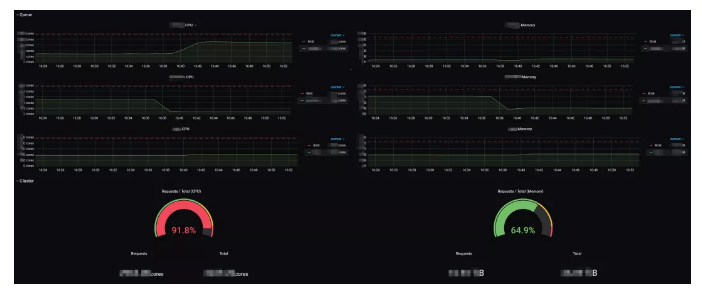
With the additional metrics, Grafana can display monitoring information for the cluster, queue, and node resources as well as the job progress. In this way, you can track cluster resource usage in real time, which facilitates troubleshooting. For example, when a job state is Pending, you can view the monitoring information to check whether the queue or cluster resources are used up or if the remaining resources on each node are sufficient for a single task.

WatchDog

We developed the WatchDog component to perform automatic O&M on Volcano resources. WatchDog provides:

  • Automatic update of capability

capability indicates the upper limit of resources a queue can use. It is difficult to maintain capability. When a node is added or deleted each time, you have to keep adjusting it. Now, WatchDog listens to node resource information and dynamically updates capability based on the queue weight.

  • Task status notification

When a task is completed or fails, you will be notified of the task status in a timely manner.

  • Task resource usage notification

WatchDog obtains the amount of requested and used resources of tasks from the monitoring system and sends you a notification. In this way, you can adjust the requested resource amount to improve the cluster resource usage.

Summary​

Volcano is critical to migrating our applications to Kubernetes. Its simple and clear design allows us to easily customize scheduling policies.

So far, Volcano has been stable in the Ruitian production environment for more than half a year, with more than 100,000 jobs scheduled per day during peak hours. We always follow the updates of the Volcano community and actively participate in the community projects. We hope that more developers can join the Volcano community to let Volcano better handle various complex job scenarios flexibly, efficiently, and intelligently.

About Ruitian

Founded in Shanghai in 2013, Ruitian Capital is a private equity investment company that places great importance on scientific research and technological accumulation. The company has developed an industry-leading strategic R&D and retesting platform and has built on-premises clusters on hundreds of high-performance servers. The founder started his own business after some exceptional achievements with some of the world's top hedge funds. By the end of the first quarter of 2019, Ruitian had been listed in the first tier of the quantitative transaction field in China, with more than 90 managed funds and over 10 billion yuan under management.