2 posts tagged with "ruitian"

View All Tags

Using Volcano in Large-Scale, Distributed Offline Computing

· 9 min read
Yunzhi Cheng
Ruitian Tech-Leader

This article was firstly released at Container Cube on December 24th, 2020, refer to锐天投资基于Volcano的大规模分布式离线计算平台的应用实践

Service Scenarios and Solution Selection​

Service Scenarios

  • VMs for research and development for policy personnel

  • AI training and inference

  • Data ETL

  • General-purposed, distributed batch processing jobs

Why Use Kubernetes?

A distributed batch processing platform can be used to manage compute and storage resources. In this use case, Ruitian decided to use Kubernetes to manage compute resources due to the following reasons:

  • Containers streamline development for users in different environments. Ruitian has four to five groups of users who use different development environments and policies. Environment isolation posed a great challenge to resource management and development efficiency. Now with containers, environments are encapsulated in containers that can be scheduled using Kubernetes.

  • Heterogeneous devices such as GPUs can be supported through Device Plugins.

  • Data storage can be centralized by using etcd.

  • Kubernetes has a robust technology ecosystem.

  • The Go language complies with the technology stack in Ruitian.

Why Use CephFS

CephFS is a type of distributed file storage interface provided by Ceph. Ceph provides three types of storage interfaces: S3, block storage, and CephFS. The reasons for using CephFS are as follows:

  • Posix Filesystem permission and interface: Local file systems are widely used in our businesses and CephFS provides stable file system mounting. In multi-tenant scenarios, each user has a UID, and the data of each user can be accessed only by themselves. Posix Filesystem provides a permission mechanism that allows users to seamlessly migrate their file permissions to SAP.

  • Strong consistency: A file written to node A can be directly read on node B.

  • Small file access at scale and high-bandwidth I/O

  • Hierarchical hardware support

  • Kubernetes ReadWriteMany PV

Why Volcano​

Why not default-scheduler

Ruitian did not choose the default-scheduler, because it cannot provide queue scheduling, fair scheduling, multi-tenant isolation, and advanced scheduling policies such as gang scheduling. Fair scheduling and advanced scheduling policies are the most important factors. Fair scheduling decides which job to run first when there are too many jobs in a queue or when the cluster has available resources. To achieve this, each queue must be mapped to a team, and each namespace must correspond to a user. The default-scheduler cannot meet the preceding requirements.

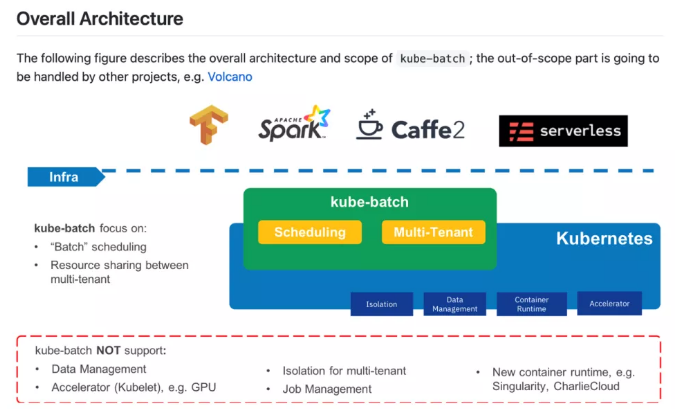
Another option was kube-batch, a batch processing scheduler of the community. However, it is only a scheduler and does not provide any solution other than scheduling. What Ruitian needed was a batch processing solution that takes care of scheduling and processing for the environment and CRDs.
Why is Volcano

  • Supports fair scheduling.

  • Supports advanced scheduling policies, such as gang scheduling and binpack.

  • Supports mutual access between pods through SSH plug-ins.

  • Supports injecting job dependencies to pods via ENV plug-ins and supports Tensorflow Worker Sharding.

  • Provides services externally via SVC plug-ins.

Such a scheduling platform can satisfy Ruitian.

System Architecture​

Service Architecture

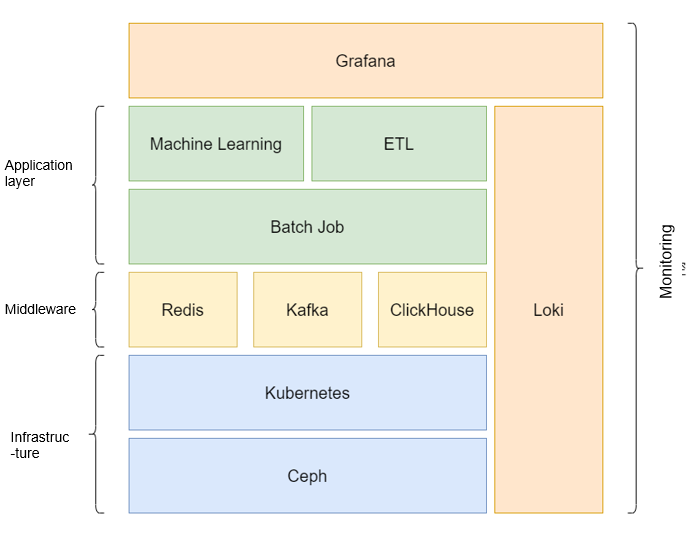
  • Ceph-based high-performance storage

  • Kubernetes-based heterogeneous hardware management

  • Loki + Grafana for user and monitoring panel

  • Hybrid deployment of middleware and application layer, making full use of cluster resources

  • Extended service scenarios with Batch Jobs

Multi-tenancy
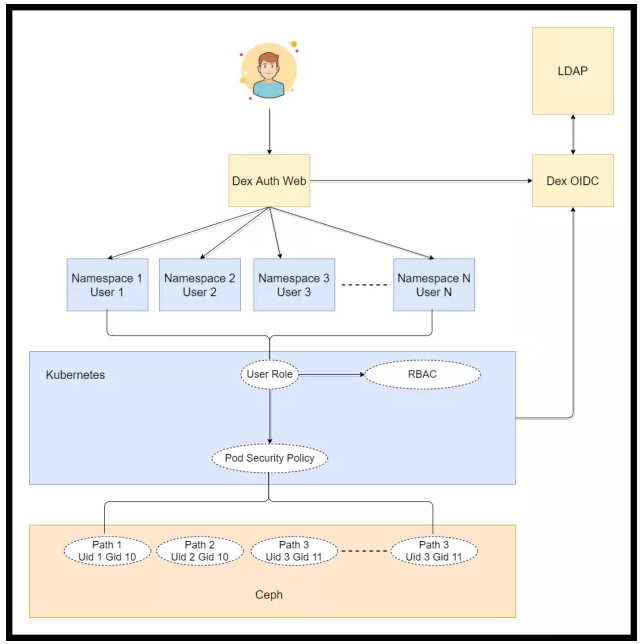
When a user submits a job, multi-tenancy can be a problem. For example, when a user adds a pod to a cluster, the cluster needs to know the running user and the UID. By default, the UID of a running user is that of the image builder, which means the UIDs of the pods submitted by all users can be the same. This is not allowed because the data obtained and generated by a user should not be accessible to other users.

In this case, Ruitian uses Kubernetes namespaces to isolate all resources. One namespace corresponds to one user. Namespaces interconnect with the development information through the existing LDAP service and OIDC to authenticate users and authorize them through RBAC to use pod security policies (PSPs). A PSP requires users to specify UID and GID in SecurityContext when submitting a pod to a cluster. The entire runtime environment of the user is subject to these settings.

With PSPs, users can be isolated when accessing data, which is all stored in Ceph. Multi-tenancy is thereby easily managed.

Workflows
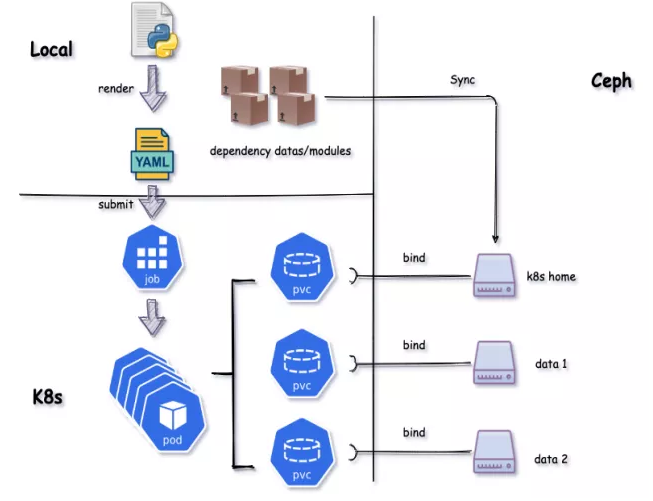
What comes next is basic workflows. The local configurations are rendered into a job YAML and then submitted. All dependency data of the user is synchronized to CephFS, and the pod is mounted with a PVC. Each user has the PVC permissions of their own directory in their own namespace. The permissions are managed and controlled through IBS. In this way, jobs are submitted to the cluster to run.

In-depth Customization on Volcano​

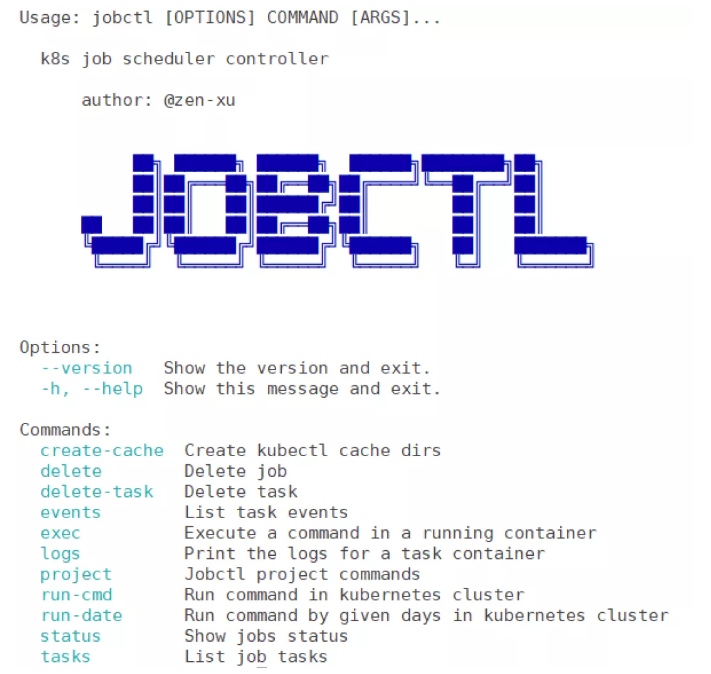
In the basic submission framework, Ruitian provides libraries for users and is developing a submission tool, Jobctl. This tool can be used as a command line tool or as the Python list that is input to the notebook or directly to the Python script of the user. Jobctl supports asynchronous and synchronous submissions. In the asynchronous mode, jobs are continuously submitted to the entire cluster. After the jobs are submitted, Jobctl exits directly. In the synchronous mode, Jobctl submits and watches jobs, and returns the execution results to the user only after the jobs are complete.

With Jobctl, Kubernetes complexities can be shielded for users. In addition, command line submission and Python Lib integration are supported, and the most basic parallel execution by replicas and by day is provided.
OOM Auto Scale Up
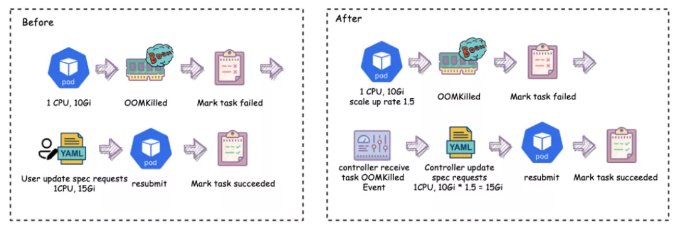
The first customization is to scale up resources of the entire job during OOM. Users may not be able to configure the exact memory required, and need to submit the job again for verification after the OOM. Therefore, Ruitian customized OOMKill Auto Scale-Up to modify the Volcano Controller to automatically scale up the resources requested by the OOMKill pods. After the scale-up, the jobs are automatically submitted again. The user will be informed upon the successful submission. This function guarantees reasonable memory requests without manual intervention, combining the Volcano policy event mechanism mentioned above.

MinSuccess
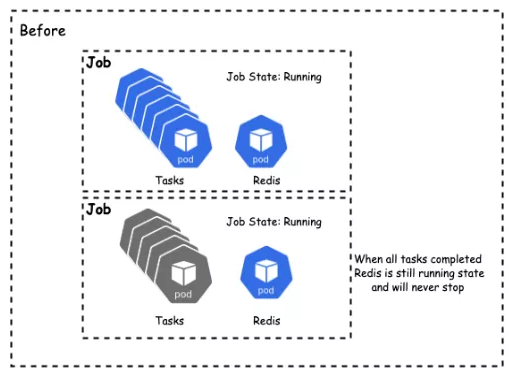
  • If the number of pods that run to completion reaches minAvailable, the job is complete.

  • Non-Gang jobs cannot be flexibly scheduled.
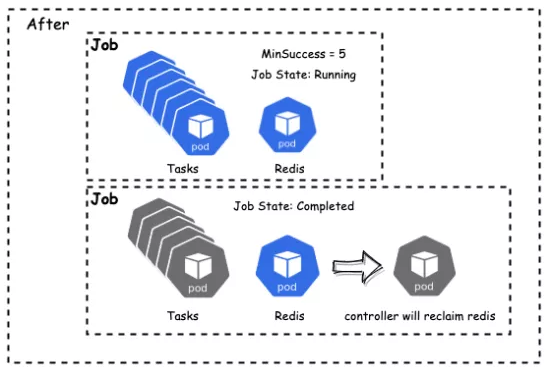
  • If the number of pods that run to completion reaches minSuccess, the job is complete.

  • Decouple the number of jobs required by Gang and the number of jobs required for completing Jobs.

NodeZone
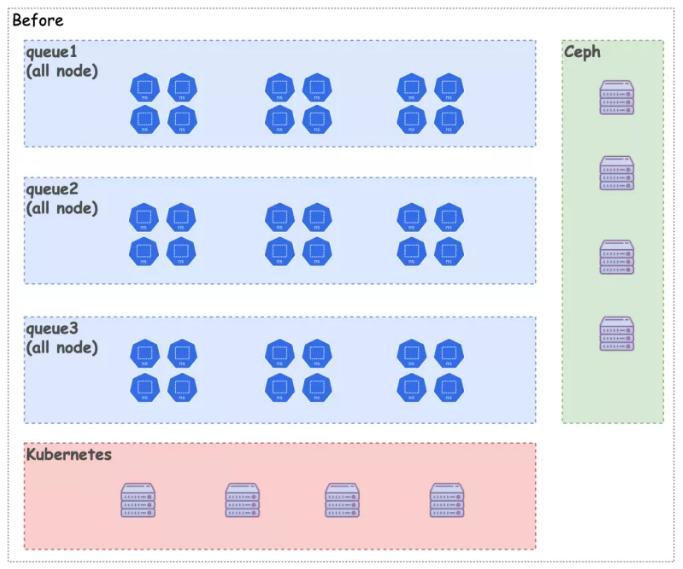
  • One Volcano instance manages all nodes.

  • Noisy Neighbor cannot be resolved.

  • Resources cannot be reserved for emergency.
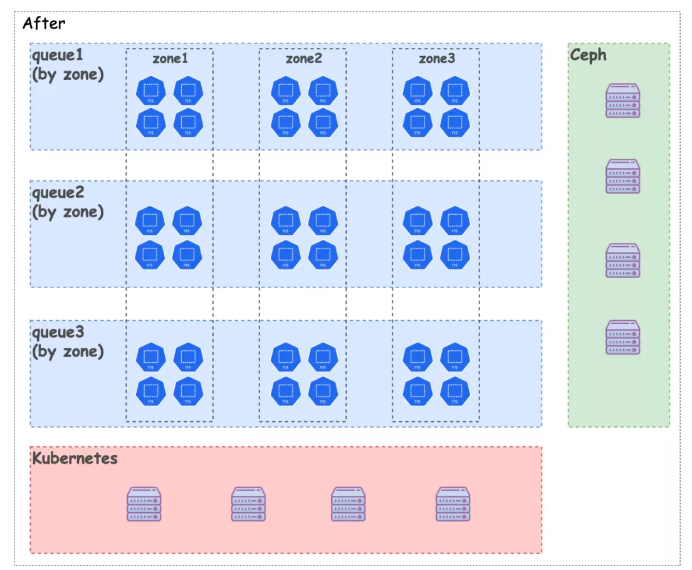
  • Multiple Volcano instances manage multiple zones.

  • Certain jobs are physically isolated.

Volcano Namespace Quota
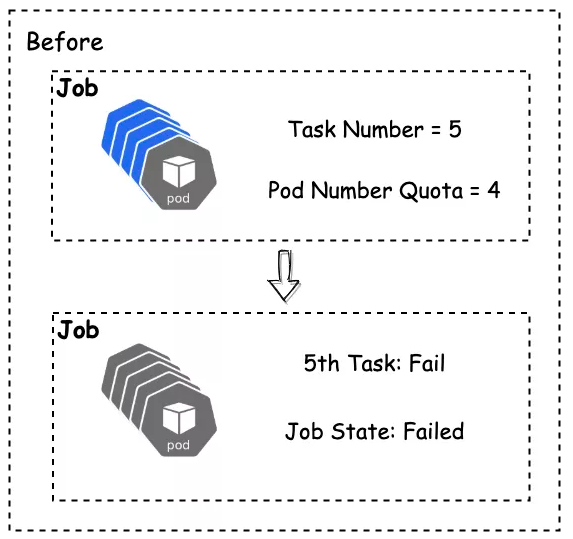
The default Kubernetes quotas cannot satisfy Ruitian's system. When the native namespace quota is triggered, pods directly fail. Therefore, Ruitian re-designed the quota in Volcano.
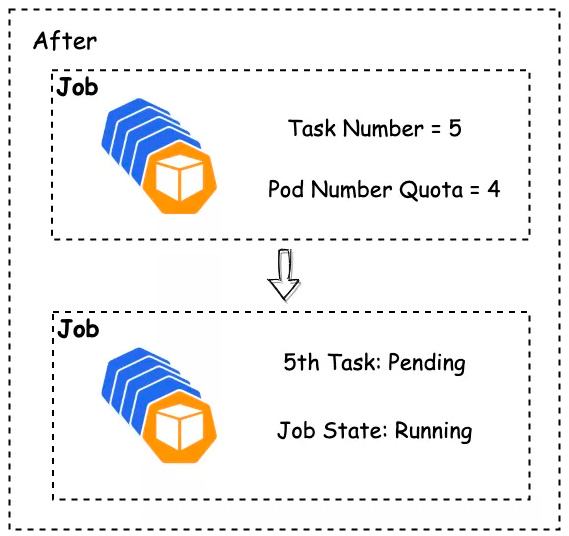
  • When the Volcano namespace quota is triggered, pod creation in a queue will be suspended.

Volcano Monitoring and Alarming
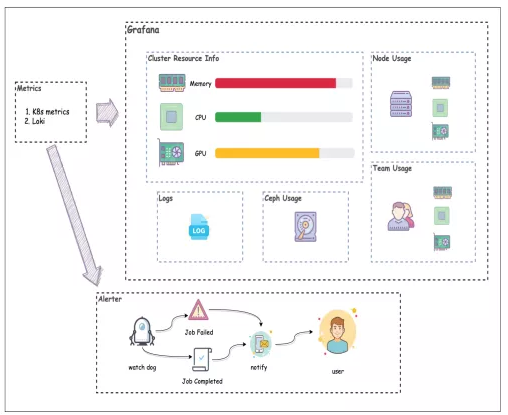
Volcano Exporter

  • Outputs the queue label of the job.

  • Outputs the queue capability.

  • Outputs the job start time and end time.

WatchDog

  • Registers the Informer and collects metrics.

  • Reports job failure and usage alarms.

  • Automatically updates the queue capability.

Job dashboard
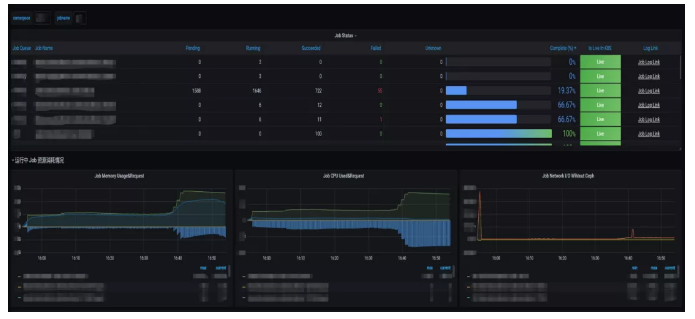
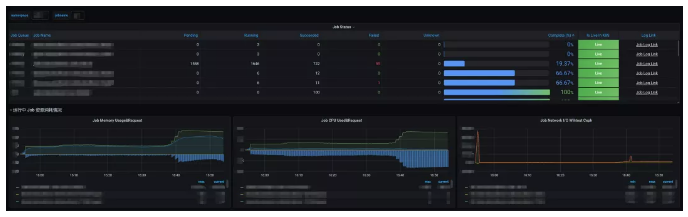
The upper panel covers the information about all jobs and provides a state table to display the job completion status. The panels below display the CPU, memory, and network resource usage. The negative axes refer to wasted cluster resources, which are allocated to pods (jobs) but not actually used during job running. These time series tables can provide resource insights to users in real time.

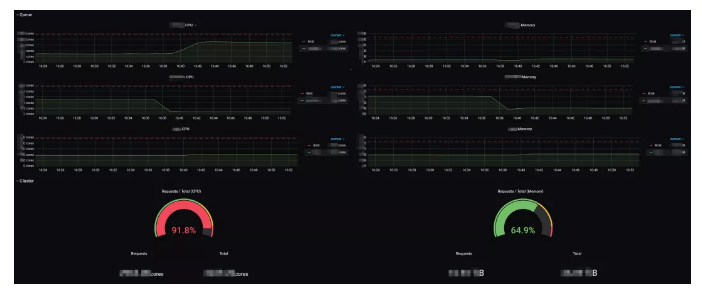
Cluster resource dashboard
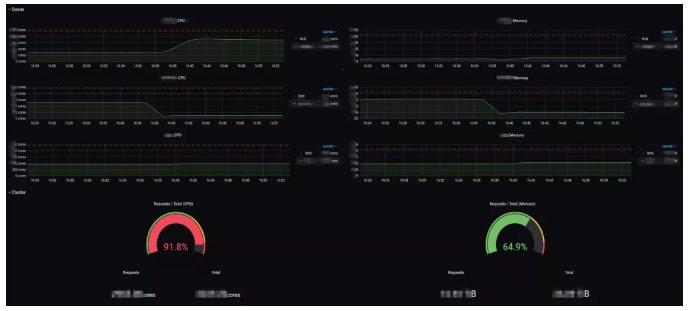
Graphs show the usage of overall queue resources, including CPU and memory. For jobs that consume a large amount of resources, for example, 300 or 500 GiB of memory, users need to know whether there is any node that can run such jobs. Therefore, we need to display the resource usage of each node available.

Challenges and Solutions in High-Concurrency Scenarios​

In Ruitian, the number of compute nodes in a single cluster has reached 200 and long-time jobs (1 week) and short-time jobs (1 minute) co-exist. The total storage capacity is 1.5 PB, the read/write bandwidth is 15 GB/s, and the number of pods increases by 100,000 to 300,000 every day. These brought challenges.

Challenge 1: Too Large Jobs
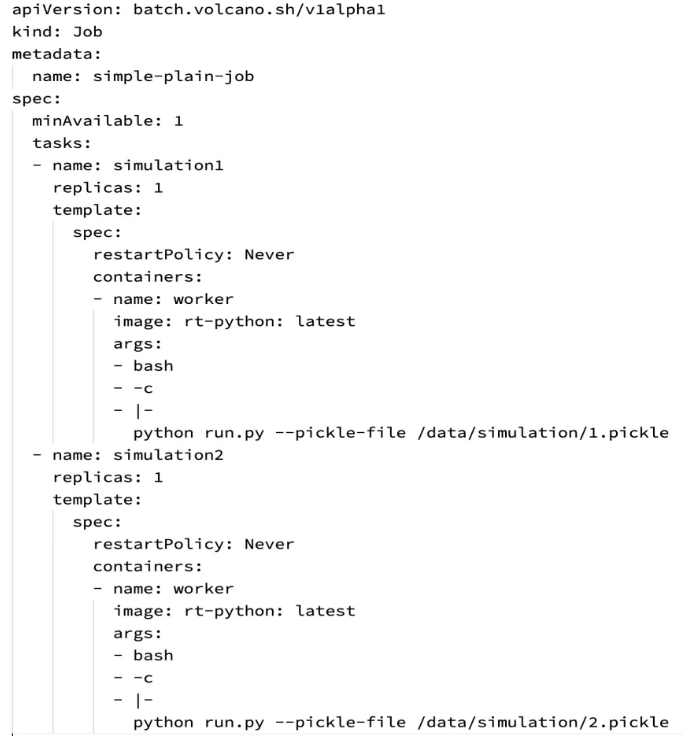
Issues:

  • The CPU usage exceeds Max Request Size (1.5 MB) of etcd when there are a large number of pods.

  • Adjusting Max Request Size will impact etcd due to a large number of objects.

Solution:

  • Submit a job in the form of multiple replicas for a single task.
  • The information provided by ENV plug-ins in a pod is read in Sharding mode.

Challenge 2: Out of CPU/Memory
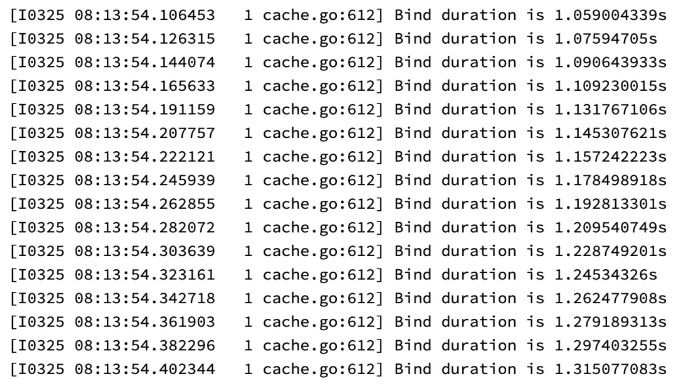
Issues:

  • There are a limited number of nodes, and a large number of short-term jobs keep being scheduled.

  • Kubelet PLEG is under great pressure, and the pod binding takes too long.
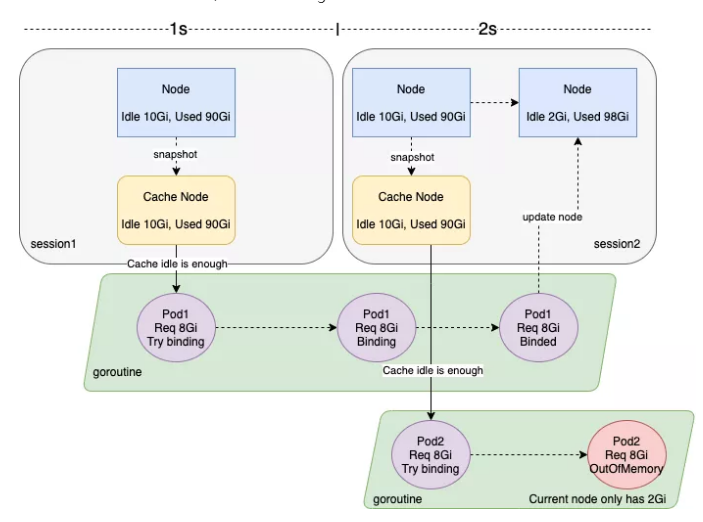
Issues:

  • There are a limited number of nodes, and a large number of short-term jobs keep being scheduled.

  • Kubelet PLEG is under great pressure, and the pod binding takes too long.

  • The default session interval of Volcano is 1s. As a result, cache snapshots are inconsistent.

  • Out of CPU + Out of Memory

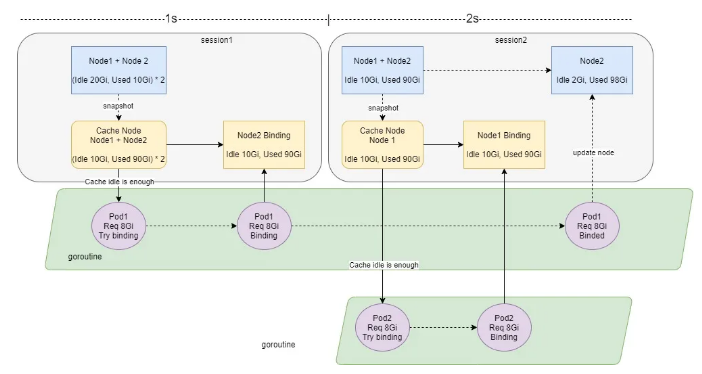
Solution:

  • Add binding task numbers for nodes.

  • When a snapshot is being created for a session, the nodes whose binding task number is smaller than 0 are skipped.
How Ruitian Used Volcano to Run Large-Scale Offline HPC Jobs

· 9 min read
Yunzhi Cheng
Tech-Leader in Ruitian
Zhengyu Xu
R&D in Ruitian

This article was firstly released at Container Cube on January 5th, 2021, refer to 基于Volcano的锐天离线高性能计算最佳实践

Why Volcano​

Ruitian Capital is a private equity investment firm committed to helping customers achieve returns by using diverse range of trading strategies. Ruitian offline computing clusters are dedicated to strategy development and big data processing. The clusters analyze large volumes of data to help develop quantitative models for stock and futures trading.

In the early stages, we used Yarn to schedule batch jobs and Ceph to store massive data. As the company grew, our strategic planners have had to work in different environments. This has prompted us to look into container technologies for multi-environment research.

With the mature and stable development of Kubernetes in recent years, container technologies, especially Kubernetes, have been widely used in computing clusters. However, the Kubernetes default-scheduler does not support:

  • Running multiple pods in one job
  • Fair-share scheduling of jobs assigned to different queues
  • Gang scheduling
  • Specifying a number of pods that must be scheduled for a job to be considered successfully scheduled
  • Dominant Resource Fairness (DRF) algorithm

We discovered the Volcano project as part of our research into these issues. Volcano is based on Kubernetes, and its robust job scheduling and control policies meet all of our requirements. Its simple architecture was a major reason we decided to migrate our scheduling platform from Yarn to Kubernetes.

How to Migrate to Volcano​

Customization of Volcano Job Templates
Our strategic planners use clusters but do not know much about Kubernetes. We encapsulated the technical details of Kubernetes and developed Jobctl to generate Volcano job templates.

Preliminary solution: Defining a job with multiple tasks

apiVersion: batch.volcano.sh/v1alpha1
kind: Job
metadata:
name: awesome-job
spec:
minAvailable: 1
tasks:
- name: simulation1
replicas: 1
template:
spec:
restartPolicy: Never
containers:
- name: worker
image: rt-python:latest
resources:
requests:
cpu: 1
memory: 1Gi
limits:
cpu: 1
memory: 1Gi
args:
- bash
- -c
- |-
python run.py --pickle-file /data/simulation/1.pickle
- name: simulation2
replicas: 1
template:
spec:
restartPolicy: Never
containers:
- name: worker
image: rt-python:latest
resources:
requests:
cpu: 1
memory: 1Gi
limits:
cpu: 1
memory: 1Gi
args:
- bash
- -c
- |-
python run.py --pickle-file /data/simulation/2.pickle
- name: simulation3
replicas: 1
template:
spec:
restartPolicy: Never
containers:
- name: worker
image: rt-python:latest
resources:
requests:
cpu: 1
memory: 1Gi
limits:
cpu: 1
memory: 1Gi
args:
- bash
- -c
- |-
python run.py --pickle-file /data/simulation/3.pickle

In this solution, you can set different parameters and images for pods to enable these pods to run different tasks.

In most cases, tasks are executed at different times and are kept separate from each other. If all pods participate in scheduling and minAvailable is set to 1, the job state changes to Running when any one pod is successfully scheduled. However, during the trial run, we found that some tasks could not be submitted. This is because some strategic planners submitted more than 5,000 concurrent pods. The size of the generated YAML file can exceed 1.5 MiB, which is more than the default request size limit allowed by etcd.

Considering that the load on etcd is high when a large number of jobs and pods are running, instead of simply increasing the default request size limit, we made some optimizations (see the final solution).

Final solution: Defining a job with one task and multiple replicas

In most cases, as only parameters of all tasks in a job are different, you can use the multi-replica function to load the corresponding parameter file for each task based on the replica ID. In this way, the size of each request sent to etcd is reduced.

apiVersion: batch.volcano.sh/v1alpha1
kind: Job
metadata:
name: awesome-job
spec:
minAvailable: 1
tasks:
- name: simulation
replicas: 10
template:
spec:
restartPolicy: Never
containers:
- name: worker
image: rt-python:latest
resources:
requests:
cpu: 1
memory: 1Gi
limits:
cpu: 1
memory: 1Gi
args:
- bash
- -c
- |-
python -u call_module_func.py --pickle-file /data/simulation/**Work ID:** .pickle module.submodule magic_function

call_module_func.py is a boot script, which is mounted to the container using a ConfigMap. It is responsible for:

  • Converting Work ID: to the replica ID, which is obtained from the host name in the container. For example, if the host name is awesome-job-awesome-job-1, the replica ID is 1.

  • Loading pickle parameters (mounted to the container using a PVC) and transferring them to the magic_function function in module.submodule.

Other Volcano Customizations​

minSuccess

Most jobs do not require the gang scheduling, but we don't want a job to be considered successfully scheduled unless all of the tasks it includes are successful.

The Volcano parameter minAvailable did not meet our requirements, so we added a new parameter, minSuccess, to decouple the logic for determining a job success from the minAvailable parameter.

minSuccess := ps.job.Job.Spec.MinSuccess
if minSuccess == 0 {
minSuccess = jobReplicas
}
​
if status.Succeeded >= minSuccess {
status.State.Phase = vcbatch.Completed
return true
}
​
if status.Succeeded+status.Failed == jobReplicas {
if status.Failed != 0 {
status.State.Phase = vcbatch.Failed
} else {
status.State.Phase = vcbatch.Completed
}
return true
}

autoMemoryScale

The requested CPU and memory must be specified when a Volcano job is submitted. Most of our planners cannot estimate the memory required by their applications, which is why we developed the autoMemoryScale function to monitor OOM events. If an application exits due to an OOM event, the memory will be automatically scaled out and the application will be rescheduled, thereby reducing costs associated with trial and error.

for i := 0; i< int(ts.Replicas); i++ `{
podName := fmt.Sprintf(jobhelpers.PodNameFmt, job.Name, name, i)
if pod, found := pods[pdName]; found {
if len(pod.Status.ContainerStatuses) == 0 {
continue
}`

reason := pod.Status.ContainerStatuses[0].State.Terminated.Reason

if reason == "OOMKilled" `{
podToScaleUp = append(podToScaleUp, pod)
jobResources := ts.Template.Spec.Containers[0].Resources
podResources := pod.Spec.Containers[0].Resources

jobReqMem, _ := jobResources.Requests[v1.ResourceMemory]
podReqMem, _ := podResources.Requests[v1.ResourceMemory]

if podReqMem.Value() >= jobReqMem.Value() {
scaleUpResource(jobResources.Requests, job.Spec.ScaleUpJobResourceRate)
scaleUpResource(jobResources.Limits, job.Spec.ScaleUpJobResourceRate)
ts.Template.Spec.Containers[0].Resources = jobResources
job.Spec.Task[taskId] = ts
}`
}
}
}

nodeZone

In the original Yarn clusters, we can forcibly reserve some nodes for urgent jobs by partitioning. We want to retain this feature after migration. Our preliminary solution is to create an independent daily queue with a relatively low weight. In addition, we use nodeSelector to constrain the tasks in the daily queue to only be able to run on specific nodes. In actual processing, we found that the resources allocated to the daily queue are not enough to run those tasks when the cluster load is high. The reason is that resources are allocated based on the weight to ensure fair-share scheduling.

For example, we define three queues:

name  weight
Q1 45
Q2 45
daily 10

The cluster has a total of 100 CPU and 100 GiB memory, among which 20 CPU and 20 GiB memory are reserved for the daily queue. When the three queues are heavily loaded, the daily queue can be allocated with only 10 CPU and 10 GiB memory due to the low weight. Although nodeSelector is used, the resource requirements cannot be met.

Our solution is to enable schedulers to support nodeZone. Nodes in a cluster are divided into different zones. Each scheduler is responsible for scheduling pods on nodes in its matching zone. When all queues on a scheduler are heavily loaded, resource allocation on another scheduler is not affected. If there is only one queue on this scheduler, the queue can apply for all resources. If you need to run tasks with different features, select different schedulers instead of a special queue (for example, daily queue) to avoid resource shortages.

On the basis of Volcano, we developed a feature where you can select nodes with specific labels and use multiple scheduler instances to schedule pods on nodes in different zones.

sc.nodeInformer.Informer().AddEventHandlerWithResyncPeriod(
cache.FilteringResourceEventHandler `{
FilterFunc: func(obj interface{}`) bool `{
switch v := obj.(type) {
case *v1.Node:
nodeZone := v.Labels["node-zone"]
return nodeZone == sc.nodeZone
default:
return false
}`
},
Handler: cache.ResourceEventHandlerFuncs `{
AddFunc: sc.AddNode,
UpdateFunc: sc.UpdateNode,
DeleteFunc: sc.DeleteNode,
}`,
},
0,
)

Metric Monitoring

Currently, Volcano mainly monitors scheduling performance metrics, but these metrics cannot fully meet our requirements. To address this issue, we defined additional metrics and developed the export server component. This component can:

  • Add a queue label for each task. (Pods generated by Volcano do not carry a queue label, which makes it difficult to search queue resources.)

  • Output the queue capability.

  • Output the job start time and end time.

With the additional metrics, Grafana can display monitoring information for the cluster, queue, and node resources as well as the job progress. In this way, you can track cluster resource usage in real time, which facilitates troubleshooting. For example, when a job state is Pending, you can view the monitoring information to check whether the queue or cluster resources are used up or if the remaining resources on each node are sufficient for a single task.

WatchDog

We developed the WatchDog component to perform automatic O&M on Volcano resources. WatchDog provides:

  • Automatic update of capability

capability indicates the upper limit of resources a queue can use. It is difficult to maintain capability. When a node is added or deleted each time, you have to keep adjusting it. Now, WatchDog listens to node resource information and dynamically updates capability based on the queue weight.

  • Task status notification

When a task is completed or fails, you will be notified of the task status in a timely manner.

  • Task resource usage notification

WatchDog obtains the amount of requested and used resources of tasks from the monitoring system and sends you a notification. In this way, you can adjust the requested resource amount to improve the cluster resource usage.

Summary​

Volcano is critical to migrating our applications to Kubernetes. Its simple and clear design allows us to easily customize scheduling policies.

So far, Volcano has been stable in the Ruitian production environment for more than half a year, with more than 100,000 jobs scheduled per day during peak hours. We always follow the updates of the Volcano community and actively participate in the community projects. We hope that more developers can join the Volcano community to let Volcano better handle various complex job scenarios flexibly, efficiently, and intelligently.

About Ruitian

Founded in Shanghai in 2013, Ruitian Capital is a private equity investment company that places great importance on scientific research and technological accumulation. The company has developed an industry-leading strategic R&D and retesting platform and has built on-premises clusters on hundreds of high-performance servers. The founder started his own business after some exceptional achievements with some of the world's top hedge funds. By the end of the first quarter of 2019, Ruitian had been listed in the first tier of the quantitative transaction field in China, with more than 90 managed funds and over 10 billion yuan under management.