This article was firstly released at Container Cube on November 6th, 2019, refer to 百度飞桨(PaddlePaddle)分布式训练在Volcano系统上的实践
PaddlePaddle is a deep learning framework open-sourced by Baidu in September 2016. It aims to provide a secure, easy-to-use, and scalable deep learning platform.
In October 2018, the paddlepaddle-team released Paddle Fluid 1.0, which enhanced neural network description, large-scale distributed training, and high-performance inference engine. Take the distributed training, indispensable to industrial applications, as an example. In Paddle Fluid 1.5.2, PaddlePaddle supports data parallelism, model parallelism, and pipeline parallelism. The parameter server architecture and point-to-point synchronous training architecture enable large-scale training on hardware resources such as CPU and GPU. The following paragraphs show you how to perform distributed training of PaddlePaddle on Volcano in the Kubernetes community.
Kubernetes is the most popular open-source system for automatic deployment, scaling, and resource management of containerized applications. With the development of Kubernetes, more and more companies are willing to deploy their service applications on Kubernetes. In addition to web and database services, deep learning frameworks are also deployed on Kubernetes for distributed training.
However, creating deep learning training jobs on Kubernetes is not as intuitive as on a traditional high-performance computing MPI platform. In 2017, an article titled Run Deep Learning with PaddlePaddle on Kubernetes was published in the Kubernetes community. The article proposed that running PaddlePaddle on Kubernetes is a best practice, based on its computing fault tolerance, elastic scaling, and resource isolation.
Since the release of Paddle Fluid 1.0, PaddlePaddle has advanced greatly in terms of platform deployment and job scheduling. With Kubernetes, PaddlePaddle can properly schedule CPU and GPU resources and elastically scale training jobs, significantly improving the utilization of computing resources. In spite of that, there is still room for improvement in parallel job creation and scheduling, lifecycle management of training jobs, affinity scheduling of computing resources, and scheduling policy optimization. To improve the computing efficiency of PaddlePaddle, the paddlepaddle-team joined with the volcano-team to release the "PaddlePaddle on Volcano" solution.
Volcano is an enhanced batch scheduling system for high-performance computing workloads running on Kubernetes.
Volcano complements Kubernetes in machine learning, deep learning, HPC, and big data computing scenarios, providing capabilities such as gang scheduling, computing job queue management, and GPU affinity scheduling. In addition, Volcano enhances batch job creation and lifecycle management, fair-share, and other Kubernetes-native capabilities.
Volcano meets the basic requirements of PaddlePaddle for resource creation and scheduling. Specifically, it provides automatic lifecycle management of computing jobs for PaddlePaddle. The gang scheduling policy meets the "all or nothing" scheduling requirements of pservers and trainers. The queue and priority logic controls the execution sequence of computing jobs in a cluster. Fair-share and GPU affinity scheduling align job scheduling with the requirements of pservers and trainers for node resources and network topology, improving computing efficiency.
With the custom resource definition (CRD) creation capability of Kubernetes, Volcano provides a resource object whose apiVersion is batch.volcano.sh/v1alpha1 and kind is job to define computing tasks. You can create, manage, and schedule computing jobs on the Volcano platform. To use the Volcano platform, install Volcano in Kubernetes clusters by following the instructions provided on the Volcano official website.
In this example, we will use Kubernetes-native resources and Volcano jobs to execute PaddlePaddle computing jobs, and compare Kubernetes with Volcano in execution methods, job management, and job scheduling. We choose the click-through rate (CTR) demo for distributed training on the PaddlePaddle official website. In the CTR demo, we will run two pserver tasks and two trainer tasks.
According to the recommended method on the PaddlePaddle website, first create a Kubernetes ReplicaSet with two replicas to run pserver tasks, and then create a Kubernetes job with the parallelism being 2 to run trainer tasks.
Create a pserver task.
root@volcano-paddlepaddle:~# kubectl apply -f pserver.yaml

replicaset.extensions/fluid-ctr-pserver create
View the pserver ReplicaSet component.
root@volcano-paddlepaddle:~# kubectl get rs

NAME                DESIRED   CURRENT   READY   AGE
fluid-ctr-pserver   2         2         2       5
View the pserver pods.
root@volcano-paddlepaddle:~# kubectl get pods | grep fluid

fluid-ctr-pserver-b9w99   1/1     Running   0          9m18s
fluid-ctr-pserver-pb9vd   1/1     Running   0          9m18
View the pserver logs. pserver has started to provide services.
root@volcano-paddlepaddle:~# kubectl logs fluid-ctr-pserver-b9w99


+ case "$1"in
+ start_fluid_process
+ pserver_label=paddle-job-pserver=fluid-ctr
+ trainer_label=paddle-job=fluid-ct
+ hostname=c-rlnrdybm-muamumvq-1
+ task_index=
+ '[' PSERVER == TRAINER ']
+ '[' PSERVER == PSERVER ']'
+ stdbuf -oL python /root/k8s_tools.py wait_pods_running paddle-job-pserver=fluid-ctr 2
label selector: paddle-job-pserver=fluid-ctr, desired: 2
current cnt: 0 sleep for 5 seconds...
+ '[' PSERVER == TRAINER ']'
+ '[' PSERVER == WORKER ']
++ python /root/k8s_tools.py fetch_endpoints paddle-job-pserver=fluid-ctr 30236
+ export PADDLE_PSERVERS=192.168.48.24:30236,192.168.48.25:30237
+ PADDLE_PSERVERS=192.168.48.24:30236,192.168.48.25:30237
++ python /root/k8s_tools.py fetch_ips paddle-job=fluid-ctr
+ export PADDLE_TRAINER_IPS=
+ PADDLE_TRAINER_IPS=
+ '[' PSERVER == TRAINER ']'
+ '[' PSERVER == WORKER ']'
++ python /root/k8s_tools.py fetch_id paddle-job-pserver=fluid-ctr
+ task_index=0
+ export PADDLE_TRAINER_ID=0
+ PADDLE_TRAINER_ID=0
+ export PADDLE_PSERVER_ID=0
+ PADDLE_PSERVER_ID=0
+ stdbuf -oL sh -c 'cd /workspace/ctr && python train.py --is_local 0 --cloud_train 1'
2019-09-03 06:43:10,661 - INFO - run dist training
2019-09-03 06:43:10,715 - INFO - run pserver
get_pserver_program() is deprecated, call get_pserver_programs() to get pserver main and startup in a single call.
I0903 06:43:10.826609    41 grpc_server.cc:435] Server listening on 192.168.48.24:30236 selected port:
Create a trainer task.
root@volcano-paddlepaddle:~# kubectl apply -f trainer.yaml

job.batch/fluid-ctr-trainer create
View the trainer pods.
root@volcano-paddlepaddle:~# kubectl get pod | grep fluid


fluid-ctr-pserver-b9w99   1/1     Running   0          87m
fluid-ctr-pserver-pb9vd   1/1     Running   0          87m
fluid-ctr-trainer-lg9n5   1/1     Running   0          12s
fluid-ctr-trainer-tvr99   1/1     Running   0          12
View the trainer logs. The trainer task is being executed.
root@volcano-paddlepaddle:~# kubectl logs fluid-ctr-trainer-lg9n5

+ case "$1" in
+ start_fluid_process
+ pserver_labe=paddle-job-pserver=fluid-ctr
+ trainer_label=paddle-job=fluid-ctr
+ hostname=c-rlnrdybm-muamumvq-2
+ task_index=
+ '[' TRAINER == TRAINER ']'
+ stdbuf -oL python /root/k8s_tools.py wait_pods_running paddle-job-pserver=fluid-ctr 2
label selector: paddle-job-pserver=fluid-ctr, desired: 2
+ '[' TRAINER == TRAINER ']'
+ stdbuf -oL python /root/k8s_tools.py wait_pods_running paddle-job=fluid-ctr 2
label selector: paddle-job=fluid-ctr, desired: 2
++ python /root/k8s_tools.py fetch_endpoints paddle-job-pserver=fluid-ctr 30236
+ export PADDLE_PSERVERS=192.168.48.24:30236,192.168.48.25:30237
+ PADDLE_PSERVERS=192.168.48.24:30236,192.168.48.25:30237
++ python /root/k8s_tools.py fetch_ips paddle-job=fluid-ctr
+ export PADDLE_TRAINER_IPS=192.168.48.24,192.168.48.25
+ PADDLE_TRAINER_IPS=192.168.48.24,192.168.48.25
+ '[' TRAINER == TRAINER ']'
+ check_failed_cnt 1
+ max_failed=1
++ python /root/k8s_tools.py count_pods_by_phase paddle-job=fluid-ctr Failed
+ failed_count=0
+ '[' 0-gt 1 ']'
++ python /root/k8s_tools.py fetch_id paddle-job=fluid-ctr
+ task_index=0
+ export PADDLE_TRAINER_ID=0
+ PADDLE_TRAINER_ID=0
+ export PADDLE_PSERVER_ID=0
+ PADDLE_PSERVER_ID=0
+ stdbuf -oL sh -c 'cd /workspace/ctr && python train.py --is_local 0 --cloud_train 1'
2019-09-03 08:10:20,888 - INFO - run dist training
2019-09-03 08:10:20,951 - INFO - download the training materials
 % Total    % Received % Xferd  Average Speed   Time    Time     Time  Current
                                Dload  Upload   Total   Spent    Left  Speed
100  433M  100  433M    0     0  70.9M      0  0:00:06  0:00:06 --:--:-- 97.0M
2019-09-03 08:11:04,522 - INFO - run trainer
2019-09-03 08:11:04,591 - WARNING -
I0903 08:11:04.594007    25 parallel_executor.cc:329] The number of CPUPlace, which is used in ParallelExecutor, is 2. And the Program will be copied 2 copies
I0903 08:11:04.875757    25 rpc_client.h:101] init rpc client with trainer_id 0
2019-09-03 08:11:38,625 - INFO - TRAIN --> pass: 0 batch: 0 loss: 0.697331115723 auc: 0.500826068453, batch_auc: 0.500826068453
2019-09-03 08:11:38,967 - INFO - TRAIN --> pass: 0 batch: 1 loss: 0.652093688965 auc: 0.48451329672, batch_auc: 0.48451329672
2019-09-03 08:11:39,242 - INFO - TRAIN --> pass: 0 batch: 2 loss: 0.629092956543 auc: 0.485173881519, batch_auc: 0.485173881519
2019-09-03 08:11:39,577 - INFO - TRAIN --> pass: 0 batch: 3 loss: 0.603850708008 auc: 0.482131778494, batch_auc: 0.482131778494
2019-09-03 08:11:39,874 - INFO - TRAIN --> pass: 0 batch: 4 loss: 0.591485412598 auc: 0.479737304993, batch_auc: 0.479737304993
2019-09-03 08:11:40,133 - INFO - TRAIN --> pass: 0 batch: 5 loss: 0.58376159668 auc: 0.478554220739, batch_auc: 0.478554220739
2019-09-03 08:11:40,385 - INFO - TRAIN --> pass: 0 batch: 6 loss: 0.561969116211 auc: 0.481465857424, batch_auc: 0.481465857424
2019-09-03 08:11:40,637 - INFO - TRAIN --> pass: 0 batch: 7 loss: 0.557065185547 auc: 0.486014931119, batch_auc: 0.486014931119
2019-09-03 08:11:40,890 - INFO - TRAIN --> pass: 0 batch: 8 loss: 0.562498413086 auc: 0.489651573333, batch_auc: 0.489651573333
2019-09-03 08:11:41,158 - INFO - TRAIN --> pass: 0 batch: 9 loss: 0.566428283691 auc: 0.489853260221, batch_auc: 0.49137884426
2019-09-03 08:11:41,452 - INFO - TRAIN --> pass: 0 batch: 10 loss: 0.564840087891 auc: 0.492880386228, batch_auc: 0.494013763938
2019-09-03 08:11:41,742 - INFO - TRAIN --> pass: 0 batch: 11 loss: 0.564809204102 auc: 0.493201528907, batch_auc: 0.498872381582
2019-09-03 08:11:42,056 - INFO - TRAIN --> pass: 0 batch: 12 loss: 0.584479736328 auc: 0.494151972036, batch_auc: 0.503926628391
2019-09-03 08:11:42,329 - INFO - TRAIN --> pass: 0 batch: 13 loss: 0.615677246094 auc: 0.49252557362, batch_auc: 0.5028352489
After the trainer task is completed, check the status of the pserver and trainer pods. The pserver pods are still running.
root@volcano-paddlepaddle:~# kubectl get pods | grep fluid


fluid-ctr-pserver-b9w99   1/1     Running     0          177m
fluid-ctr-pserver-pb9vd   1/1     Running     0          177m
fluid-ctr-trainer-lg9n5   0/1     Completed   0          90m
fluid-ctr-trainer-tvr99   0/1     Completed   0          90
Run the preceding computing tasks again on the Volcano platform.
Volcano supports multi-pod jobs and allows you to define multiple pods in the tasks field. For example, replicas indicates the number of pods to be generated by a task, and name indicates the task name. The pod name is generated based on the task name. The value of Template is the same as that of podTemplate in Kubernetes. The CTR demo contains two types of tasks: pserver and trainer. Each task has two replicas, which means that the demo will create two pserver tasks and two trainer tasks.
If you use the Volcano scheduler, set schedulerName to volcano in the job configuration. If schedulerName is not set to volcano, the default scheduler of Kubernetes is used.
Volcano uses the minAvailable field to configure the gang scheduling policy. minAvailable indicates the minimum number of pods required for executing a task. The value of minAvailable cannot exceed the total number of pods in the task. In the PaddlePaddle framework, computing starts only when all pserver and trainer tasks are running. Therefore, in PaddlePaddle, the value of minAvailable must be equal to the total number of computing pods in the task.
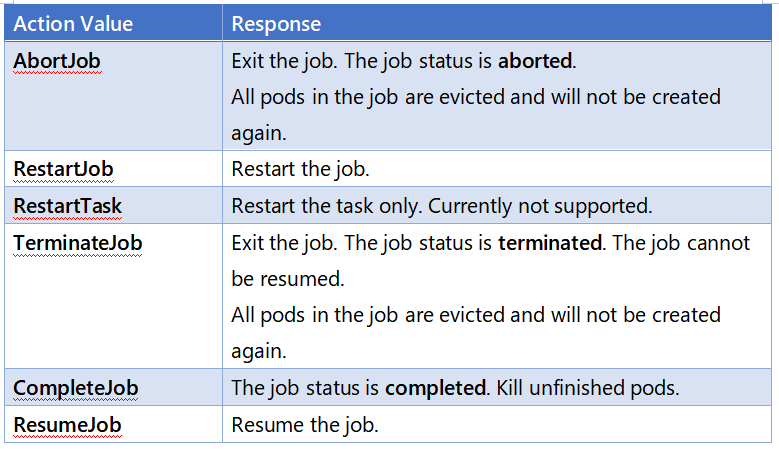
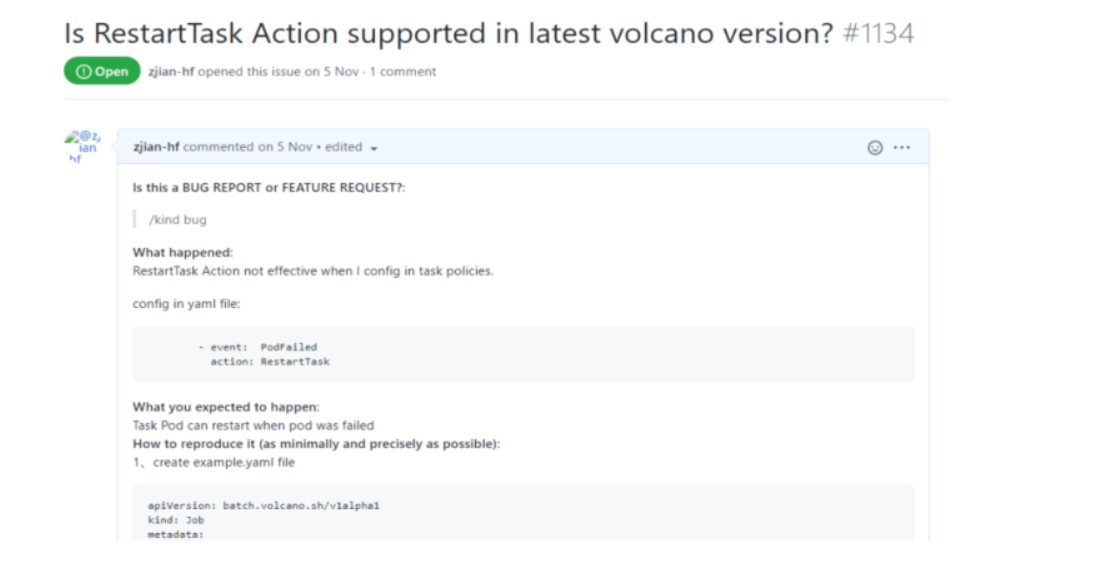
For an application that uses PaddlePaddle for distributed training, if a pserver task or a trainer task is evicted or fails, the computing cluster formed by the pserver and trainer tasks becomes invalid. All pserver tasks and trainer tasks will be restarted to form a new computing cluster. In Volcano, this can be achieved by configuring the policies field. Set the PodEvicted event to align with RestartJob and set the PodFailed event to align with RestartJob. After you set the two events, if a computing task is evicted or fails, all computing tasks will be restarted.
The following is the configuration file ctr-volcano.yaml used for executing CTR tasks on the Volcano platform. You can obtain the configuration file from the Volcano code repository.
Volcano code repository:
https://github.com/volcano-sh/volcano/blob/master/example/integrations/paddlepaddle/ctr-paddlepaddle-on-volcano.yaml
apiVersion: batch.volcano.sh/v1alpha1
kind: Job
metadata:
 name: ctr-volcano
spec:
 minAvailable: 4
schedulerName: volcano
 policies:
- event: PodEvicted
   action: RestartJob
 - event: PodFailed
 action: RestartJob
 tasks:
- replicas: 2
     name: pserver
     template:
       metadata:
         labels:
paddle-job-pserver: fluid-ctr
       spec:
         imagePullSecrets:
 - name: default-secret
         volumes:
         - hostPath:
 path: /home/work/
             type: ""
   name: seqdata
         containers:
 - image: volcanosh/edlctr:v1
             command:
               - paddle_k8s
               - start_fluid
             imagePullPolicy: IfNotPresent
   name: pserver
             volumeMounts:
 - mountPath: /mnt/seqdata
 name: seqdata
             resources:
               limits:
                 cpu: 10
                 memory: 30Gi
 ephemeral-storage: 10Gi
               requests:
                 cpu: 1
                 memory: 100M
                 ephemeral-storage: 1Gi
             env:
 - name: GLOG_v
                 value: "0"
 - name: GLOG_logtostderr
                 value: "1"
               - name: TOPOLOGY
                 value: ""
 - name: TRAINER_PACKAGE
                 value: /workspace
   - name: NAMESPACE
                 valueFrom:
                   fieldRef:
                     apiVersion: v1
                     fieldPath: metadata.namespace
   - name: POD_IP
                 valueFrom:
                   fieldRef:
                     apiVersion: v1
                     fieldPath: status.podIP
   - name: POD_NAME
                 valueFrom:
                   fieldRef:
                     apiVersion: v1
       fieldPath: metadata.name
               - name: PADDLE_CURRENT_IP
                 valueFrom:
                   fieldRef:
                     apiVersion: v1
                     fieldPath: status.podIP
- name: PADDLE_JOB_NAME
                 value: fluid-ctr
     - name: PADDLE_IS_LOCAL
                 value: "0"
     - name: PADDLE_TRAINERS_NUM
                 value: "2"
               - name: PADDLE_PSERVERS_NUM
                 value: "2"
 - name: FLAGS_rpc_deadline
"                  value: "
   - name: ENTRY
                 value: cd /workspace/ctr && python train.py --is_local 0 --cloud_train 1
   - name: PADDLE_PORT
                 value: "30236"
 - name: LD_LIBRARY_PATH
                 value: /usr/local/lib:/usr/local/nvidia/lib64:/usr/local/rdma/lib64:/usr/lib64/mlnx_ofed/valgrind
- name: PADDLE_TRAINING_ROLE
                 value: PSERVER
- name: TRAINING_ROLE
                 value: PSERVER
         restartPolicy: OnFailure
   - replicas: 2
     policies:
 - event: TaskCompleted
       action: CompleteJob
     name: trainer
     template:
       metadata:
         labels:
           paddle-job: fluid-ctr
       spec:
         imagePullSecrets:
- name: default-secret
         volumes:
         - hostPath:
             path: /home/work/
             type: ""
           name: seqdata
         containers:
   - image: volcanosh/edlctr:v1
             command:
               - paddle_k8s
               - start_fluid
             imagePullPolicy: IfNotPresent
   name: trainer
             volumeMounts:
 - mountPath: /mnt/seqdata
 name: seqdata
             resources:
               limits:
                 cpu: 10
                 memory: 30Gi
                 ephemeral-storage: 10Gi
               requests:
                 cpu: 1
                 memory: 100M
                 ephemeral-storage: 10Gi
             env:
- name: GLOG_v
                 value: "0"
   - name: GLOG_logtostderr
                 value: "1"
- name: TOPOLOGY
- name: TRAINER_PACKAGE
                 value: /workspace
 - name: CPU_NUM
                 value: "2"
               - name: NAMESPACE
                 valueFrom:
                   fieldRef:
                     apiVersion: v1
                     fieldPath: metadata.namespace
 - name: POD_IP
                 valueFrom:
                   fieldRef:
                     apiVersion: v1
                     fieldPath: status.podIP
   - name: POD_NAME
                 valueFrom:
                   fieldRef:
                     apiVersion: v1
                     fieldPath: metadata.name
               - name: PADDLE_CURRENT_IP
                 valueFrom:
                   fieldRef:
                     apiVersion: v1
                     fieldPath: status.podIP
 - name: PADDLE_JOB_NAME
                 value: fluid-ctr
               - name: PADDLE_IS_LOCAL
                 value: "0"
 - name: FLAGS_rpc_deadline
"                  value: "
 - name: PADDLE_PORT
                 value: "30236"
- name: PADDLE_PSERVERS_NUM
                 value: "2"
 - name: PADDLE_TRAINERS_NUM
                 value: "2"
- name: PADDLE_TRAINING_ROLE
                 value: TRAINER
 - name: TRAINING_ROLE
                 value: TRAINER
     - name: LD_LIBRARY_PATH
                 value: /usr/local/lib:/usr/local/nvidia/lib64:/usr/local/rdma/lib64:/usr/lib64/mlnx_ofed/valgrind
   - name: ENTRY
                 value: cd /workspace/ctr && python train.py --is_local 0 --cloud_train 1
         restartPolicy: OnFailure
Run the following command in the cluster to create a Volcano job in the default namespace:
root@volcano-paddlepaddle:~# kubectl apply -f ctr-volcano.yaml

job.batch.volcano.sh/ctr-volcano create
Check the pod status. Both pserver tasks and trainer tasks have been delivered to the cluster and should be running properly. If the idle resources in the cluster cannot meet the demands of the pserver and trainer tasks, no more tasks will be created.
root@volcano-paddlepaddle:~# kubectl get pods | grep ctr-volcano


ctr-volcano-pserver-0     1/1     Running     0          16s
ctr-volcano-pserver-1     1/1     Running     0          16s
ctr-volcano-trainer-0     1/1     Running     0          16s
ctr-volcano-trainer-1     1/1     Running     0          16
Select a pserver pod to view logs. pserver is listening on the corresponding port and providing services.
root@volcano-paddlepaddle:~# kubectl logs ctr-volcano-pserver-0


+ case "$1" in
+ start_fluid_process
+ pserver_label=paddle-job-pserver=fluid-ctr
+ trainer_label=paddle-job=fluid-ctr
+ hostname=ctr-volcano-pserver-0
+ task_index=
+ '[' PSERVER == TRAINER ']'
+ '[' PSERVER == PSERVER ']'
+ stdbuf -oL python /root/k8s_tools.py wait_pods_running paddle-job-pserver=fluid-ctr 2
label selector: paddle-job-pserver=fluid-ctr, desired: 2
current cnt: 0 sleep for 5 seconds...
+ '[' PSERVER == TRAINER ']'
+ '[' PSERVER == WORKER ']'
++ python /root/k8s_tools.py fetch_endpoints paddle-job-pserver=fluid-ctr 30236
+ export PADDLE_PSERVERS=172.20.0.148:30236,172.20.1.134:30237
+ PADDLE_PSERVERS=172.20.0.148:30236,172.20.1.134:30237
++ python /root/k8s_tools.py fetch_ips paddle-job=fluid-ctr
+ export PADDLE_TRAINER_IPS=172.20.0.147,172.20.1.133
+ PADDLE_TRAINER_IPS=172.20.0.147,172.20.1.133
+ '[' PSERVER == TRAINER ']'
+ '[' PSERVER == WORKER ']'
++ python /root/k8s_tools.py fetch_id paddle-job-pserver=fluid-ctr
+ task_index=0
+ export PADDLE_TRAINER_ID=0
+ PADDLE_TRAINER_ID=0
+ export PADDLE_PSERVER_ID=0
+ PADDLE_PSERVER_ID=0
+ stdbuf -oL sh -c 'cd /workspace/ctr && python train.py --is_local 0 --cloud_train 1'
2019-09-03 09:57:55,619 - INFO - run dist training
2019-09-03 09:57:55,708 - INFO - run pserver
get_pserver_program() is deprecated, call get_pserver_programs() to get pserver main and startup in a single call.
I0903 09:57:55.860916    41 grpc_server.cc:435] Server listening on 172.20.0.148:30236 selected port:

Select a trainer pod to view logs. The computing task is being executed.
root@volcano-paddlepaddle:~# kubectl logs ctr-volcano-trainer-0


+ case "$1" in
+ start_fluid_process
+ pserver_label=paddle-job-pserver=fluid-ctr
+ trainer_label=paddle-job=fluid-ctr
+ hostname=ctr-volcano-trainer-0
+ task_index=
+ '[' TRAINER == TRAINER ']'
+ stdbuf -oL python /root/k8s_tools.py wait_pods_running paddle-job-pserver=fluid-ctr 2
label selector: paddle-job-pserver=fluid-ctr, desired: 2
current cnt: 0 sleep for 5 seconds...
+ '[' TRAINER == TRAINER ']'
+ stdbuf -oL python /root/k8s_tools.py wait_pods_running paddle-job=fluid-ctr 2
label selector: paddle-job=fluid-ctr, desired: 2
++ python /root/k8s_tools.py fetch_endpoints paddle-job-pserver=fluid-ctr 30236
+ export PADDLE_PSERVERS=172.20.0.148:30236,172.20.1.134:30237
+ PADDLE_PSERVERS=172.20.0.148:30236,172.20.1.134:30237
++ python /root/k8s_tools.py fetch_ips paddle-job=fluid-ctr
+ export PADDLE_TRAINER_IPS=172.20.0.147,172.20.1.133
+ PADDLE_TRAINER_IPS=172.20.0.147,172.20.1.133
+ '[' TRAINER == TRAINER ']'
+ check_failed_cnt 1
+ max_failed=1
++ python /root/k8s_tools.py count_pods_by_phase paddle-job=fluid-ctr Failed
+ failed_count=0
+ '[' 0 -gt 1 ']'
++ python /root/k8s_tools.py fetch_id paddle-job=fluid-ctr
+ task_index=0
+ export PADDLE_TRAINER_ID=0
+ PADDLE_TRAINER_ID=0
+ export PADDLE_PSERVER_ID=0
+ PADDLE_PSERVER_ID=0
+ stdbuf -oL sh -c 'cd /workspace/ctr && python train.py --is_local 0 --cloud_train 1'
2019-09-03 09:57:56,712 - INFO - run dist training
2019-09-03 09:57:56,773 - INFO - download the training materials
 % Total    % Received % Xferd  Average Speed   Time    Time     Time  Current
                                Dload  Upload   Total   Spent    Left  Speed
100  433M  100  433M    0     0  96.2M      0  0:00:04  0:00:04 --:--:-- 96.2M
2019-09-03 09:58:27,648 - INFO - run trainer
2019-09-03 09:58:27,732 - WARNING -
I0903 09:58:27.734141    25 parallel_executor.cc:329] The number of CPUPlace, which is used in ParallelExecutor, is 2. And the Program will be copied 2 copies
I0903 09:58:27.937546    25 rpc_client.h:101] init rpc client with trainer_id 0
2019-09-03 09:58:37,957 - INFO - TRAIN --> pass: 0 batch: 0 loss: 0.670620727539 auc: 0.510430537062, batch_auc: 0.510764985415
2019-09-03 09:58:38,264 - INFO - TRAIN --> pass: 0 batch: 1 loss: 0.641319274902 auc: 0.503955813399, batch_auc: 0.503955813399
2019-09-03 09:58:38,585 - INFO - TRAIN --> pass: 0 batch: 2 loss: 0.617138793945 auc: 0.50334993182, batch_auc: 0.50334993182
2019-09-03 09:58:38,873 - INFO - TRAIN --> pass: 0 batch: 3 loss: 0.598490356445 auc: 0.507263818365, batch_auc: 0.507263818365
2019-09-03 09:58:39,182 - INFO - TRAIN --> pass: 0 batch: 4 loss: 0.573976501465 auc: 0.510442316749, batch_auc: 0.51044231674
View the pod logs after about 70 minutes. The logs show that the pods have terminated normally.
root@volcano-paddlepaddle:~# kubectl get pod | grep ctr-volcano


ctr-volcano-trainer-0   0/1     Completed   0          77m
ctr-volcano-trainer-1   0/1     Completed   0          77
After the training is completed, we may need to use the trained model for other purposes. In the YAML file, we have defined the volcanosh/edlctr:v1 image in the /workspace/ctr directory, and have configured train.py to call the save_inference_model interface to save the model after every 1,000 jobs or after completing each round of training sets. The model is saved in the /workspace/ctr/models folder. After the training is completed, there are two ways you can obtain the model:
- In the YAML file, define volume in spec of trainer to map the /workspace/ctr/models folder to the host. Run the kubectl describe pod ctr-volcano-trainer-0 command to locate the node where the model is stored. Then, log in to this node using SSH to obtain the trained model in the path on the host.
- To obtain the model automatically, create a file server and distributed file system, such as GlusterFS, in the Kubernetes cluster, and map the /workspace/ctr/models folder in the ctr-volcano-trainer-0 container to the persistent volume claim (PVC) of GlusterFS. Then, use wget or curl to obtain and deliver the model over FTP.
To sum up, we can use Volcano to execute PaddlePaddle computing jobs, including batch creation, automatic management, and job scheduling. Compared with the ReplicaSet+job mode, Volcano can improve the efficiency of parallel computing.
Authors
Dong Daxiang, @guru4elephant, PaddlePaddle Architect, Principal Architect, Baidu
Wang Jiawei, @wangjiawei04, PaddlePaddle Engineer, Senior Engineer, Baidu
Yu Dianhai, @raindrops2sea, PaddlePaddle Architect, Distinguished Architect, Baidu
Zhang Jinghui, @sivanzcw, Volcano Contributor, Cloud Native software engineer, Huawei
Ma Da, @k82cn, Kubernetes Maintainer, SIG-Scheduling Co-Leader, Volcano Lead, Huawei